AppBrain
AppBrain
  • Apps
  • Apps being viewed right now Trending apps today Most popular apps All-time most installed apps Top rated apps iPhone and iPad apps
  • Intelligence ▾
    Intelligence overview → Track any Android app or your whole market
    Track & analyze
    Keyword Tracker & OptimizerTrack & improve Play rankings App Performance ReportOne-off PDF for any app StatisticsFree Android & Play market stats
    Promote your app
    Featured Apps App Links
  • Intelligence
  • Pricing
  • Dashboard
  • Sign up
  • Log in
App Store Apps > Productivity > Reduce: Screen Time Control
Reduce: Screen Time Control icon

Reduce: Screen Time Control

1.0.0
Apphaze
0.00
0 reviews
Free

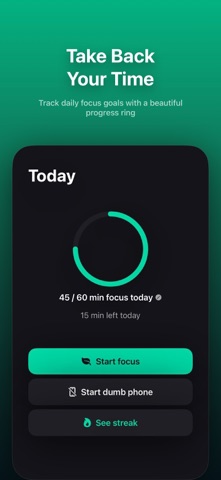
Reduce: Screen Time Control Screenshot 1 of 5
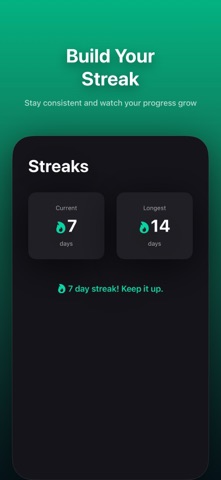
Reduce: Screen Time Control Screenshot 2 of 5
Reduce: Screen Time Control Screenshot 3 of 5
Reduce: Screen Time Control Screenshot 4 of 5
Reduce: Screen Time Control Screenshot 5 of 5
Screenshots by Apphaze, from the the App Store listing
View on the App Store

AppBrain's verdict

Last updated
March 1, 2026
Size
2.47 MB
Official page on the App Store

User feedback

Ratings and reviews on the App Store

Comments on Reduce: Screen Time Control for iOS

We don't have enough comments to show example comments. Please check back later.

Store listing

By Apphaze, from the App Store
Description by Apphaze Written by the developer, not by AppBrain. Click to read.
Take back your focus. Reduce helps you block distracting apps, build daily focus streaks, and reclaim hours of your day - powered by Apple's native Screen Time technology.

- FOCUS SESSIONS -
Start a session and Reduce blocks your most distracting apps at the system level. Choose your duration, pick your blocklist, and get to work. No willpower required - blocked apps stay blocked until your session ends.

- DUMB PHONE MODE -
Turn your iPhone into a dumb phone with one tap. Only essential apps stay accessible - everything else is blocked. Perfect for deep work, family time, or a complete digital detox.

- DAILY GOALS & STREAKS -
Set a daily focus goal and watch your progress with a visual ring. Build a streak by hitting your goal every day - don't break the chain.

- LIVE ACTIVITY -
See your active session on your Lock Screen and Dynamic Island. Always know how much focus time is left without opening the app.

- RECURRING BLOCKS -
Schedule daily blocks to automatically restrict apps during work hours, study time, or bedtime. Set it once and your blocks activate on their own.

- KEY FEATURES -
• Block specific apps or entire categories
• Focus Mode: block distractions, keep everything else
• Dumb Phone Mode: allow only essential apps
• Session durations from 15 minutes to 3 hours
• Daily focus goal with visual progress ring
• Streak tracking to stay motivated
• Live Activity on Dynamic Island & Lock Screen
• Scheduled recurring daily blocks
• System-level blocking via Apple Screen Time
• Privacy-first: all data stays on your device

- SUBSCRIPTION -
Reduce is free with Focus Sessions, daily goals, and streak tracking. Upgrade to Reduce Pro to unlock Dumb Phone Mode, longer sessions, and recurring blocks.

Terms of Use: https://reducescreentime.app/terms/
Privacy Policy: https://reducescreentime.app/privacy/

Safety and technology

Found in the app by AppBrain
Price
Free
App size
2.47 MB
Content rating
Everyone

Technologies used by Reduce: Screen Time Control

Releases

Updates seen on the App Store
Version
1.0.0
Launched
March 2026

No changelog data

Alternatives

Similar apps and more from Apphaze

Alternatives to Reduce: Screen Time Control

Scrolloc: Screen Time Control icon Scrolloc: Screen Time Control
Mindful Software Studio LLC
5.0
Free
1 ratings
LookUp: Block Apps & Focus icon LookUp: Block Apps & Focus
CodedHarmony Technologies
5.0
Free
3 ratings
Flowstate: Block Apps & Focus icon Flowstate: Block Apps & Focus
Krish Thiru
1.0
Free
1 ratings
ScrollScholar - App Blocker icon ScrollScholar - App Blocker
Morrel Ventures LLC
4.8
Free
12 ratings
Downtime: Focus App Blocker icon Downtime: Focus App Blocker
Ari Aparikyan
4.5
Free
2 ratings
Omit: Screen Time Control icon Omit: Screen Time Control
Dumke Ventures UG (haftungsbeschraenkt)
0.0
Free
BrainFree: Stop Doom Scrolling icon BrainFree: Stop Doom Scrolling
The App, Inc.
5.0
Free
3 ratings
TimeGuard: Screen Time + Focus icon TimeGuard: Screen Time + Focus
Meta Message Communication Technology Co., Ltd.
0.0
Free

More from Apphaze

Locker Practice App icon Locker Practice App
Apphaze
4.6
Free
110 ratings
Blackjack Strategy: 21 Trainer icon Blackjack Strategy: 21 Trainer
Apphaze
4.7
Free
110 ratings
Private Browser Incognito icon Private Browser Incognito
Apphaze
4.8
Free
25 ratings
Love Crush: AI Girlfriend Chat icon Love Crush: AI Girlfriend Chat
Apphaze
4.8
Free
18 ratings
Visual Timer For Kids Toddlers icon Visual Timer For Kids Toddlers
Apphaze
4.6
Free
16 ratings
PicZap: Swipe Photo Cleaner icon PicZap: Swipe Photo Cleaner
Apphaze
4.7
Free
15 ratings
Blackjack - No Ads & Offline icon Blackjack - No Ads & Offline
Apphaze
4.3
Free
13 ratings
World Clock:Timezone Converter icon World Clock:Timezone Converter
Apphaze
5.0
Free
7 ratings

Rankings

App Store top charts

App Store Rankings for Reduce: Screen Time Control

This app is not ranked

About the app and developer

About Reduce: Screen Time Control

Reduce: Screen Time Control is a productivity app developed by Apphaze.

User Ratings

The app has no ratings yet.

App Information

Reduce: Screen Time Control is freely available from the App Store. The app size is 2.47 MB. The latest version available is 1.0.0. The last update was on March 1, 2026.

Technical Requirements

The app has a content rating of Everyone. The app has been available on the App Store since March 2026.

Reduce: Screen Time Control is made and published by Apphaze. AppBrain is an independent app data site and isn't affiliated with Apphaze. The app name, icon, screenshots and description belong to Apphaze and are shown as published on the App Store.

Developer information for Apphaze

Apphaze

Address:

Frequently asked questions about Reduce: Screen Time Control

Is Reduce: Screen Time Control free?

Yes. Reduce: Screen Time Control is free on the App Store.

Is Reduce: Screen Time Control still available?

Yes. Reduce: Screen Time Control is on the App Store, and the last update we saw was on March 1, 2026.

How large is Reduce: Screen Time Control?

Reduce: Screen Time Control is 2.47 MB.

Is Reduce: Screen Time Control suitable for children?

App Store rates the content of Reduce: Screen Time Control as suitable for everyone.

Who made Reduce: Screen Time Control?

Reduce: Screen Time Control was developed by Apphaze. It is listed in the productivity category on the App Store.

What are the best alternatives to Reduce: Screen Time Control?

People looking at Reduce: Screen Time Control also look at these productivity apps: Scrolloc: Screen Time Control, LookUp: Block Apps & Focus, Flowstate: Block Apps & Focus, ScrollScholar - App Blocker, Downtime: Focus App Blocker.

Share Reduce: Screen Time Control

Price drops on Google Play Today's trending apps Top new apps Popular Productivity Apps Apps other people are watching
Scrolloc: Screen Time Control icon Scrolloc: Screen Time Control
LookUp: Block Apps & Focus icon LookUp: Block Apps & Focus
Flowstate: Block Apps & Focus icon Flowstate: Block Apps & Focus
ScrollScholar - App Blocker icon ScrollScholar - App Blocker
Downtime: Focus App Blocker icon Downtime: Focus App Blocker
Omit: Screen Time Control icon Omit: Screen Time Control
BrainFree: Stop Doom Scrolling icon BrainFree: Stop Doom Scrolling
TimeGuard: Screen Time + Focus icon TimeGuard: Screen Time + Focus
Overview Alternatives Reviews Rankings Technology
AppBrain Intelligence premium content

Subscribe now to get full and unlimited access to AppBrain Intelligence. You'll have access to:

  • App Intelligence dashboard (performance timeline, competitor comparison, country rankings, insight cards)
  • Detailed ranking data per app
  • Full timeline per developer
  • Device market shares data per country
  • Unlimited keyword tracking
  • AI assistant access via MCP (Claude, Cursor or any MCP client)
1 Month

$75/mo
(billed every month)

SAVE 0%
Subscribe
3 Months

$65/mo
($195 billed every 3 months)

SAVE 13%
Subscribe
1 Year

$57.50/mo
($690 billed every year)

SAVE 23%
Subscribe
Each subscription will automatically renew 3 days before the expiration date for the same time period. Subscriptions can be cancelled at any time before the renewal.

AppBrain is an app data site, we track rankings, ratings, installs for all apps and games on Google Play and the App Store. AppBrain doesn't host app files or APKs, all install links go directly to the official store. All trademarks are owned by their respective owners.

More apps

  • Top Android apps being viewed
  • POTS Screen for Android
  • View Girafit
  • Ragdoll Archers - CrazyGames

App statistics

  • Android statistics
  • Google Play Developer stats
  • Trending Android Apps
  • Trending iOS apps
  • Top popular Apps
  • Buy the best Android phone
  • Buy & sell app businesses

About AppBrain

  • Contact
  • Privacy
  • Documentation
  • DMCA takedowns
  • Blog
  • How to improve the earnings of your ad units
© 2010-2026 - AppBrain