

Reminders & Calendar Widget
Reminders & Calendar Widget is made and published by Carlos Manso. AppBrain is an independent app data site and isn't affiliated with Carlos Manso. The app name, icon, screenshots and description belong to Carlos Manso and are shown as published on the App Store.
AppBrain's verdict
- Best rank
- #71
- Top Paid, France
- Rating on App Store
- 4.00
- 3 ratings
- Last updated
- April 15, 2026
It doesn't have enough ratings yet to judge what users think. Its best ranking is #71 in Top Paid, Productivity in France.
Rankings
App Store top charts- Highest rank
- #71
- Chart
- Top Paid
- Productivity
- Country
- France
App Store Rankings for Reminders & Calendar Widget
Top rankings
| Rank | Country | Category | List |
|---|---|---|---|
| 71 | France | Productivity | Top Paid |
Ranking history in France
Competitors
Similar apps and more from Carlos MansoMore from Carlos Manso


Releases
Updates seen on the App Store- Version
- 1.1
- Launched
- April 2026
No changelog data
User feedback
Ratings and reviews on the App StoreComments on Reminders & Calendar Widget for iOS
We don't have enough comments to show example comments. Please check back later.
Technology
Found in the app by AppBrain- Price
- $2.99
- App size
- 6.40 MB
- Content rating
- Everyone
Technologies used by Reminders & Calendar Widget
About the app and developer
About Reminders & Calendar Widget
Reminders & Calendar Widget is a productivity app developed by Carlos Manso.
What is the rating of Reminders & Calendar Widget?
Reminders & Calendar Widget is rated 4.00 out of 5 stars, based on 3 ratings.
Is Reminders & Calendar Widget free?
Reminders & Calendar Widget costs $2.99. The app size is 6.40 MB. The latest version available is 1.1. The last update was on April 15, 2026.
What are the requirements for Reminders & Calendar Widget?
The app has a content rating of Everyone. The app has been available on the App Store since April 2026.
Developer information for Carlos Manso
Address:
Store listing
By Carlos Manso, from the App Store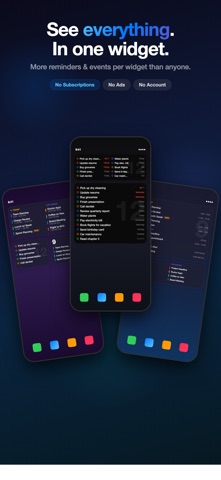


Description by Carlos Manso Written by the developer, not by AppBrain. Click to read.
REMINDERS
View all your Apple Reminders organized by status — overdue, upcoming, and anytime. Tap any reminder to edit its title, due date, priority, or list. Swipe to mark as done. Everything syncs with the built-in Reminders app.
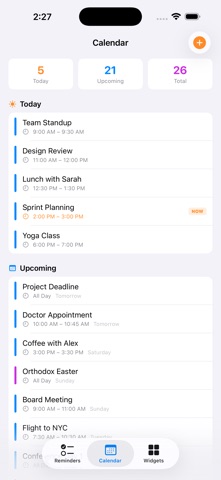
CALENDAR
A full calendar view with a monthly date picker. Tap any date to see that day's events from all your calendars. Tap any event to open the native
Apple event editor — edit title, time, recurrence, alerts, and more.
Create new events directly from the app.
TO-DO LIST
A simple, focused to-do list stored locally on your device. Add items with optional due dates and priorities. Check them off from the app or directly from the widget. No account needed — your data stays on your device.
SMART WIDGETS
Three widget families — Reminders, Calendar, and To-Do — each available in
Small, Medium, Large, and Extra Large sizes. Widgets adapt intelligently to your content:
- Fewer items? Larger, more readable text with full sentences
- More items? Compact layout that fits everything
- Mark items as done directly from the widget
- Customize background colors with 18+ theme presets
- Configure how many items each widget size displays
ADDITIONAL FEATURES
- Live Activity support for reminders on Lock Screen and Dynamic Island
- Dark, Light, and Automatic theme options
- Guided onboarding to get started quickly
- Full Spanish localization
- Pull to refresh on all screens
- Haptic feedback on actions
Remi Calendar Widget nders & respects your privacy. Reminders and calendar data come from Apple's EventKit — we never collect or transmit your data. To-do items are stored locally on your device.