

RemoteFence is made and published by davide patrone. AppBrain is an independent app data site and isn't affiliated with davide patrone. The app name, icon, screenshots and description belong to davide patrone and are shown as published on the App Store.
AppBrain's verdict
- Last updated
- October 25, 2026
Rankings
App Store top chartsApp Store Rankings for RemoteFence
Releases
Updates seen on the App Store- Version
- 1.0
- Launched
- October 2026
No changelog data
User feedback
Ratings and reviews on the App StoreComments on RemoteFence for iOS
We don't have enough comments to show example comments. Please check back later.
Technology
Found in the app by AppBrain- Price
- Free
- App size
- 25.2 MB
- Content rating
- Everyone
Technologies used by RemoteFence
About the app and developer
About RemoteFence
RemoteFence is an utilities app developed by davide patrone.
What is the rating of RemoteFence?
RemoteFence has no ratings yet.
Is RemoteFence free?
RemoteFence is free. The app size is 25.25 MB. The latest version available is 1.0. The last update was on October 25, 2026.
What are the requirements for RemoteFence?
The app has a content rating of Everyone. The app has been available on the App Store since October 2026.
Developer information for davide patrone
Address:
Frequently asked questions about RemoteFence
Is RemoteFence free?
Yes. RemoteFence is free on the App Store.
Is RemoteFence still available?
Yes. RemoteFence is on the App Store, and the last update we saw was on October 25, 2026.
How large is RemoteFence?
RemoteFence is 25.25 MB.
Is RemoteFence suitable for children?
App Store rates the content of RemoteFence as suitable for everyone.
Who made RemoteFence?
RemoteFence was developed by davide patrone. It is listed in the utilities category on the App Store.
Store listing
By davide patrone, from the App Store


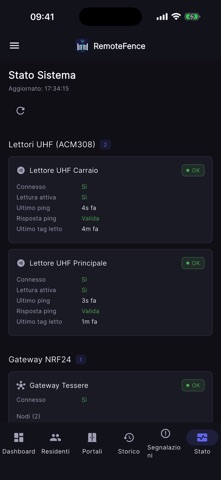

Description by davide patrone Written by the developer, not by AppBrain. Click to read.
COSA PUOI FARE
• Aprire i varchi con un tocco, con conferma prima dell'apertura
• Consultare lo storico dei tuoi accessi (varco, data e ora)
• Vedere le tessere e i tag associati al tuo account
• Inviare segnalazioni all'amministrazione, ad esempio per un guasto o una mancata apertura
• Accedere in modo rapido e sicuro con Face ID o Touch ID
• Eliminare il tuo account e i tuoi dati in qualsiasi momento, direttamente dall'app
SICUREZZA
• Accesso con account personale, gestito da un servizio di autenticazione dedicato
• Apertura limitata a un'area: per i varchi con "area di apertura" attiva, l'app consente l'apertura solo se ti trovi nelle vicinanze. La posizione è letta solo nel momento dell'apertura e non viene tracciata né salvata
• Nessuna pubblicità e nessuna profilazione
PER GLI AMMINISTRATORI
• Gestione di residenti, gruppi, tessere, varchi e lettori
• Inviti via email ai nuovi residenti
• Definizione dell'area di apertura di ogni varco direttamente su mappa
• Stato dei lettori e dei varchi in tempo reale, storico accessi e segnalazioni
COME INIZIARE
Al primo avvio inserisci l'indirizzo del server fornito dalla tua amministrazione, poi accedi con le credenziali ricevute. L'app richiede un account creato dall'amministratore del tuo comprensorio.