

Remove Backgrounds & Edit Text
Remove Backgrounds & Edit Text is made and published by 春霞 梁. AppBrain is an independent app data site and isn't affiliated with 春霞 梁. The app name, icon, screenshots and description belong to 春霞 梁 and are shown as published on the App Store.
AppBrain's verdict
- Last updated
- August 11, 2026
Rankings
App Store top chartsApp Store Rankings for Remove Backgrounds & Edit Text
Competitors
Similar apps and more from 春霞 梁Alternatives to Remove Backgrounds & Edit Text



More from 春霞 梁


Releases
Updates seen on the App Store- Version
- 1.6.2
- Launched
- November 2025
No changelog data
User feedback
Ratings and reviews on the App StoreComments on Remove Backgrounds & Edit Text for iOS
We don't have enough comments to show example comments. Please check back later.
Technology
Found in the app by AppBrain- Price
- Free
- App size
- 26.1 MB
- Content rating
- Everyone
Technologies used by Remove Backgrounds & Edit Text
About the app and developer
About Remove Backgrounds & Edit Text
Remove Backgrounds & Edit Text is a graphics & design app developed by 春霞 梁.
User Ratings
The app has no ratings yet.
App Information
Remove Backgrounds & Edit Text is freely available from the App Store. The app size is 26.13 MB. The latest version available is 1.6.2. The last update was on August 11, 2026.
Technical Requirements
The app has a content rating of Everyone. The app has been available on the App Store since November 2025.
Developer information for 春霞 梁
Address:
Frequently asked questions about Remove Backgrounds & Edit Text
Is Remove Backgrounds & Edit Text free?
Yes. Remove Backgrounds & Edit Text is free on the App Store.
Is Remove Backgrounds & Edit Text still available?
Yes. Remove Backgrounds & Edit Text is on the App Store, and the last update we saw was on August 11, 2026.
How large is Remove Backgrounds & Edit Text?
Remove Backgrounds & Edit Text is 26.13 MB.
Is Remove Backgrounds & Edit Text suitable for children?
App Store rates the content of Remove Backgrounds & Edit Text as suitable for everyone.
Who made Remove Backgrounds & Edit Text?
Remove Backgrounds & Edit Text was developed by 春霞 梁. It is listed in the graphics & design category on the App Store.
What are the best alternatives to Remove Backgrounds & Edit Text?
People looking at Remove Backgrounds & Edit Text also look at these graphics & design apps: Photo Editor-Add, Replace Text, PurpleCut : Background Eraser, 我爱截图王-微商截图王, Edit Text In Photo, AI Character Motion Swap VIORA.
Store listing
By 春霞 梁, from the App Store

Description by 春霞 梁 Written by the developer, not by AppBrain. Click to read.
Tired of complicated photo editing? Want to achieve professional-level results in just one second? We have carefully developed this revolutionary AI-powered image processing app. Whether you're a social media enthusiast, a creative designer, or a casual user, it can instantly bring new life to your photos!
Core Feature 1: AI Smart Background Removal, Change Backgrounds Freely
One-Tap Background Removal: Utilizing cutting-edge AI technology, just a single tap automatically and accurately identifies the subject, removes cluttered backgrounds in seconds, and handles fine details like hair strands with precision.
Extensive Background Options: Includes thousands of advanced color schemes and gradients, supports a color picker for free color selection, and allows you to upload personal images as backgrounds.
Versatile Applications: Easily handle ID photo background color changes, switch scenery in travel photos, and enhance product images—all with ease.
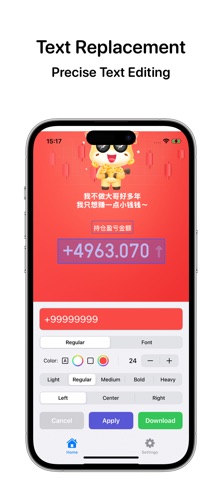
Core Feature 2: Smart Text Editing, Precise Down to Every Character
Intelligent Text Recognition: Automatically detects and locates all text areas in an image—no manual selection needed.
Comprehensive Text Editing: Edit content directly with a tap, support for adjusting font, color, size, and thickness, plus hundreds of elegant fonts to choose from.
Full Coverage for Practical Needs: Correct typos in screenshots, add slogans to posters, customize captions for memes—meet all your requirements.
Why Choose Us?
Quick and Efficient: Complex operations simplified into one-tap actions, saving you time and effort.
Accurate AI Recognition: Flawless portrait cutouts and precise text positioning.
Unlimited Creativity: Rich combinations of backgrounds and text to inspire your creativity.
Simple and User-Friendly: Intuitive interface, easy to get started even for beginners.
Download Now and Start Your Visual Creation Journey!
Whether you're creating social media profile pictures, designing event posters, or processing work-related images, we are your ideal choice.
Privacy Policy:https://liangshujun996.github.io/DipSik/dipsik_privacy.html
Use of Terms:https://www.apple.com/legal/internet-services/itunes/dev/stdeula/
Any feedback or feature suggestions are highly welcome; contact us via email at liangshujun996@163.com
If you have subscribed before, re-downloaded the app, or downloaded the app on other platforms such as iPad, Mac, you can restore the subscription status by restoring the subscription!