

Remove BG - Background Remover
Remove BG - Background Remover is made and published by Dzine Media. AppBrain is an independent app data site and isn't affiliated with Dzine Media. The app name, icon, screenshots and description belong to Dzine Media and are shown as published on the App Store.
AppBrain's verdict
- Rating on App Store
- 5.00
- 8 ratings
- Last updated
- September 27, 2025
- Size
- 57.6 MB
It doesn't have enough ratings yet to judge what users think.
User feedback
Ratings and reviews on the App StoreComments on Remove BG - Background Remover for iOS
We don't have enough comments to show example comments. Please check back later.
Store listing
By Dzine Media, from the App Store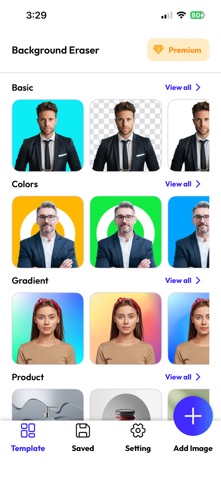


Description by Dzine Media Written by the developer, not by AppBrain. Click to read.
The resulting images can be used for various purposes like stickers, photomontage, collage, etc. Furthermore, by adding a colored background, the photo can be used for official purposes like a passport or application submission.
So you do not want complex photo processing and editing skills except this magic eraser. With this background eraser, you can perfectly extract the desired image in just one tap and use it wherever you want. The instant uses of the extracted image can be:
1) Colored background PNG
2) Product showcase for e-commerce
3) Cartoon profile
4) Podcast cover
5) Perfect display picture
6) ID Photo
7) Passport photo
8) Application photo
There are many reasons why you may want to remove background and objects of a photo or a random design for repurposing. This can be done using the resulting image as a logo on your website or on your Instagram.
In some other scenarios, you may require a smart tool to create your YouTube banner or to design some catchy YouTube thumbnails as well using the BG Remover. Moreover, you may also want to Remove BG to rid the watermark you don’t want to be reflected in your images.
In another most common situation, you may want to remove background and objects where the picture itself is perfectly the DP material but something or some object in the background might be annoying you, so you look for an easy BG Remover option.
How to Remove the Background
If we talk about the actual process to of this application, that is pretty simple and easy and doesn’t take more than just a few seconds.
1. You simply upload the image from your gallery or camera
2. Hit the remove background button on the screen
3. Choose some other background from the options
4. Or simply take the image and save it to your gallery
This is all what it takes to remove background from an image or design and leave only what you want to be left.
AI Mode
As the name suggests, this artificial intelligence-driven mode does all on its own to remove background and objects since AI recognizes people, animals, plants, anime etc, by default. It gives you high-quality cut-out images with sharper edges and smoother transitions between objects and backgrounds.
Manual Mode
If you believe that you can do the job much better depending on your own skills with this BG Remover, you can also do this through manual mode. You can quickly outline the object in the photo you want to cut and extract. Erase and repair the cut-out picture manually.
Background Options
In addition to the background removal, you can also add a desired background to the cut-out photo with just a click from the built-in background options of this background eraser. These versatile backgrounds can be applied for various purposes and the final image can be saved immediately.
Why this Background Eraser?
Well, several reasons make this smart tool your number one choice. First of all, it does the job in a blink of an eye. It doesn’t charge you a penny, unlike most other software that comes with a heavy price.
The background options are available in this magic eraser help better repurpose your images and reuse them for diverse purposes. This convenient png maker certainly deserves a try for creating a transparent background for your favorite images.
Terms and conditions:
https://www.trostun.com/terms-of-use/
Safety and technology
Found in the app by AppBrain- Price
- Free
- App size
- 57.6 MB
- Content rating
- Everyone
Technologies used by Remove BG - Background Remover
Releases
Updates seen on the App Store- Version
- 1.2.1
- Launched
- May 2023
No changelog data
Alternatives
Similar apps and more from Dzine MediaAlternatives to Remove BG - Background Remover





More from Dzine Media



Rankings
App Store top chartsApp Store Rankings for Remove BG - Background Remover
About the app and developer
About Remove BG - Background Remover
Remove BG - Background Remover is a photo & video app developed by Dzine Media.
User Ratings
Remove BG - Background Remover is rated 5.00 out of 5 stars. The rating is based on 8 ratings.
App Information
Remove BG - Background Remover is freely available from the App Store. The app size is 57.56 MB. The latest version available is 1.2.1. The last update was on September 27, 2025.
Technical Requirements
The app has a content rating of Everyone. The app has been available on the App Store since May 2023.
Developer information for Dzine Media
Address: