We don't have enough comments to show example comments. Please check back later.
Store listing
By Ct Pham, from the App Store
Description by Ct PhamWritten by the developer, not by AppBrain. Click to read.
REPLAYMASTER - Never Miss a Moment Replaymaster is the ultimate instant replay camera for capturing life's best moments. Record video with an intelligent buffer system that lets you save highlights from the past, even if you didn't press record in time.
Perfect for:
Pickleball & Tennis: Capture that 20-shot rally or a perfect passing shot.
Baseball & Basketball: Never miss your child’s double or a buzzer-beater shot.
Coaching: Save specific clips instantly to review and teach later.
Solo Training: Frame your shot perfectly even when the phone is across the court.
KEY FEATURES: APPLE WATCH REMOTE & COMPLICATIONS The "Sleep" Solution: No more waking your watch or hunting for the app mid-action. Custom complications keep your controls on your watch face—one tap saves the highlight instantly, even if the watch was asleep.
Always-Ready Controls: Add dedicated buttons to your watch face for Start/Stop Recording, Save Clip, and Save 2X.
Wrist Live Preview: Frame your shots perfectly from a distance. See your iPhone's camera feed on your wrist—ideal for tripod setups or placing your phone against a wall.
Ultra Action Button: Map the orange Action Button on Apple Watch Ultra to "SAVE Clip" for tactile, eyes-free control during intense play.
INSTANT REPLAY RECORDING Continuous Buffer: Captures video before you hit save—the app "thinks" backwards in time.
Retroactive Saving: Save moments after they happen.
Flexible Lengths: Adjustable highlight durations and a "Double-Length" save option.
SMART EDITING & MERGING Finger-Friendly Editor: Use a large, intuitive slider to trim clips down fast.
Instant Merge: Combine multiple highlights into one professional reel or save them as individual clips.
PROFESSIONAL CONTROLS Lens Options: Support for Ultra Wide (0.5x), Wide (1x), and Telephoto (3x, 5x).
High Resolution: Shoot in 4K, 2K, or 1080p with real-time camera previews.
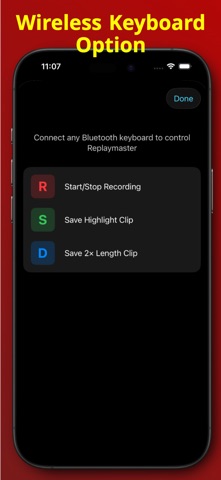
Wireless Keyboard Support: Use shortcuts (R, S, D) for complete hands-free operation.
PRO FONT & BRANDING CUSTOMIZATION 20 Premium Fonts: Use a smooth scroll wheel to choose the perfect style for your highlights.
Full Color Control: Custom color and outline pickers to match your team or personal brand.
Dynamic Sizing: Adjustable font sizes (35–80pt) and outline widths (0–12pt).
Live 16:9 Preview: See exactly how your text and branding look before you save. Settings persist across all your clips.
HOW IT WORKS: Setup: Add ReplayMaster complications to your Apple Watch face for instant access.
Frame: Place your iPhone on a tripod and use the Watch Live Preview to check your framing.
Record: Tap the Record complication on your watch face to start the session.
React: When a great play happens, tap the Save complication on your wrist. The app captures the past action—no need to "wake" the app.
Edit: Trim your clips, add custom fonts, and share your highlight reel.
Safety and technology
Found in the app by AppBrain
Price
Free
App size
3.92 MB
Content rating
Everyone
Technologies used by REPLAYMASTER
Releases
Updates seen on the App Store
Version
1.0.3
Launched
January 2026
No changelog data
Rankings
App Store top charts
App Store Rankings for REPLAYMASTER
This app is not ranked
About the app and developer
About REPLAYMASTER
REPLAYMASTER is a photo & video app developed by Ct Pham.
User Ratings
The app has no ratings yet.
App Information
REPLAYMASTER is freely available from the App Store. The app size is 3.92 MB. The latest version available is 1.0.3. The last update was on February 11, 2026.
Technical Requirements
The app has a content rating of Everyone. The app has been available on the App Store since January 2026.
REPLAYMASTER is made and published by
Ct Pham.
AppBrain is an independent app data site and isn't affiliated with Ct Pham.
The app name, icon, screenshots and description belong to Ct Pham and are shown as published on the App Store.
Each subscription will automatically renew 3 days before the expiration date for
the same time period. Subscriptions can be cancelled at any time before the renewal.