

Rewindo - Reverse Video Maker
Rewindo - Reverse Video Maker is made and published by Hiroki Sugiyama. AppBrain is an independent app data site and isn't affiliated with Hiroki Sugiyama. The app name, icon, screenshots and description belong to Hiroki Sugiyama and are shown as published on the App Store.
AppBrain's verdict
- Last updated
- September 10, 2026
Rankings
App Store top chartsApp Store Rankings for Rewindo - Reverse Video Maker
Competitors
Similar apps and more from Hiroki SugiyamaAlternatives to Rewindo - Reverse Video Maker


More from Hiroki Sugiyama


Releases
Updates seen on the App Store- Version
- 1.0.2
- Launched
- September 2026
No changelog data
User feedback
Ratings and reviews on the App StoreComments on Rewindo - Reverse Video Maker for iOS
We don't have enough comments to show example comments. Please check back later.
Technology
Found in the app by AppBrain- Price
- Free
- App size
- 33.7 MB
- Content rating
- Everyone
Technologies used by Rewindo - Reverse Video Maker
About the app and developer
About Rewindo - Reverse Video Maker
Rewindo - Reverse Video Maker is a photo & video app developed by Hiroki Sugiyama.
User Ratings
The app has no ratings yet.
App Information
Rewindo - Reverse Video Maker is freely available from the App Store. The app size is 33.75 MB. The latest version available is 1.0.2. The last update was on September 10, 2026.
Technical Requirements
The app has a content rating of Everyone. The app has been available on the App Store since September 2026.
Developer information for Hiroki Sugiyama
Address:
Store listing
By Hiroki Sugiyama, from the App Store


Description by Hiroki Sugiyama Written by the developer, not by AppBrain. Click to read.
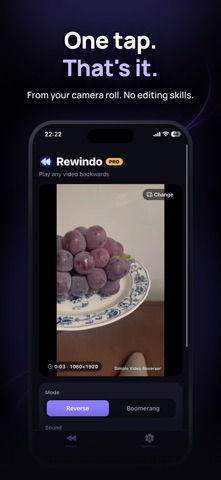
Jumps become landings. Spills clean themselves up. Runners go backwards. Pick a video, tap "Reverse it", and rewind reality. No setup, no account.
Features
- Pick one video from your camera roll and reverse it
- Sound is reversed too (or choose Muted)
- Progress and time remaining while it works, and you can cancel anytime
- Result screen with an Original / Reversed toggle, so you can compare before you save
- Save to Photos, or share straight to social media and messages
- See the length of the result before you start
- If a video can't be processed, Rewindo tells you why (format, length, storage, and more)
- A clean dark design that puts your video first
PRO (one-time purchase)
- No watermark
- No length limit
- Boomerang: forward then backwards in one clip, loops seamlessly
- Speed: 0.25x / 0.5x slow-motion reverse or 1.5x / 2x fast reverse
- Buy once, keep forever. No subscription, no extra fees
Free
- Reverse the first 30 seconds of any video (longer videos are trimmed to the first 30 seconds)
- Reversed or muted sound
- Compare, save as MP4 or MOV to Photos or Files, and share
- Exports include a small watermark in the corner
Privacy
Everything runs on your iPhone. Your videos are never uploaded to a server, there is no account, and it works offline. Photo library access is used only to pick a video and to save the result.
Great for
- TikTok, Reels, and Shorts ideas
- Jumps, dives, splashes, confetti: anything that looks amazing in reverse
- Kids and pets, made a little bit magical
- Magic-trick and time-warp effects
For iPhone (iOS 16.4 or later).