

Twin Calc: Two Calculators
Twin Calc: Two Calculators is made and published by Hiroki Sugiyama. AppBrain is an independent app data site and isn't affiliated with Hiroki Sugiyama. The app name, icon, screenshots and description belong to Hiroki Sugiyama and are shown as published on the App Store.
AppBrain's verdict
- Last updated
- September 4, 2026
Rankings
App Store top chartsApp Store Rankings for Twin Calc: Two Calculators
Competitors
Similar apps and more from Hiroki SugiyamaAlternatives to Twin Calc: Two Calculators


More from Hiroki Sugiyama


Releases
Updates seen on the App Store- Version
- 1.0.0
- Launched
- September 2026
No changelog data
User feedback
Ratings and reviews on the App StoreComments on Twin Calc: Two Calculators for iOS
We don't have enough comments to show example comments. Please check back later.
Technology
Found in the app by AppBrain- Price
- Free
- App size
- 45.1 MB
- Content rating
- Everyone
Technologies used by Twin Calc: Two Calculators
About the app and developer
About Twin Calc: Two Calculators
Twin Calc: Two Calculators is an utilities app developed by Hiroki Sugiyama.
User Ratings
The app has no ratings yet.
App Information
Twin Calc: Two Calculators is freely available from the App Store. The app size is 45.10 MB. The latest version available is 1.0.0. The last update was on September 4, 2026.
Technical Requirements
The app has a content rating of Everyone. The app has been available on the App Store since September 2026.
Developer information for Hiroki Sugiyama
Address:
Store listing
By Hiroki Sugiyama, from the App Store


Description by Hiroki Sugiyama Written by the developer, not by AppBrain. Click to read.
Compare two estimates. Split a bill two different ways. Convert on one side while you total on the other. Check last year's numbers against this year's. Open Twin Calc and calculators A and B are already there — no onboarding, no sign-up.
Features
- Calculator A and B stacked vertically (or side by side in landscape), each fully independent
- Works just like the built-in iPhone calculator: + − × ÷, %, ±, backspace, and thousands separators
- An expression line shows what you are calculating, so you never lose track
- Drag the divider to resize the two calculators; double-tap to reset to half and half
- Long-press a result to copy it; swipe left to delete one character
- Haptic feedback (can be turned off)
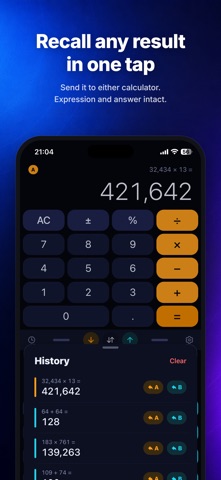
- History (tape) keeps your results automatically — tap to copy, or send a result back to A or B
- Light and dark themes that follow your system setting
- Both calculators and the split ratio are restored exactly as you left them
Free
- Two calculators, history, and reuse of your 3 most recent results
- No ads
PRO (one-time purchase)
- Never retype a result again: send A's answer straight to B, or swap A and B in one tap
- Bring back any past result from history
- 3 extra themes: Midnight, Paper, and Mono
PRO is a single one-time purchase. No subscription, no extra fees.
Everything you calculate stays on your device and is never sent to a server.
For iPhone (portrait and landscape).