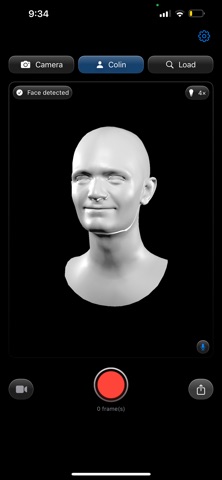
Riggle: Face Mocap & Animation came out 87 days ago. It doesn't have enough ratings yet to judge what users think.
Riggle: Face Mocap & Animation is made and published by
MORNINGSTAR VENTURES LLC.
AppBrain is an independent app data site and isn't affiliated with MORNINGSTAR VENTURES LLC.
The app name, icon, screenshots and description belong to MORNINGSTAR VENTURES LLC and are shown as
published on the App Store.
About Riggle: Face Mocap & Animation
Riggle: Face Mocap & Animation is a productivity app developed by MORNINGSTAR VENTURES LLC.
User Ratings
Riggle: Face Mocap & Animation is rated 5.00 out of 5 stars. The rating is based on one rating ratings.
App Information
Riggle: Face Mocap & Animation is freely available from the App Store. The app size is 11.06 MB. The latest version available is 2.0. The last update was on August 9, 2026.
Technical Requirements
The app has a content rating of Low Maturity. The app has been available on the App Store since August 2026.
Description by MORNINGSTAR VENTURES LLC(from the App Store)
Riggle turns your iPhone into a facial motion-capture studio and brings your expressions to 3D characters you already own. Using the front TrueDepth camera, Riggle captures all 52 ARKit facial blend shapes, head pose, and synchronized audio. Import a rigged character, watch it perform live, record a take, and export it for animation, editing, or sharing.
BRING YOUR OWN CHARACTER Import GLB, VRM, or USDZ characters. Riggle matches the model’s facial morph targets to the ARKit set by name, including common naming variations such as eyeBlinkLeft and eyeBlink_L. Before recording, you can see how many targets matched and which ones are missing.
FIND A CHARACTER VTubeMe (vtubeme.com) offers free, ARKit-compatible avatars. VRoid Hub and Sketchfab have more — check each model's license and blend shapes first. These are independent sites, not affiliated with Riggle; verify compatibility yourself.
EXPORT FOR YOUR WORKFLOW • Animated GLB or VRM with facial motion baked onto your character, ready for compatible workflows in Blender, Unity, Maya, Houdini, Godot, and Cinema 4D. No Riggle plug-in or custom import script required. • CSV and JSON motion data using your rig’s own blend-shape names. • WAV audio synchronized with the recorded take. • MP4 video with sound and animated GIF for easy sharing.
REOPEN AND REUSE YOUR TAKES Open a file exported by Riggle and play it back in the app. Apply the same captured performance to another compatible character and export it again.
AUDIO FOR LIP SYNC Riggle records facial motion and audio together, keeping dialogue aligned with the performance and ready for your editing timeline.
PREVIEW BEFORE YOU EXPORT Play back a take on your character, scrub frame by frame, adjust the lighting, and orbit the camera. Export a video from any angle without recording again.
PRIVATE BY DESIGN No account. No sign-in. No analytics. Riggle processes capture, preview, and export entirely on device and does not upload your files.
REQUIREMENTS • An iPhone with Face ID and a TrueDepth front camera • iOS 17 or later
Riggle is made for animators, designers, VTubers, and creators who want to capture on iPhone, work with their own characters, and continue in the tools they already use.
Terms of Use: https://www.apple.com/legal/internet-services/itunes/dev/stdeula/
Each subscription will automatically renew 3 days before the expiration date for
the same time period. Subscriptions can be cancelled at any time before the renewal.