RMDAnalyzer is a finance app developed by Joseph Walker.
User Ratings
RMDAnalyzer is rated 5.00 out of 5 stars. The rating is based on one rating ratings.
App Information
RMDAnalyzer costs $9.99. The app size is 1.17 MB. The latest version available is 1.0. The last update was on October 16, 2025.
Technical Requirements
The app has a content rating of Everyone. The app has been available on the App Store since October 2025.
Description by Joseph Walker(from the App Store)
Why RMDAnalyzer
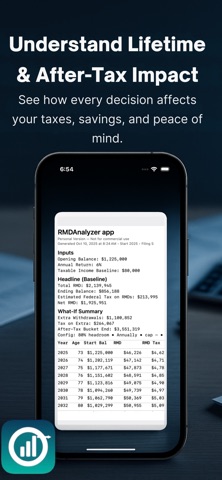
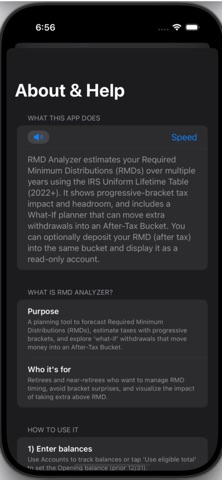
RMDAnalyzer helps you see how today’s choices affect tomorrow’s after-tax outcomes. Run a baseline RMD forecast, try a What-If plan (like “fill my bracket to 80% each year”), and Compare to Baseline to see your end-of-plan, after-tax lift.
Who it’s for: Individuals planning RMDs from IRAs/401(k)s
Families stress-testing taxes for heirs.
Financial enthusiasts who want transparent math.
Personal Version — Not for commercial use. For client-facing reports, upgrade to Pro.
Key Features (with Definitions & Benefits)
1) Baseline RMD Forecast:
What it does: Year-by-year RMDs using the IRS Uniform Lifetime Table (owner), taxed using your filing status and baseline taxable income, with portfolio growth.
Age 73 divisor = 26.5 (owner table). End balance convention: (Start − RMD − Extra) × (1 + return).
What it does: Simulates additional withdrawals to “fill” a tax bracket up to a chosen headroom %, with optional max per-year cap, timing (this year/next year/annually), and a repeat years limit.
After-Tax Bucket destination with custom return and tax drag. “Show as read-only account” to visualize the bucket alongside your accounts.
3) Compare to Baseline (Δ Terminal After-Tax)
What it shows: Clear “lift” vs doing nothing extra. Δ Terminal after-tax = (Heirs after-tax in Scenario + After-Tax Bucket) − (Heirs after-tax in Baseline). Δ Lifetime taxes = total taxes (Scenario) − total taxes (Baseline).
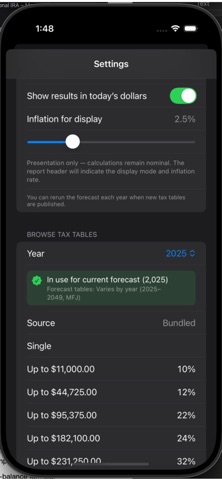
What it does: Choose Single or Married Filing Jointly; “Tax Table In Use” shows the active year and source. Reminder: Rerun forecasts when new tax tables are published.
5) Per-Account Return Overrides
What it does: Set expected returns per account, with a global fallback.
6) Landscape PDF Export with Glossary What it does: Exports a clean, landscape PDF that: Prunes empty “all-dash” columns Includes Inputs, Headline, What-If Summary (with compare line), and full Forecast table Adds a Glossary page (Uniform Lifetime divisor + end-balance formula) Prints a privacy caution footer by default
Sensitive info: Reports may include personal financial data. Share only with trusted parties.
What’s New: Compare header layout improved (separate label/amount lines) Filing status picker (Single/MFJ) reflected across app and PDF PDF defaults to landscape; auto-prunes empty columns; adds Glossary Stability: share sheet presents only after export is fully written
App Privacy: No ads. No third-party trackers. Data stays on device except when you export/share a PDF. Not tax advice. Educational modeling only.
Review Notes: Uses the IRS Uniform Lifetime Table (owner) (e.g., age 73 = 26.5). End-balance convention: (Start − RMD − Extra) × (1 + return). No financial advice; educational modeling. Share sheet presents only after file exists and is non-empty.
Each subscription will automatically renew 3 days before the expiration date for
the same time period. Subscriptions can be cancelled at any time before the renewal.