Download Android Apps and Games
AppBrain
  • Apps
  • Apps being viewed right now Trending apps today Most popular apps All-time most downloaded apps Top rated apps
  • Intelligence ▾
    Intelligence overview → Track any Android app or your whole market
    Track & analyze
    Keyword Tracker & OptimizerTrack & improve Play rankings App Performance ReportOne-off PDF for any app StatisticsFree Android & Play market stats
    Promote your app
    Featured Apps App Links
  • Intelligence
  • Pricing
  • Dashboard
  • Sign up
  • Log in
Last updated on: 2026-07-09
App Store Apps > Business > Rosteroo - Staff Scheduling
Rosteroo - Staff Scheduling icon

Rosteroo - Staff Scheduling

1.0
Specta Labs, Inc.
3.25
4 reviews
Free

Rosteroo - Staff Scheduling Screenshot 1 of 8
Rosteroo - Staff Scheduling Screenshot 2 of 8
Rosteroo - Staff Scheduling Screenshot 3 of 8
Rosteroo - Staff Scheduling Screenshot 4 of 8
Rosteroo - Staff Scheduling Screenshot 5 of 8
Rosteroo - Staff Scheduling Screenshot 6 of 8
Rosteroo - Staff Scheduling Screenshot 7 of 8
Rosteroo - Staff Scheduling Screenshot 8 of 8
Download from the App Store Android version

About Rosteroo - Staff Scheduling

Rosteroo - Staff Scheduling is an overall app developed by Specta Labs, Inc..

How many times has Rosteroo - Staff Scheduling been downloaded?

What is the rating of Rosteroo - Staff Scheduling?

Rosteroo - Staff Scheduling is rated 3.25 out of 5 stars, based on 4 ratings.

Is Rosteroo - Staff Scheduling free?

Rosteroo - Staff Scheduling is free to download. The APK download size is 24.01 MB. The latest version available is 1.0. The last update was on February 16, 2022.

What are the requirements for Rosteroo - Staff Scheduling?

The app has a content rating of Everyone. The app has been available on Google Play February 2022.

Description
Rosteroo is the smarter way to create your employee schedule, manage shifts and keep track of work hours.

Build your work schedule with just a few clicks. Keep your staff posted on the latest shift changes. Assign shift location, position, pay, break hours, notes and more. And Rosteroo verifies each shift, so you always schedule the right staff, across all locations and job positions.

As business unexpectedly picks up during the day and you’re not fully covered, Rosteroo will help you quickly find out who’s available to work and assign them a new shift. Or find out who’s on the clock, who hasn’t shown up yet and who’s scheduled to start later.

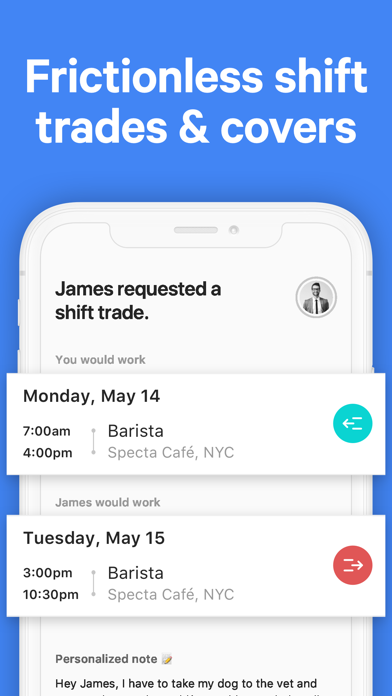
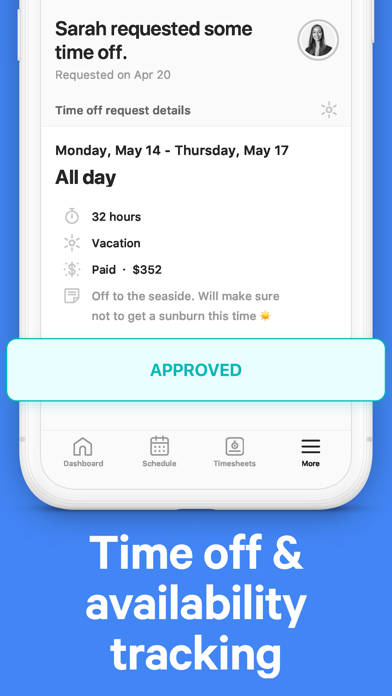
Keep your business running smoothly and don’t manage every shift swap yourself. Allow staff to trade shifts or find cover without making a single call. And to avoid scheduling conflicts, always stay on top of your staff’s time off and keep track of their availability. Managers approve or reject time off requests as they come in and notify their staff right away.

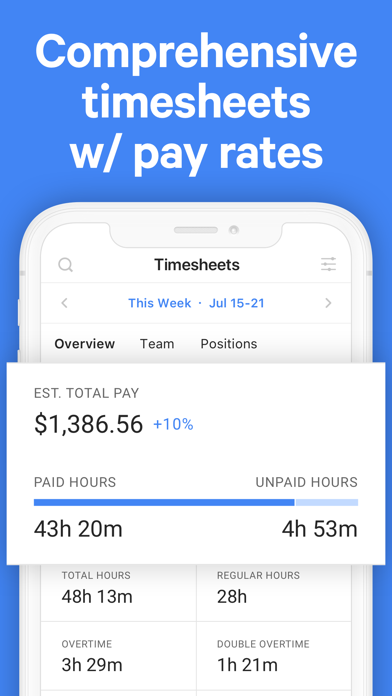
Whether in the field or at the shop, our intuitive mobile time clock makes time tracking easy. You’ll save hours of your time with insightful timesheet & payroll reports, generated automatically. And to speed up your payroll process, set up multiple pay rates based on a staff member’s job position or for different time periods. Never second-guess your data when processing payroll again.


With Rosteroo, scheduling takes minutes, not hours!


Why you’ll love Rosteroo:

• Increase accountability and eliminate no-shows.
• Replace old-fashioned whiteboard rosters.
• Streamlined shift trading and cover requests for an empowered team.
• Always properly staffed and ready to go.
• Enjoy automated staff timesheet reports.
• Maintain an eye on payroll - without all the hassle


Key features at a glance:

• Smart Scheduling
Quickly build your schedule. Assign shifts, notify your team, and make sure your business is properly staffed.

• In-Depth Shift Details
Shift start & end times, earnings, job position, location, breaks, notes and so much more to set your team up for work.

• Trade & Cover Requests
Don’t manage every swap yourself. Allow staff to trade shifts or find cover without making a single call.

• Mobile Time Clock
Whether in the field or at the shop, our intuitive mobile time clock makes time tracking easy.

• Timesheet Reports
Save hours of your time with insightful timesheet & payroll reports, generated automatically.

• Team Activity
Build your employee schedule faster by taking into account staff vacation, availability, payroll costs, and more.

• Time Off Management
Stay on top of your team’s time off. Easily approve or reject requests and avoid scheduling conflicts.

• Real-Time Attendance Updates
Make sure you’re always covered. Find out in real-time who's on the clock, who’s running late or who's available to work.

• Helpful Reminders
Get instant notifications whenever the schedule is published, your shift is updated, a shift is about to start, or a coworker asks to trade your shift.

• Unlimited Support
Get free unlimited help from our support team whenever you need it.


Get started today and streamline your entire staff scheduling process.

For feedback, ideas, or questions, please contact us at support@rosteroo.com
Show more Show less

More data about Rosteroo - Staff Scheduling

Price Free to download
Rating 3.25 based on 4 ratings
Ranking Not ranked
Version 1.0
App download size 24.0 MB
Suitable for Everyone

Alternative downloads for the Rosteroo - Staff Scheduling app

TimeTo.Work - staff schedule icon TimeTo.Work - staff schedule
Puzzle King AB
3.0
Free
6 ratings
Employee Scheduling by BLEND icon Employee Scheduling by BLEND
Blendapp Software Ltd
4.6
Free
133 ratings
Camelo: Work Schedule Maker icon Camelo: Work Schedule Maker
Camelo LLC
4.6
Free
195 ratings
SHIFTR Employee Scheduling icon SHIFTR Employee Scheduling
Specsoft
4.7
Free
720 ratings
Simple Rota Maker icon Simple Rota Maker
Members of Us Limited
3.0
Free
2 ratings
StaffAny Employee Scheduling icon StaffAny Employee Scheduling
StaffAny
5.0
Free
4 ratings
Work Schedule Maker icon Work Schedule Maker
SentientIT Software Solution
3.5
Free
11 ratings
Week at Work icon Week at Work
BitLogic Solutions, Inc.
3.3
Free
7 ratings

More from Specta Labs, Inc.

Atto: Time Tracking & Shifts icon Atto: Time Tracking & Shifts
Specta Labs, Inc.
4.6
Free
3.5K ratings
Kiosk by Atto icon Kiosk by Atto
Specta Labs, Inc.
0.0
Free

Changelog of Rosteroo - Staff Scheduling

No changelog data

Developer information for Specta Labs, Inc.

Specta Labs, Inc.

Address:

Share Rosteroo - Staff Scheduling

Comments on Rosteroo - Staff Scheduling for iOS

We don't have enough comments to show example comments. Please check back later.

App Store Rankings for Rosteroo - Staff Scheduling

This app is not ranked

Technologies used by Rosteroo - Staff Scheduling

Top new apps Apps on sale Popular Overall Apps other people are watching Today's trending apps
TimeTo.Work - staff schedule icon TimeTo.Work - staff schedule
Employee Scheduling by BLEND icon Employee Scheduling by BLEND
Camelo: Work Schedule Maker icon Camelo: Work Schedule Maker
SHIFTR Employee Scheduling icon SHIFTR Employee Scheduling
Simple Rota Maker icon Simple Rota Maker
StaffAny Employee Scheduling icon StaffAny Employee Scheduling
Work Schedule Maker icon Work Schedule Maker
Week at Work icon Week at Work

Back to top
AppBrain Intelligence premium content

Subscribe now to get full and unlimited access to AppBrain Intelligence. You'll have access to:

  • App Intelligence dashboard (performance timeline, competitor comparison, country rankings, insight cards)
  • Detailed ranking data per app
  • Full timeline per developer
  • Device market shares data per country
  • Unlimited keyword tracking
1 Month

$75/mo
(billed every month)

SAVE 0%
Subscribe
3 Months

$65/mo
($195 billed every 3 months)

SAVE 13%
Subscribe
1 Year

$57.50/mo
($690 billed every year)

SAVE 23%
Subscribe
Each subscription will automatically renew 3 days before the expiration date for the same time period. Subscriptions can be cancelled at any time before the renewal.

AppBrain is a directory focused on discovering great apps and games. We give statistics, rankings and search options that Google Play and the App Store don't have. All trademarks are owned by their respective owners. AppBrain doesn't offer APKs or binaries, and always lets users install the official version from Google Play or the App Store.

More apps

  • Top Android apps being viewed
  • View Blur Photo & Mosaic
  • Ninja Arashi 2
  • Matchingham Android App

Android Statistics

  • Android statistics
  • Google Play Developer stats
  • Trending Android Apps
  • Top popular Apps
  • Buy the best Android phone

About AppBrain

  • Contact
  • Privacy
  • Documentation
  • DMCA takedowns
  • Articles
  • Blog
  • Android App Marketing: Learn how to better market your Android app
© 2010-2026 - AppBrain