

SHIFTR Employee Scheduling
SHIFTR Employee Scheduling is made and published by Specsoft. AppBrain is an independent app data site and isn't affiliated with Specsoft. The app name, icon, screenshots and description belong to Specsoft and are shown as published on the App Store.
AppBrain's verdict
EstablishedLoved by users- Rating on App Store
- 4.66
- 755 ratings
- Last updated
- October 28, 2026
- Size
- 39.7 MB
Users love it: 4.7 stars from 755 ratings.
User feedback
Ratings and reviews on the App StoreComments on SHIFTR Employee Scheduling for iOS
We don't have enough comments to show example comments. Please check back later.
Store listing
By Specsoft, from the App Store




Description by Specsoft Written by the developer, not by AppBrain. Click to read.
Flexible features include:
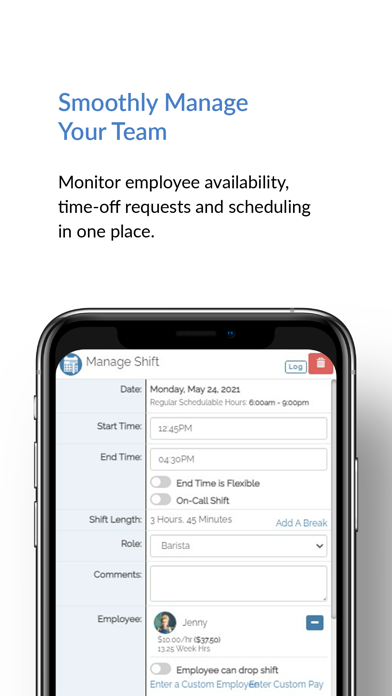
• Easy Employee Scheduling
• Time Clock & Time Tracking
• Time Off Requests & Availability
• Shift Swapping
• Open Shifts Up For Grabs
• Templates, Copying & Recurring Schedules
• Budgeting & Labor Costing
• Automatic Notifications
• Calendar Sync
• Easy Employee Onboarding
• Account Customization
Enjoy streamlined, on-the-go, scheduling from a web browser or the mobile app.
EASY EMPLOYEE SCHEDULING
• Quickly see who is available and eligible to work each shift
• Know you’re covered with highlighted conflicts
• Add daily notes to the schedule for team communication
• When the schedule is finished, simply publish it to the team for digital access
• Access the schedule anytime, anywhere
TIME CLOCK & TIME TRACKING
• Allow team members to clock in and out via a device you've designated as an on-site kiosk and/or use their own devices
• Track time clock entries by location, department and role
• Automatically calculate regular and overtime hours
• Create custom time tracking categories (i.e. holiday, vacation, sick, etc.)
• View detailed reporting and export entries for payroll needs
• Option to disable time clock
TIME OFF REQUESTS & AVAILABILITY
• Manage time off requests and availability to avoid conflicts
• Save time by having employees submit their requests for manager response
• Changes to availability can be set to take effect immediately or at a future date
• Detailed reporting allows you to quickly spot gaps in coverage
SHIFT SWAPPING
• Allow team members to swap shifts and find coverage on their own
• Control eligibility and approval requirements
OPEN SHIFTS UP FOR GRABS
• Create open shifts for team members to pick up—great for extra hours, volunteers and events!
• Control eligibility and preferences
TEMPLATES, COPYING & RECURRING SCHEDULES
• Create auto-load templates for each day of the week—with or without employees included. Great for recurring schedules!
• Create templates for custom events and situations
• Copy individual days or a full week
• Highlighted conflicts allow for quick adjustments
BUDGETING & LABOR COSTING
• Calculate hours and budgeting in real-time including weekly labor budgets, daily sales projections, target labor ratios, overtime, salary overhead, and more
• Budgeting and labor costing information is optional and only seen by administrators
AUTOMATIC NOTIFICATIONS
• Streamline communication with automatic notification options for new schedules, time off requests, shift swapping, shift reminders, and more
• Notifications are available via text, email, app push notifications, and the SHIFTR dashboard
• The notification history log lets you see a full history of your notifications including when you read and responded to them
CALENDAR SYNC
• Subscribe via your preferred calendar client to automatically sync your work schedule with your calendar
EASY EMPLOYEE ONBOARDING
• Invite team members to join via an email invitation or create and share a custom URL or invite code
• Assign team members to their qualified roles, departments and locations for fast and accurate scheduling
ACCOUNT CUSTOMIZATION
• Feature your logo, user photos, and more
• Customize your account features and preferences to fit your needs
TEAMS OF ALL SIZES
• Manage a variety of teams all in one place
• Enjoy flexible features for teams of all sizes—no team too big or small!
COMPLIMENTARY SUPPORT & TRAINING
• Complimentary support and training via phone, email, and live chat
Safety and technology
Found in the app by AppBrain- Price
- Free
- App size
- 39.7 MB
- Content rating
- Everyone
Technologies used by SHIFTR Employee Scheduling
Releases
Updates seen on the App Store- Version
- 3.0.0
- Launched
- June 2018
No changelog data
Alternatives
Similar apps and more from SpecsoftAlternatives to SHIFTR Employee Scheduling




Also available on Google Play

Rankings
App Store top chartsApp Store Rankings for SHIFTR Employee Scheduling
About the app and developer
About SHIFTR Employee Scheduling
SHIFTR Employee Scheduling is a business app developed by Specsoft.
User Ratings
SHIFTR Employee Scheduling is rated 4.66 out of 5 stars. The rating is based on 760 ratings.
App Information
SHIFTR Employee Scheduling is freely available from the App Store. The app size is 39.75 MB. The latest version available is 3.0.0. The last update was on October 28, 2026.
Technical Requirements
The app has a content rating of Everyone. The app has been available on the App Store since June 2018.
Developer information for Specsoft
Address:
Frequently asked questions about SHIFTR Employee Scheduling
Is SHIFTR Employee Scheduling free?
Yes. SHIFTR Employee Scheduling is free on the App Store.
Is SHIFTR Employee Scheduling still available?
Yes. SHIFTR Employee Scheduling is on the App Store, and the last update we saw was on October 28, 2026.
How large is SHIFTR Employee Scheduling?
SHIFTR Employee Scheduling is 39.75 MB.
Is SHIFTR Employee Scheduling suitable for children?
App Store rates the content of SHIFTR Employee Scheduling as suitable for everyone.
How do people rate SHIFTR Employee Scheduling?
SHIFTR Employee Scheduling scores 4.66 out of 5 stars, from 755 ratings on the App Store.
Who made SHIFTR Employee Scheduling?
SHIFTR Employee Scheduling was developed by Specsoft. It is listed in the business category on the App Store.
What are the best alternatives to SHIFTR Employee Scheduling?
People looking at SHIFTR Employee Scheduling also look at these business apps: Employee Scheduling by BLEND, TimeTo.Work - staff schedule, Planday Employee Scheduling, Coast: Native Work Order CMMS, Shift Day Work Calendar: Spoke.