

RST Decoder Pro
RST Decoder Pro is made and published by koji kamogawa. AppBrain is an independent app data site and isn't affiliated with koji kamogawa. The app name, icon, screenshots and description belong to koji kamogawa and are shown as published on the App Store.
AppBrain's verdict
Established- Rating on App Store
- 5.00
- 1 ratings
- Last updated
- August 30, 2026
- Size
- 1.39 MB
It doesn't have enough ratings yet to judge what users think.
User feedback
Ratings and reviews on the App StoreComments on RST Decoder Pro for iOS
We don't have enough comments to show example comments. Please check back later.
Store listing
By koji kamogawa, from the App Store


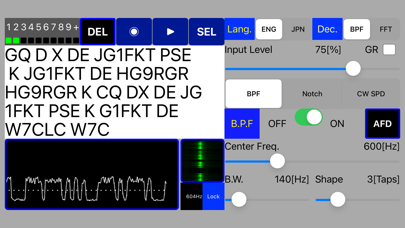


Description by koji kamogawa Written by the developer, not by AppBrain. Click to read.
I recommend that you try the basic functions and usage with the free version before purchasing.
It is a Morse practice App that you can use to check if you are keying the correct code.
Signals with good S/N can be decoded correctly, but signals with bad S/N cannot be decoded correctly.
Also, the performance will be degraded for extremely slow or fast signals.
Usually about 5 to 10 characters are required for speed synchronization of Morse Code.
Adjust the input signal so that the peak value changes from level 6 to level 7.
Make fine adjustments to each parameter according to the reception status.
[Additional Functions]
-In addition to the decoder using BPF, a new decoder using FFT has been added so that it can be switched according to the usage.
-AFD (Auto Frequency Detector) function has been added to the decoder using BPF, and BPF can be set automatically by pressing the AFD button.
-The decoder using FFT automatically follows the strongest signal in the band by AFD (Auto Frequency Detector) and AGC (Auto Gain Control). You can also hold the AFD / AGC parameters by pressing the Lock button.
* There will be a time lag of about 1 to 2 seconds for AFD tracking.
* The Pro version also supports waterfall display.
[Control parameters]
1.Language select English and Japanese(KANA)
2.Audio Input Level
3.BPF ON/OFF
4.BPF of Center Frequency
5.BPF of Band Width
6.BPF of Shape
7.Notch ON/OFF
8.Notch of Center Frequency
9.CW Speed Control ON/OFF
10.CW Speed Control Low, Mid1, Mid2 or High
11.Delete All Decoded Text
12.Realtime CW Signal Display
13.Input signal recording function.
14.Playback function from the file list.
15.Support the Garbage Data reduction function
[Note]
Since the signal after BPF is output to the audio output, it can also be used as an AF-CW filter.
[URL of this App(Free version) working example video]
The GUI is slightly different, but the basic functionality is the same.
https://youtu.be/Pwp7W4m-m34
Safety and technology
Found in the app by AppBrain- Price
- $1.99
- App size
- 1.39 MB
- Content rating
- High
Technologies used by RST Decoder Pro
Releases
Updates seen on the App Store- Version
- 3.1.0
- Launched
- June 2020
No changelog data
Alternatives
Similar apps and more from koji kamogawaAlternatives to RST Decoder Pro







More from koji kamogawa





Rankings
App Store top chartsApp Store Rankings for RST Decoder Pro
About the app and developer
About RST Decoder Pro
RST Decoder Pro is an education app developed by koji kamogawa.
User Ratings
RST Decoder Pro is rated 5.00 out of 5 stars. The rating is based on one rating ratings.
App Information
RST Decoder Pro costs $1.99. The app size is 1.39 MB. The latest version available is 3.1.0. The last update was on August 30, 2026.
Technical Requirements
The app has a content rating of High Maturity. The app has been available on the App Store since June 2020.
Developer information for koji kamogawa
Address: