

RST MR Pro is made and published by koji kamogawa. AppBrain is an independent app data site and isn't affiliated with koji kamogawa. The app name, icon, screenshots and description belong to koji kamogawa and are shown as published on the App Store.
AppBrain's verdict
- Last updated
- August 19, 2026
- Size
- 5.43 MB
User feedback
Ratings and reviews on the App StoreComments on RST MR Pro for iOS
We don't have enough comments to show example comments. Please check back later.
Store listing
By koji kamogawa, from the App Store
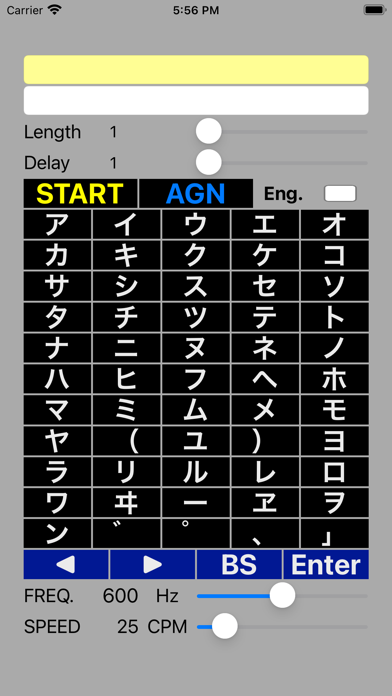
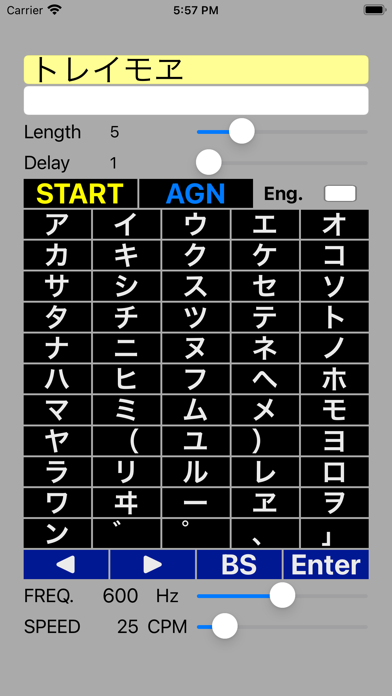


Screenshots by koji kamogawa, from the the App Store listing
Description by koji kamogawa Written by the developer, not by AppBrain. Click to read.
This app is a practice app for memorization reception, which can be said to be essential for Morse reception.
Memorization reception is also called "delayed reception", and it is a method of interpreting the heard Morse code with a delay after listening to the Morse code for several characters, instead of interpreting it immediately (writing it on paper etc).
It is not necessary for receiving low-speed Morse code, but it is an essential reception technique for receiving some high-speed Morse code.
[App features]
1. The code length generated is a minimum of 5 characters and a maximum of 20 characters, in units of 1 character.
It can be set arbitrarily.
2. The minimum number of delayed characters is 1 and the maximum is 10 characters.
However, it cannot be set longer than the code length to be generated.
3. Use the in-app keyboard until you reach the set number of delayed characters.
Even if you enter characters, the input operation will be ignored.
4. The generated code is "Japanese KANA" or "alphabet + number".
To select "alphabet + number", select the "Eng." check box.
In the current version, " ゛ ゜( ) 」 " does not appear.
5. The dial tone of the generated Morse code can be changed with the "Frequency" slide bar.
(Variable range: 300Hz-900Hz)
6. The speed of the generated Morse code can be changed with the "Speed" slide bar.
(Variable range: 10CPM to 150CPM)
7. The speed of the generated Morse code can be changed with the "Volume" slide bar.
You can also adjust with the volume button on the main unit.
[How to use the app]
1. Set the "code length" and "delayed character".
* At first, "code length: 5 delayed characters: 1" is recommended
2. Set "Frequency", "Speed" and "Volume".
* "Frequency: 600Hz", "Speed: 50-60CPM", "Volume" are optional
3. When you press "START", you will hear the Morse code, so you can use the app
Enter the code with the keyboard.
However, during the number of characters of "delayed characters", memorize without inputting and the number of characters
When you reach, enter from the first letter you memorized.
4. If you cannot hear the characters of "code length" length, press "AGN".
The Morse code was heard from the beginning again, so enter the correct characters.
5. Finally press "Enter"
6. Press "Enter" to score, and after a certain amount of time, the next Morse code
You will hear it, so enter the code on the keyboard of the app in the same way.
7. If you make a mistake in the input characters, you can correct them using "BS" and etc.
When the operation for 8.10 questions is completed, the scoring result pop-up will be displayed.
Memorization reception is also called "delayed reception", and it is a method of interpreting the heard Morse code with a delay after listening to the Morse code for several characters, instead of interpreting it immediately (writing it on paper etc).
It is not necessary for receiving low-speed Morse code, but it is an essential reception technique for receiving some high-speed Morse code.
[App features]
1. The code length generated is a minimum of 5 characters and a maximum of 20 characters, in units of 1 character.
It can be set arbitrarily.
2. The minimum number of delayed characters is 1 and the maximum is 10 characters.
However, it cannot be set longer than the code length to be generated.
3. Use the in-app keyboard until you reach the set number of delayed characters.
Even if you enter characters, the input operation will be ignored.
4. The generated code is "Japanese KANA" or "alphabet + number".
To select "alphabet + number", select the "Eng." check box.
In the current version, " ゛ ゜( ) 」 " does not appear.
5. The dial tone of the generated Morse code can be changed with the "Frequency" slide bar.
(Variable range: 300Hz-900Hz)
6. The speed of the generated Morse code can be changed with the "Speed" slide bar.
(Variable range: 10CPM to 150CPM)
7. The speed of the generated Morse code can be changed with the "Volume" slide bar.
You can also adjust with the volume button on the main unit.
[How to use the app]
1. Set the "code length" and "delayed character".
* At first, "code length: 5 delayed characters: 1" is recommended
2. Set "Frequency", "Speed" and "Volume".
* "Frequency: 600Hz", "Speed: 50-60CPM", "Volume" are optional
3. When you press "START", you will hear the Morse code, so you can use the app
Enter the code with the keyboard.
However, during the number of characters of "delayed characters", memorize without inputting and the number of characters
When you reach, enter from the first letter you memorized.
4. If you cannot hear the characters of "code length" length, press "AGN".
The Morse code was heard from the beginning again, so enter the correct characters.
5. Finally press "Enter"
6. Press "Enter" to score, and after a certain amount of time, the next Morse code
You will hear it, so enter the code on the keyboard of the app in the same way.
7. If you make a mistake in the input characters, you can correct them using "BS" and etc.
When the operation for 8.10 questions is completed, the scoring result pop-up will be displayed.
Safety and technology
Found in the app by AppBrain- Price
- $1.99
- App size
- 5.43 MB
- Content rating
- Everyone
Technologies used by RST MR Pro
Releases
Updates seen on the App Store- Version
- 1.7.0
- Launched
- May 2021
No changelog data
Alternatives
Similar apps and more from koji kamogawaAlternatives to RST MR Pro







More from koji kamogawa





Rankings
App Store top chartsApp Store Rankings for RST MR Pro
This app is not ranked
About the app and developer
About RST MR Pro
RST MR Pro is an education app developed by koji kamogawa.
User Ratings
The app has no ratings yet.
App Information
RST MR Pro costs $1.99. The app size is 5.43 MB. The latest version available is 1.7.0. The last update was on August 19, 2026.
Technical Requirements
The app has a content rating of Everyone. The app has been available on the App Store since May 2021.
Developer information for koji kamogawa
Address: