





AppBrain's verdict
- Rating on App Store
- 4.25
- 4 ratings
- Last updated
- June 17, 2024
- Size
- 75.3 MB
It doesn't have enough ratings yet to judge what users think.
User feedback
Ratings and reviews on the App StoreComments on Ruler AR - Tape Measure App for iOS
We don't have enough comments to show example comments. Please check back later.
Store listing
By Nhu Ngoc Le, from the App StoreDescription by Nhu Ngoc Le Written by the developer, not by AppBrain. Click to read.
Imagine you're decorating your house and need to know the exact size of a wall. Or, you're building a piece of furniture and need to make sure all the parts fit together perfectly. Or, you're a contractor and need to submit accurate measurements to a client. Or maybe you just want to measure the things you want right away without a ruler or tape measure nearby. Ruler AR - Tape Measure App, on-screen ruler can help you with all of these tasks and more.
Feature of Ruler AR - Tape Measure App
Tape measure everything
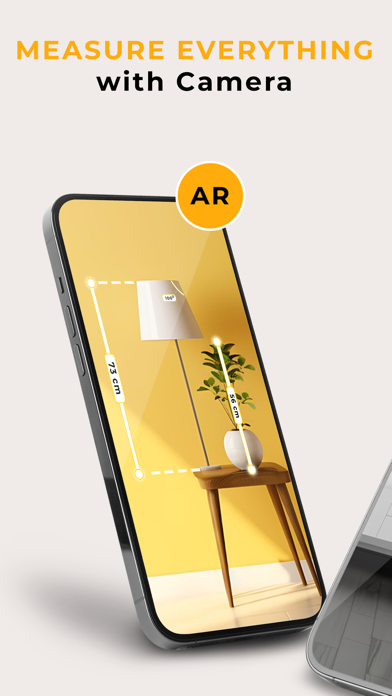
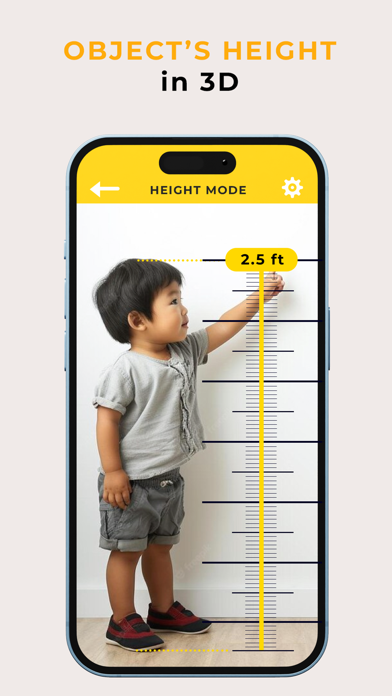
Ruler AR - Tape Measure App can be used to measure on multiple different surfaces. Simply point your device's camera at a textured surface (horizontal or vertical) and AR Ruler will do the rest. With Ruler AR - Tape Measure App, you can measure the distance between your device's camera and a fixed point on a 3D surface. This measure app allows you to estimate the height of any object or structure in your view with the 3D height measurement scanner. You can also measure the corners of 3D planes and the size of a 3D object with the volume scanner feature.
Physical Ruler
AR Ruler provides a standard ruler feature (Ruler). You can use this feature by placing the object to be measured vertically on the device and selecting the unit of measurement.
Various measurements in units
Ruler AR - Tape Measure App supports a variety of units, including inches, millimeters, centimeters, meters, yards, and feet. You can quickly choose units of measurement without having to use multiple measure tools.
Take Photos
Camera measurement allows you to take photos of your measurements. The results can be downloaded and saved for you to review later.
Measurement archive
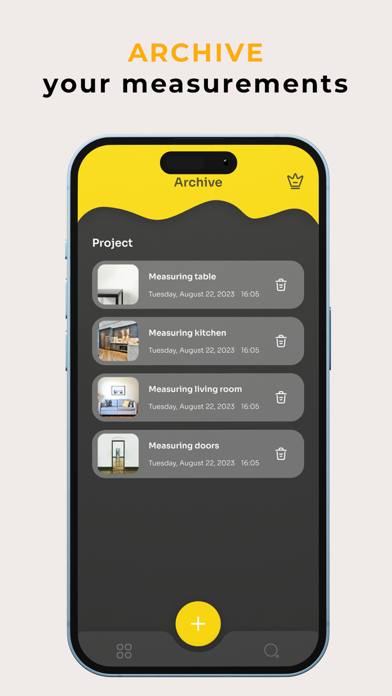
If you want to search and review all the objects you have measured and compare them to each other, you need to store them. AR Ruler allows you to save your measurements for future reference.
How to use Ruler AR - Tape Measure App
Open Ruler AR - Tape Measure App and select AR ruler.
Aim the camera at the surface where the object to be measured is placed. You can move the camera to detect the plane.
Start measuring on the object.
The measurement results will be displayed on the screen.
Capture to save the results.
Ruler AR - Tape Measure App is a free digital tape measure. With AR Ruler, the measure tool helps you to measure distance, height, length, width, angle and more by simply scanning your device. You can use this measure app in any indoor or outdoor environment, including rooms, fields, and construction sites.With just a phone and AR Ruler, you can measure everything around you.
Note:
Please note that the AR Ruler app requires the ARCore library (also known as lidar iOS) developed by Google. ARCore (lidar iOS) is constantly being improved, which has a positive impact on the quality of room scanning and the accuracy of image measurements in the AR Ruler augmented reality app.
Ruler AR - Tape Measure App quickly, easily, and accurately. So what are you waiting for? Download Ruler AR - Tape Measure App today and start measuring like a pro!
Terms of Use: https://www.apple.com/legal/internet-services/itunes/dev/stdeula/
Safety and technology
Found in the app by AppBrain- Price
- Free
- App size
- 75.3 MB
- Content rating
- Everyone
Technologies used by Ruler AR - Tape Measure App
Releases
Updates seen on the App Store- Version
- 1.0.8
- Launched
- January 2024
No changelog data
Alternatives
Similar apps and more from Nhu Ngoc Le





Rankings
App Store top chartsApp Store Rankings for Ruler AR - Tape Measure App
About the app and developer
About Ruler AR - Tape Measure App
Ruler AR - Tape Measure App is an utilities app developed by Nhu Ngoc Le.
User Ratings
Ruler AR - Tape Measure App is rated 4.25 out of 5 stars. The rating is based on 4 ratings.
App Information
Ruler AR - Tape Measure App is freely available from the App Store. The app size is 75.34 MB. The latest version available is 1.0.8. The last update was on June 17, 2024.
Technical Requirements
The app has a content rating of Everyone. The app has been available on the App Store since January 2024.
Ruler AR - Tape Measure App is made and published by Nhu Ngoc Le. AppBrain is an independent app data site and isn't affiliated with Nhu Ngoc Le. The app name, icon, screenshots and description belong to Nhu Ngoc Le and are shown as published on the App Store.
Developer information for Nhu Ngoc Le
Address: