

RulerApp: Ruler & Tape Measure
RulerApp: Ruler & Tape Measure is made and published by Takumi Sekiguchi. AppBrain is an independent app data site and isn't affiliated with Takumi Sekiguchi. The app name, icon, screenshots and description belong to Takumi Sekiguchi and are shown as published on the App Store.
AppBrain's verdict
- Last updated
- October 18, 2026
- Size
- 9.51 MB
User feedback
Ratings and reviews on the App StoreComments on RulerApp: Ruler & Tape Measure for iOS
We don't have enough comments to show example comments. Please check back later.
Store listing
By Takumi Sekiguchi, from the App Store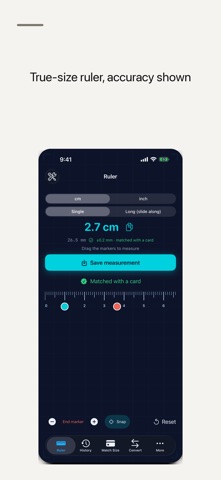



Description by Takumi Sekiguchi Written by the developer, not by AppBrain. Click to read.
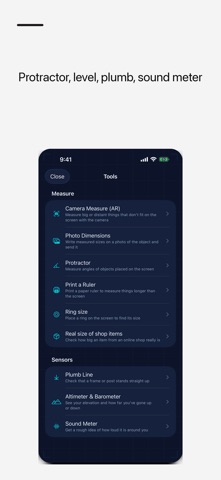
Beyond the screen, it is a pocket toolbox: a "Long (slide along)" mode for items longer than the screen, AR measuring with the camera, a ring size finder, a protractor, a spirit level, a plumb line and a decibel meter.
TRUE-SIZE RULER
- On-screen ruler at true scale (cm/inch, marked in 1mm or 1/16-inch steps)
- Built-in screen sizes for each iPhone and iPad model, so the marks are right even before you match the size with a card; unknown models are guided to "Match Size" first
- "Match Size": hold a standard credit card (85.6mm) to the outline and match the size quickly, in either orientation
- Drag start/end markers to calculate the distance between two points
- Fine-tune markers in 0.1mm steps with the − / + buttons, and snap them to tick marks for small parts like screws and beads
- Each result shows an accuracy estimate (for example ±0.3mm when "Matched with a card")
- Works in portrait and landscape (landscape measures farther)
LONGER THAN THE SCREEN
- "Long (slide along)" mode: mark the end of the screen, slide your device along the object, and the ruler continues from the previous length to give the total
- Print a paper ruler with AirPrint and use it without your device
AR MEASURE WITH THE CAMERA
- Measure walls, desks and objects too big or too far away for the screen
- Area of rectangles, volume of boxes, diameter and area of circles
- Angles between two lines, height from the floor, and the total length of a multi-segment path
- Export what you measured as a floor plan image or PDF with dimensions
MORE TOOLS
- Ring size finder: place a ring you own on the screen, match the inner circle, and see its US, UK, EU and Japanese sizes with the inner diameter in mm
- Photo measure: write the sizes you measured on a photo and share it as one image, for example for a marketplace listing
- Protractor: read the angle of an object or drawing placed on the screen
- Spirit level: check whether a surface is flat or plumb
- Plumb line: a line that always points straight down, with the angle off vertical
- Decibel meter: current and maximum sound level (dB estimate) using the microphone
- Altimeter: air pressure, relative height change, elevation and coordinates
- See online sizes at true scale: share text like "8.6 × 5.4 cm" from Safari to show a rectangle of that size on screen, or type the size yourself
- Unit converter for cm / inch / mm, plus day-of-year (Julian date) conversion
QUICK TO OPEN
Open the ruler in one step from Home Screen and Lock Screen widgets, a Control Center button, the Action button, Siri or Shortcuts.
YOUR MEASUREMENTS
- Save favorite measurements and recall them instantly
- A counter shows how many measurements you saved today, this week and in total. Deleting a saved measurement lowers the count.
- Blueprint dark theme: subtle grid lines on a deep blue background
Measurements are processed on your device. The microphone is used only to show the sound level; audio is not recorded or saved.
After your first measurement, the app may ask once for a rating (within Apple's limits).
FREE AND FULL ACCESS
Free (with banner ads): the true-size ruler, Match Size, the "Long (slide along)" mode, fine-tuning, protractor, spirit level, plumb line, decibel meter, altimeter, printable ruler, online sizes, unit converter, widgets and Siri, and up to 3 saved measurements.
Full Access (one-time purchase, no subscription): ring size finder, AR measure, photo measure, unlimited saved measurements with export, and no ads. Customers who previously bought the paid app keep using it without ads.
Privacy Policy: https://smallappworks.com/rulerapp/privacy/
Support: https://smallappworks.com/rulerapp/support/
Safety and technology
Found in the app by AppBrain- Price
- Free
- App size
- 9.51 MB
- Content rating
- Everyone
Technologies used by RulerApp: Ruler & Tape Measure
Releases
Updates seen on the App Store- Version
- 1.0.6
- Launched
- July 2026
No changelog data
Alternatives
Similar apps and more from Takumi SekiguchiAlternatives to RulerApp: Ruler & Tape Measure


More from Takumi Sekiguchi


Rankings
App Store top chartsApp Store Rankings for RulerApp: Ruler & Tape Measure
About the app and developer
About RulerApp: Ruler & Tape Measure
RulerApp: Ruler & Tape Measure is an utilities app developed by Takumi Sekiguchi.
User Ratings
The app has no ratings yet.
App Information
RulerApp: Ruler & Tape Measure is freely available from the App Store. The app size is 9.51 MB. The latest version available is 1.0.6. The last update was on October 18, 2026.
Technical Requirements
The app has a content rating of Everyone. The app has been available on the App Store since July 2026.
Developer information for Takumi Sekiguchi
Address: