

Rumskrot Remote
Rumskrot Remote is made and published by Dansk Rumskrot ApS. AppBrain is an independent app data site and isn't affiliated with Dansk Rumskrot ApS. The app name, icon, screenshots and description belong to Dansk Rumskrot ApS and are shown as published on the App Store.
AppBrain's verdict
- Last updated
- September 26, 2026
Rankings
App Store top chartsApp Store Rankings for Rumskrot Remote
Competitors
Similar apps and more from Dansk Rumskrot ApSAlternatives to Rumskrot Remote


More from Dansk Rumskrot ApS


Releases
Updates seen on the App Store- Version
- 1.0.5
- Launched
- April 2026
No changelog data
User feedback
Ratings and reviews on the App StoreComments on Rumskrot Remote for iOS
We don't have enough comments to show example comments. Please check back later.
Technology
Found in the app by AppBrain- Price
- Free
- App size
- 17.4 MB
- Content rating
- Everyone
Technologies used by Rumskrot Remote
About the app and developer
About Rumskrot Remote
Rumskrot Remote is an utilities app developed by Dansk Rumskrot ApS.
User Ratings
The app has no ratings yet.
App Information
Rumskrot Remote is freely available from the App Store. The app size is 17.37 MB. The latest version available is 1.0.5. The last update was on September 26, 2026.
Technical Requirements
The app has a content rating of Everyone. The app has been available on the App Store since April 2026.
Developer information for Dansk Rumskrot ApS
Address:
Store listing
By Dansk Rumskrot ApS, from the App Store


Description by Dansk Rumskrot ApS Written by the developer, not by AppBrain. Click to read.
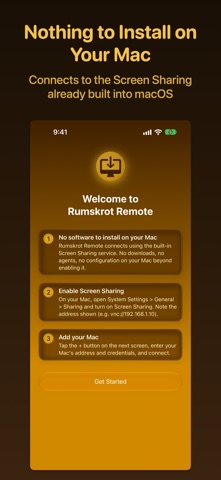
Turn on Screen Sharing in your Mac's System Settings and Rumskrot Remote connects straight to it, using the VNC service macOS already ships with. No helper app, no account, no cloud relay.
YOUR MACS, ONE TAP AWAY
Macs on your network appear automatically through Bonjour. Save the ones you use, and tap anywhere on a row to connect.
THE WHOLE DESKTOP, SMOOTHLY
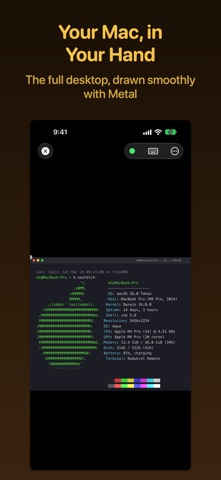
The remote screen is drawn with Metal for a smooth, responsive picture. ZRLE, Hextile and other supported VNC encodings keep bandwidth low, and cursor tracking follows ProMotion on displays that have it.
TOUCH THAT FEELS LIKE A TRACKPAD
- Drag to move the pointer, tap to click, two-finger tap to right-click
- Two-finger drag to scroll, pinch to zoom and pan
- Three-finger swipes for Mission Control, App Exposé and jumping between monitors
- Haptics confirm clicks, drag lock, modifier keys and monitor jumps
EVERY KEY YOUR MAC EXPECTS
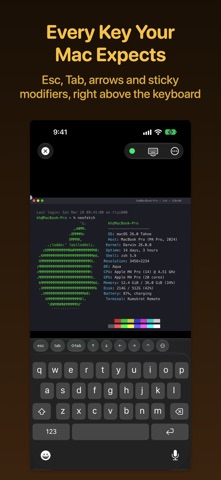
A bar above the iOS keyboard adds the keys macOS needs and iOS lacks: Esc, Tab, arrow keys, F1–F12, Page Up/Down, Home/End, Forward Delete, Mission Control and App Exposé. Sticky Command, Control, Option and Shift arm with a tap and apply to your next key. Reorder or remove keys to suit you, and let the bar hide itself when a hardware keyboard is connected. Use a hardware keyboard, mouse or trackpad to control your Mac directly.
CONNECT YOUR WAY
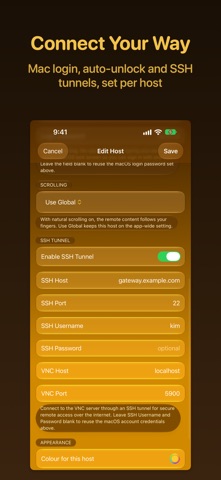
- macOS login, VNC password or Apple Remote Desktop authentication
- SSH tunnel for Macs you reach through an SSH server, with host-key verification that refuses to send credentials if the server's identity ever changes
- Auto-unlock: opt in per host to type your macOS password after connecting, so you land at the desktop instead of the lock screen
- Custom ports, per-host scrolling and a per-host accent colour
MORE THAN ONE SCREEN
Choose which display to view on a Mac with several monitors, or swipe between them.
SNIPPETS
Save commands and text you type often and send them to your Mac with a tap. Paste as Keystrokes types text from your device's clipboard into the Mac, including when macOS Screen Sharing does not accept clipboard transfers.
SHORTCUTS AND SIRI
Connect to a saved Mac and disconnect again from Shortcuts, Siri or Spotlight, so one shortcut can open a session, do its job and close it.
PRIVATE BY DESIGN
Connections go straight from your device to your Mac. Saved passwords are kept in your device's Keychain without iCloud syncing. No accounts, no analytics, no tracking.
ALSO INCLUDED
- Receive clipboard text from your Mac; send clipboard text to compatible VNC servers
- Performance modes, including 16-bit colour for slower networks
- Live diagnostics overlay: frame rate, latency and bandwidth
- Adjustable pointer speed, scroll direction and accent colour
- Automatic reconnect when the network drops
Terms of Use (EULA): https://www.apple.com/legal/internet-services/itunes/dev/stdeula/
Privacy Policy: https://danskrumskrot.com/privacy