

Glassy Desk: Remote Desktop
Glassy Desk: Remote Desktop is made and published by Fernando Bunn. AppBrain is an independent app data site and isn't affiliated with Fernando Bunn. The app name, icon, screenshots and description belong to Fernando Bunn and are shown as published on the App Store.
AppBrain's verdict
New- Rating on App Store
- 5.00
- 1 ratings
- Last updated
- October 14, 2026
- Size
- 53.7 MB
Glassy Desk: Remote Desktop came out 88 days ago. It doesn't have enough ratings yet to judge what users think.
User feedback
Ratings and reviews on the App StoreComments on Glassy Desk: Remote Desktop for iOS
We don't have enough comments to show example comments. Please check back later.
Store listing
By Fernando Bunn, from the App Store



Description by Fernando Bunn Written by the developer, not by AppBrain. Click to read.
Check on your Mac for free. Go Pro for unlimited sessions with a monthly or yearly plan, or pay once with Lifetime. No account to create.
TWO WAYS TO CONNECT
• Standard VNC uses the Screen Sharing built into macOS. Nothing to download on the Mac.
• Fast Connection uses the free Glassy Desk for Mac app: up to 4K at 60 FPS, hardware H.264 video that adapts to your network, and an encrypted link straight to your Mac.
MADE FOR HEADLESS MACS
• Wake a sleeping Mac with Wake-on-LAN, then connect
• Reconnect automatically after short network drops
• Reach your Mac from outside your home or office through a VPN such as Tailscale
• Pick which display to show when the Mac has more than one
WATCH YOUR MAC WHILE YOU WORK
• Keep a session in Picture in Picture while you use other apps
• Connect in one tap with Siri, Shortcuts, and the Quick Connect and My Macs widgets
• Show the Mac on an external display and use your device as the controller
REAL KEYS AND A REAL POINTER
• Direct touch or trackpad mode, with tap, drag, right-click, scroll, and pinch to zoom
• Command, Option, Control, arrow, and function keys, plus common shortcuts, from the on-screen or a hardware keyboard
• Apple Pencil as a precise pointer, with hover and double-tap or squeeze actions
• Paste text from your device onto the Mac
FILES BOTH WAYS
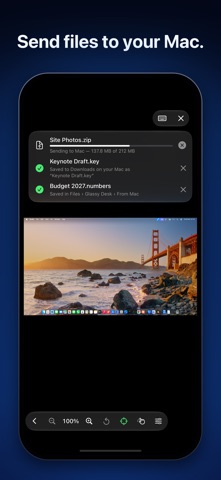
Send files and photos to the Mac's Downloads folder, and bring files selected in the Mac's Finder into the Files app. (Fast Connection)
MADE FOR IPHONE DUO
Layouts adapt as you fold and unfold. Stand it up half-folded and the lower half becomes a trackpad, with an optional keyboard and special keys.
PRIVATE BY DESIGN
• No cloud relay: connections go straight to the computer you choose
• Curtain Mode covers the Mac's screen and blocks its local keyboard and mouse while you work remotely (Fast Connection)
• Lock Glassy Desk with Face ID, Touch ID, or your passcode, and hide remote screens in the app switcher
• Saved Macs sync through your private iCloud database, and passwords are stored encrypted
COMPATIBILITY
Standard VNC is designed and tested with macOS Screen Sharing and Remote Management; other standards-based VNC servers may work. Fast Connection requires Glassy Desk for Mac on macOS 14 or later, on Apple silicon or Intel. Connecting from outside your network requires a VPN or other route to the Mac.
EULA: https://www.apple.com/legal/internet-services/itunes/dev/stdeula/
Safety and technology
Found in the app by AppBrain- Price
- Free
- App size
- 53.7 MB
- Content rating
- Everyone
Technologies used by Glassy Desk: Remote Desktop
Releases
Updates seen on the App Store- Version
- 3.1
- Launched
- August 2026
No changelog data
Alternatives
Similar apps and more from Fernando BunnAlternatives to Glassy Desk: Remote Desktop


More from Fernando Bunn


Rankings
App Store top chartsApp Store Rankings for Glassy Desk: Remote Desktop
About the app and developer
About Glassy Desk: Remote Desktop
Glassy Desk: Remote Desktop is an utilities app developed by Fernando Bunn.
User Ratings
Glassy Desk: Remote Desktop is rated 5.00 out of 5 stars. The rating is based on one rating ratings.
App Information
Glassy Desk: Remote Desktop is freely available from the App Store. The app size is 53.66 MB. The latest version available is 3.1. The last update was on October 14, 2026.
Technical Requirements
The app has a content rating of Everyone. The app has been available on the App Store since August 2026.
Developer information for Fernando Bunn
Address:
Frequently asked questions about Glassy Desk: Remote Desktop
Is Glassy Desk: Remote Desktop free?
Yes. Glassy Desk: Remote Desktop is free on the App Store.
Is Glassy Desk: Remote Desktop still available?
Yes. Glassy Desk: Remote Desktop is on the App Store, and the last update we saw was on October 14, 2026.
How large is Glassy Desk: Remote Desktop?
Glassy Desk: Remote Desktop is 53.66 MB.
Is Glassy Desk: Remote Desktop suitable for children?
App Store rates the content of Glassy Desk: Remote Desktop as suitable for everyone.
How do people rate Glassy Desk: Remote Desktop?
Glassy Desk: Remote Desktop has one rating of 5.00 stars on the App Store.
Who made Glassy Desk: Remote Desktop?
Glassy Desk: Remote Desktop was developed by Fernando Bunn. It is listed in the utilities category on the App Store.
What are the best alternatives to Glassy Desk: Remote Desktop?
People looking at Glassy Desk: Remote Desktop also look at these utilities apps: LAN Screen Control, Beam VNC, Rumskrot Remote, CTRL Micro, Hybrid Tracker Gas & EV Log.