It doesn't have enough ratings yet to judge what users think.
Russian Handwriting Board is made and published by
倩喜 阮.
AppBrain is an independent app data site and isn't affiliated with 倩喜 阮.
The app name, icon, screenshots and description belong to 倩喜 阮 and are shown as
published on the App Store.
About Russian Handwriting Board
Russian Handwriting Board is an utilities app developed by 倩喜 阮.
User Ratings
Russian Handwriting Board is rated 5.00 out of 5 stars. The rating is based on one rating ratings.
App Information
Russian Handwriting Board costs $9.99. The app size is 59.43 MB. The latest version available is 1.0. The last update was on March 11, 2022.
Technical Requirements
The app has a content rating of Everyone. The app has been available on the App Store since March 2022.
Description by 倩喜 阮(from the App Store)
Russian Handwriting Board: an input method for handwriting Russian characters
= = = Product Function = = =
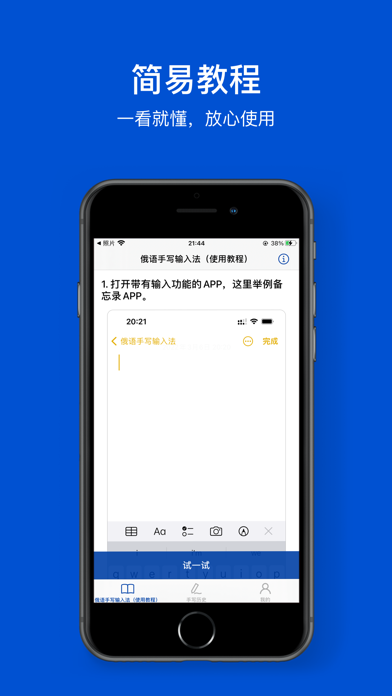
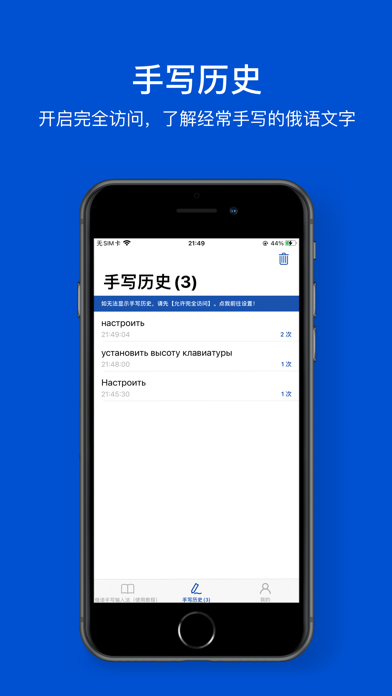
【Accurate Recognition】A large thesaurus, which can be accurately recognized even if it is scribbled 【Recognition PLUS】Arabic numerals, symbols and English 26 letters are OK! 【High Pitched Reading Handwritten Content】It can read handwritten content and support speed adjustment. (go to my - Settings - Sound - read handwritten content, and you can start using it) 【Brush Color Customization】Choose any color you want! 【Custom Brush Thickness】If you want to define how thin and thick the brush is, just drag and drop it! 【Keyboard Height Customization】Large screen handwriting is very free 【Stable Input】Continuous optimization to ensure stability 【Handwriting History】View frequently handwritten Russian characters 【Have A Try】Combine with the tutorial to practice quickly 【Offline Use】No networking is required, and the operation is very natural 【Theme Following】Dark and light color mode of appearance following system
【Tip 1】How to enable Russian handwriting input method? Step 1: After installation, enter system settings - > General - > keyboard - > add a new keyboard - > select 【RUBoard】 with a third-party keyboard - >【RUBoard】- > turn on full access (you can view your handwriting history and use the optional key) - > finish Step 2: Open any input box - > long press the earth key to select 【RUBoard】
【Tip 2】How to view handwriting history and use the optional key? Enter system settings - > General - > keyboard - >【RUBoard】- > enable full access
【Tip 3】How to customize the height of the keyboard? Open any input box - > the keyboard is set to 【RUBoard】keyboard - > click the 「」 button in the upper right corner of the keyboard to adjust
【Tip 4】If you download 【RUBoard】 and cannot find it, please restart the associated app or restart the device to try! (or update the latest stable IOS system)
= = = Thanks = = =
Thank you. Your support (five-star praise) will make us do better!!
Each subscription will automatically renew 3 days before the expiration date for
the same time period. Subscriptions can be cancelled at any time before the renewal.