

Safe Area Insets Device Specs
Safe Area Insets Device Specs is made and published by Phuc Pham. AppBrain is an independent app data site and isn't affiliated with Phuc Pham. The app name, icon, screenshots and description belong to Phuc Pham and are shown as published on the App Store.
AppBrain's verdict
- Last updated
- August 19, 2026
- Size
- 4.74 MB
User feedback
Ratings and reviews on the App StoreComments on Safe Area Insets Device Specs for iOS
We don't have enough comments to show example comments. Please check back later.
Store listing
By Phuc Pham, from the App Store



Description by Phuc Pham Written by the developer, not by AppBrain. Click to read.
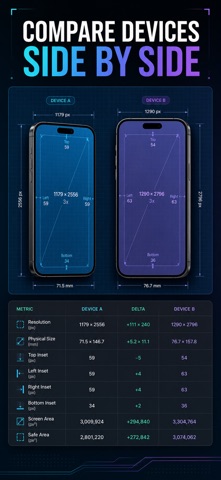
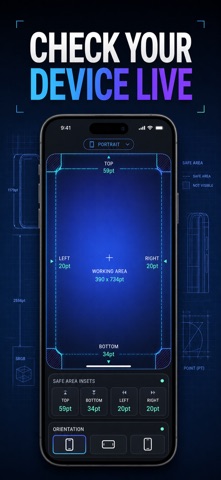
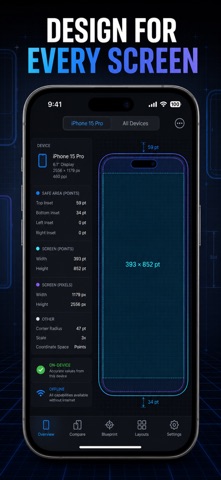
Most spec sheets are a wall of numbers. This one shows you where those numbers land. Every device gets a scaled blueprint with the status bar, notch, or Dynamic Island marked and the safe region highlighted, so you can see the constraint instead of memorising it. A Live tab reads the real insets off the iPhone you are holding right now, and Compare puts any two devices next to each other with the difference calculated for you. Everything works offline, because a reference tool that needs a signal is not a reference tool.
WHAT YOU GET
- Exact safe-area insets — top, bottom, leading, and trailing in points for 18 iPhone and iPad profiles
- A blueprint for every model showing the safe region, the inset zones, and the status bar, notch, or Dynamic Island
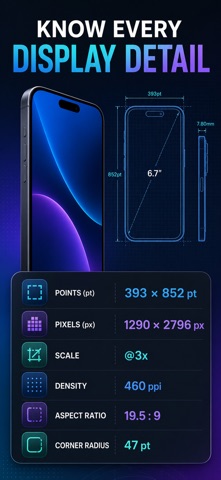
- Screen numbers you can trust — points, pixels, usable area, scale, aspect ratio, pixel density, and corner radius
- Portrait and landscape values for the same model, without doing the maths yourself
- A live readout of the current device's own insets, screen points, pixels, and scale
- Tap any value to copy it to the clipboard, then paste straight into your layout
PERFECT FOR
- iOS developers writing SwiftUI or UIKit layouts that must not clip on any device
- Designers building Figma or Sketch frames that respect real hardware bounds
- Web and cross-platform teams sizing viewports around the notch and home indicator
- Anyone learning why their content keeps hiding behind the Dynamic Island
WHY NOT JUST SEARCH FOR IT?
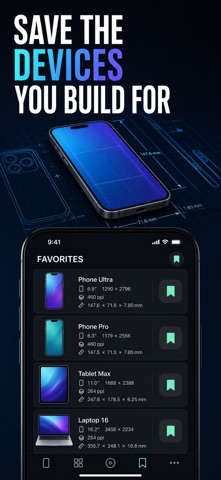
Because half the numbers online are from a device generation ago, and the other half are unsourced screenshots. Values here are organised per model with the top feature, release year, and diagonal shown, plus a Learn section that explains what an inset actually is and which SwiftUI modifiers honour it — .safeAreaInset, .ignoresSafeArea, and reading safeAreaInsets from GeometryReader. Bookmark the three devices you actually ship for and stop re-searching them.
PRIVACY
Everything runs on the device. No account, no sign-up, no ads, no analytics, no tracking, nothing leaving your phone. The entire device library is bundled inside the app, so it works in airplane mode.
FULL ACCESS
Premium unlocks the complete 18-device library, the side-by-side Compare tool, and every detail value. It is offered as a weekly subscription, a yearly subscription, or a one-time lifetime purchase — pick whichever fits how you work. Subscriptions renew automatically until cancelled in your Apple ID settings; the lifetime option is a single payment with no renewal.
Open the Live tab, see your own device measured in seconds, and never guess an inset again.
Terms of Use (EULA): https://web-levi.web.app/terms
Privacy Policy: https://web-levi.web.app/privacy-policy
Questions? tphuc.work@gmail.com
Safety and technology
Found in the app by AppBrain- Price
- Free
- App size
- 4.74 MB
- Content rating
- Everyone
Technologies used by Safe Area Insets Device Specs
Releases
Updates seen on the App Store- Version
- 1.1.1
- Launched
- May 2026
No changelog data
Alternatives
Similar apps and more from Phuc PhamMore from Phuc Pham


Rankings
App Store top chartsApp Store Rankings for Safe Area Insets Device Specs
About the app and developer
About Safe Area Insets Device Specs
Safe Area Insets Device Specs is a graphics & design app developed by Phuc Pham.
User Ratings
The app has no ratings yet.
App Information
Safe Area Insets Device Specs is freely available from the App Store. The app size is 4.74 MB. The latest version available is 1.1.1. The last update was on August 19, 2026.
Technical Requirements
The app has a content rating of Everyone. The app has been available on the App Store since May 2026.
Developer information for Phuc Pham
Address:
Frequently asked questions about Safe Area Insets Device Specs
Is Safe Area Insets Device Specs free?
Yes. Safe Area Insets Device Specs is free on the App Store.
Is Safe Area Insets Device Specs still available?
Yes. Safe Area Insets Device Specs is on the App Store, and the last update we saw was on August 19, 2026.
How large is Safe Area Insets Device Specs?
Safe Area Insets Device Specs is 4.74 MB.
Is Safe Area Insets Device Specs suitable for children?
App Store rates the content of Safe Area Insets Device Specs as suitable for everyone.
Who made Safe Area Insets Device Specs?
Safe Area Insets Device Specs was developed by Phuc Pham. It is listed in the graphics & design category on the App Store.