Safer Screentime is made and published by
SAFERONLINE PTY LTD.
AppBrain is an independent app data site and isn't affiliated with SAFERONLINE PTY LTD.
The app name, icon, screenshots and description belong to SAFERONLINE PTY LTD and are shown as
published on the App Store.
About Safer Screentime
Safer Screentime is a lifestyle app developed by SAFERONLINE PTY LTD.
What is the rating of Safer Screentime?
Safer Screentime has no ratings yet.
Is Safer Screentime free?
Safer Screentime is free. The app size is 58.25 MB. The latest version available is 2.3.3. The last update was on October 8, 2026.
What are the requirements for Safer Screentime?
The app has a content rating of Everyone. The app has been available on the App Store since September 2024.
Description by SAFERONLINE PTY LTD(from the App Store)
Safer is a free parental control app for parents and guardians. Block adult content, limit screen time, and manage apps from your own iPhone. No subscription or hidden fees - just simple, private screen time management for your family.
Set healthy digital boundaries for every child in your family, all from your own iPhone.
Install Safer on your own iPhone and your child's device. Choose Parent on your phone and Child on theirs, then follow the guided setup. Once setup is complete, you'll be managing their screen time from your own phone.
Manage your family's screen time See today's screen time at a glance for every child. Lock or unlock devices instantly with one tap.
View screen time reports See which apps your child uses most, with hourly breakdowns and daily and weekly views. Review up to four weeks of history to spot patterns and have informed conversations about screen time.
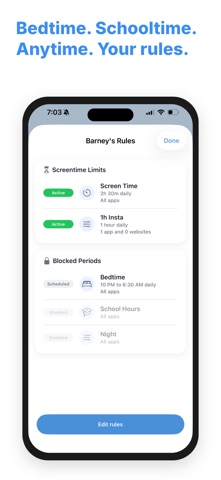
Set limits and schedules Set daily screen time limits and schedule downtime for bedtime, homework, or school hours. Choose different schedules for each day of the week. Set the schedule once and Safer handles the rest.
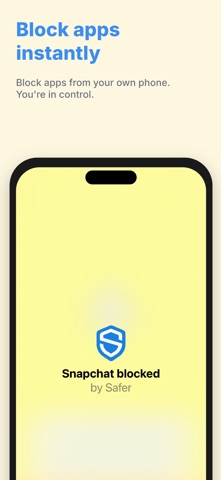
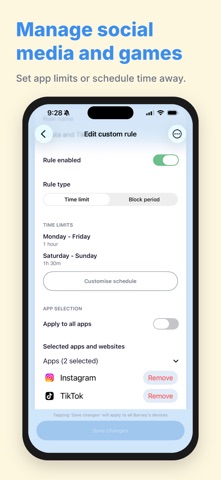
Manage social media and games Set daily limits for individual apps, block them completely, or schedule restrictions for groups of apps. Choose the rules that work for your family.
Manage content and app restrictions Block adult content and prevent app installs without your permission. Keep essential apps and websites available by marking them as always allowed.
Review requests for more time Receive requests from your child when they reach a limit. Choose whether to allow additional screen time from your own phone.
Why Safer? Your child's privacy matters. We don't read their messages or collect their browsing history. Safer uses Apple's built-in Screen Time technology so you can manage screen time without sharing those private details with us.
Terms of Use: https://www.apple.com/legal/internet-services/itunes/dev/stdeula/
Each subscription will automatically renew 3 days before the expiration date for
the same time period. Subscriptions can be cancelled at any time before the renewal.