

SageDocs: Secure Document Safe
SageDocs: Secure Document Safe is made and published by Florin Nica. AppBrain is an independent app data site and isn't affiliated with Florin Nica. The app name, icon, screenshots and description belong to Florin Nica and are shown as published on the App Store.
AppBrain's verdict
- Last updated
- October 13, 2026
Rankings
App Store top chartsApp Store Rankings for SageDocs: Secure Document Safe
Competitors
Similar apps and more from Florin NicaAlternatives to SageDocs: Secure Document Safe





More from Florin Nica

Releases
Updates seen on the App Store- Version
- 1.0.13
- Launched
- April 2026
No changelog data
User feedback
Ratings and reviews on the App StoreComments on SageDocs: Secure Document Safe for iOS
We don't have enough comments to show example comments. Please check back later.
Technology
Found in the app by AppBrain- Price
- Free
- App size
- 9.84 MB
- Content rating
- Everyone
Technologies used by SageDocs: Secure Document Safe
About the app and developer
About SageDocs: Secure Document Safe
SageDocs: Secure Document Safe is an utilities app developed by Florin Nica.
User Ratings
The app has no ratings yet.
App Information
SageDocs: Secure Document Safe is freely available from the App Store. The app size is 9.84 MB. The latest version available is 1.0.13. The last update was on October 13, 2026.
Technical Requirements
The app has a content rating of Everyone. The app has been available on the App Store since April 2026.
Developer information for Florin Nica
Address:
Frequently asked questions about SageDocs: Secure Document Safe
Is SageDocs: Secure Document Safe free?
Yes. SageDocs: Secure Document Safe is free on the App Store.
Is SageDocs: Secure Document Safe still available?
Yes. SageDocs: Secure Document Safe is on the App Store, and the last update we saw was on October 13, 2026.
How large is SageDocs: Secure Document Safe?
SageDocs: Secure Document Safe is 9.84 MB.
Is SageDocs: Secure Document Safe suitable for children?
App Store rates the content of SageDocs: Secure Document Safe as suitable for everyone.
Who made SageDocs: Secure Document Safe?
SageDocs: Secure Document Safe was developed by Florin Nica. It is listed in the utilities category on the App Store.
What are the best alternatives to SageDocs: Secure Document Safe?
People looking at SageDocs: Secure Document Safe also look at these utilities apps: iCollect+, Quotas - Time management, UnblockPiP: Float Video Player, Vmoto, Vmoto Soco.
Store listing
By Florin Nica, from the App Store



Description by Florin Nica Written by the developer, not by AppBrain. Click to read.
REMINDERS THAT ACTUALLY ARRIVE
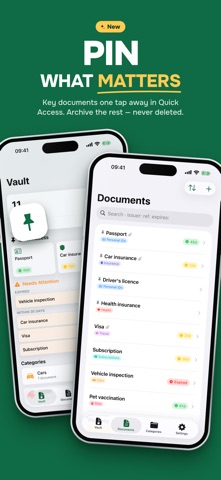
Set an expiry date and SageDocs reminds you 90, 30, 7 and 1 days before, or on the day itself. You choose the hour. Reminders are planned across your whole vault, soonest first, so the nearest expiries always get their reminders first. The dashboard's Needs Attention card shows what has expired and what is coming up in the next 7 and 30 days. Snooze 7 Days, Mark Renewed or Open straight from the notification. The Timeline section lists every document by when it expires: overdue, this week, this month and later.
START IN SECONDS
Pick a template (Passport, National ID, Driver's licence, Car insurance, Vehicle inspection, Health insurance, Home insurance, Pet vaccination, Warranty, Subscription or Visa) and the title, category and reminder schedule are filled in for you. Scan with the camera on iPhone and iPad, or drag files in on Mac and iPad. Text on a photo, scan or PDF can fill in the fields for you, on iPhone, iPad and Mac.
KEEP IT TIDY
Archive documents you want to keep but no longer track, like an old passport or a cancelled policy. They drop out of your counts and reminders and stay searchable. Pin the ones you open most and they appear first, in a Quick Access row. Fifteen built-in categories, plus your own.
PRIVATE BY DESIGN
Attachments and document details (titles, notes, issuers, reference numbers) are encrypted with AES-256-GCM on your device before anything is saved or synced. Unlock with Face ID, Touch ID or your PIN. Sharing a file always asks for Face ID, Touch ID or your PIN first. SageDocs has no servers of its own, no accounts and no tracking, and it works offline.
SYNC THAT STAYS YOURS
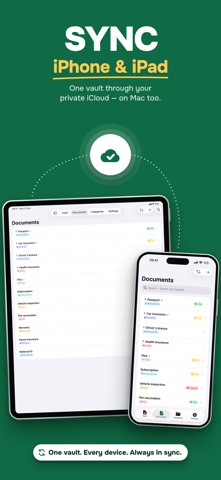
Documents sync between your devices through your private iCloud account, and only there. Add a passport on your iPhone and it shows up on your Mac shortly after. Sync also works with iCloud Drive turned off.
BUILT FOR APPLE DEVICES
Small, medium and large Home Screen widgets and a Lock Screen widget, Siri shortcuts, a Share extension, Mac menu bar and keyboard shortcuts, an optional Liquid Glass look on iOS 26, iPadOS 26 and macOS 26 or later, and a layout that adapts to iPhone, iPad and Mac. Available in 12 languages.
SUBSCRIPTION
SageDocs Premium is an auto-renewing subscription, monthly or yearly. New users get 7 days of full access for free, and the monthly plan also includes a free 7-day introductory offer for eligible new subscribers; the yearly plan has none. Payment is charged to your Apple Account when you confirm the purchase or, with the introductory offer, when the free period ends. The subscription renews automatically unless you cancel at least 24 hours before the end of the current period, including the free introductory period. You can manage or cancel it in your Apple Account settings. When a trial or subscription ends, your documents stay yours: you can still open, edit, export and delete them, but adding new documents or files needs Premium.
Terms of Use (EULA): https://www.apple.com/legal/internet-services/itunes/dev/stdeula/
Privacy Policy: https://sagelight-studio.com/privacy-policy.html
Support: contact@sagelight-studio.com