

Salon Calendar
Salon Calendar is made and published by Taiki Yamagami. AppBrain is an independent app data site and isn't affiliated with Taiki Yamagami. The app name, icon, screenshots and description belong to Taiki Yamagami and are shown as published on the App Store.
AppBrain's verdict
- Last updated
- August 22, 2026
Rankings
App Store top chartsApp Store Rankings for Salon Calendar
Competitors
Similar apps and more from Taiki YamagamiAlternatives to Salon Calendar


More from Taiki Yamagami


Releases
Updates seen on the App Store- Version
- 1.2
- Launched
- August 2026
No changelog data
User feedback
Ratings and reviews on the App StoreComments on Salon Calendar for iOS
We don't have enough comments to show example comments. Please check back later.
Technology
Found in the app by AppBrain- Price
- Free
- App size
- 4.56 MB
- Content rating
- Everyone
Technologies used by Salon Calendar
About the app and developer
About Salon Calendar
Salon Calendar is a productivity app developed by Taiki Yamagami.
User Ratings
The app has no ratings yet.
App Information
Salon Calendar is freely available from the App Store. The app size is 4.56 MB. The latest version available is 1.2. The last update was on August 22, 2026.
Technical Requirements
The app has a content rating of Everyone. The app has been available on the App Store since August 2026.
Developer information for Taiki Yamagami
Address:
Store listing
By Taiki Yamagami, from the App Store




Description by Taiki Yamagami Written by the developer, not by AppBrain. Click to read.
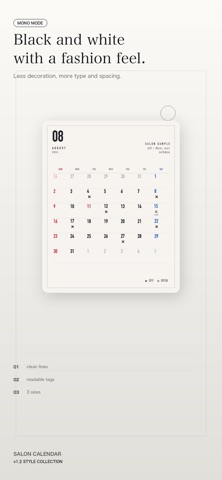
Even a small schedule image says something about your taste. Instead of posting a photo of a handwritten calendar or forcing a generic calendar app to fit, you can present the details clearly in a style that matches your salon.
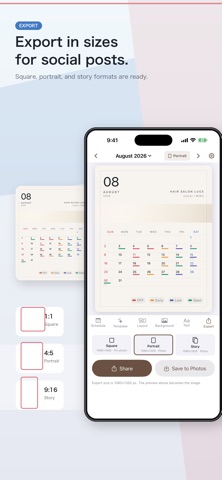
■ Choose the post size first
Pick the format before you design the calendar.
- Square: 1080 x 1080; photo backgrounds require Pro
- Portrait post: 1080 x 1350; photo backgrounds supported
- Story: 1080 x 1920; photo backgrounds supported
Because photos crop differently by format, choosing the destination first helps the final image feel intentional.
■ Tap dates to add availability
Tap a date on the calendar and choose the schedule label for that day. Weekly days off or recurring shifts can be set in batches by weekday.
Default labels include:
- Off
- Work
- Early
- Late
- Available
- Full
- Class
- Shoot
Labels can be renamed, so you can use wording that fits your own way of posting. Short notes such as time slots can also be added.
■ Japanese holidays included
National holidays, substitute holidays, and citizens' holidays are reflected automatically. Sundays and holidays are marked in red, and Saturdays in blue, so the month is easy to scan.
The week can start on Sunday or Monday.
■ Match the look to your salon
Choose a template to switch the layout, background, type, and readability treatment together. Your schedule and custom label names stay in place while the mood changes.
- Photo placement: full, top, or none; square photo placement requires Pro
- 29 templates
- Static frames and light accents
- 14 built-in backgrounds, or your own photos
- 9 type styles
- Schedule display as color markers or text inside cells
- Editable label names; Pro adds schedule mark position and schedule mark font controls
When a photo makes dates harder to read, adjust blur, brightness, and text backing to keep the calendar clear. Text color adapts to the brightness of the imported photo.
■ Export a static image
The preview you edit becomes the exported image. Save it to Photos or share it directly to other apps from the Export tab.
■ No account and no developer server
No account is required. Your schedule and imported photos stay on your device. The app does not send them to a developer-operated server, and it does not include ads or analytics.
Terms of Use (Apple Standard EULA):
https://www.apple.com/legal/internet-services/itunes/dev/stdeula/
Requires iOS 17.0 or later
Provided by Better Day Tech