SayLy — for the days Japanese is hard.
Living in Japan as a foreigner, the problem isn't really "I don't know Japanese." It's that by the time you've typed out the sentence, the moment has passed. Your friend sent three more messages. The store clerk is already waiting. The landlord's email needs a reply that sounds natural, not like a robot. You know what you want to say — it's just that your fingers and your Japanese aren't on the same page yet.
SayLy is built for those days.
---
Hold the mic, send Japanese (new in 2.1)
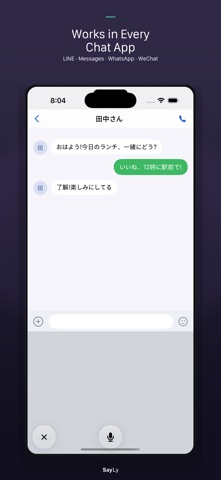
Open the SayLy keyboard in any chat app — LINE, Messages, WhatsApp, Instagram, WeChat — and there's a microphone button right in the middle. Hold it, speak in English or Chinese, let go. A natural Japanese sentence appears. Tap it. It sends.
You never leave the conversation. You never look down and type. About as fluid as replying in your own language.
---
Or type, and let SayLy do the rest
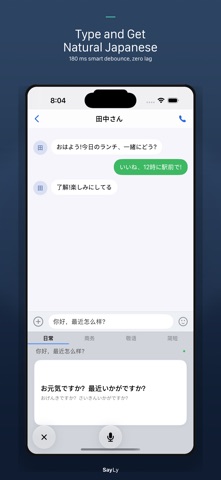
Type in your usual keyboard, then switch to SayLy. A Japanese translation is waiting. Tap to replace, tap to send.
· Results appear the moment you stop typing
· Phrasing follows the tone you picked in settings
· Around 10,000 common phrases work offline
· Paste Japanese in, see what it means in your language
---
Face-to-face voice translation
For restaurants, directions, paperwork, doctor visits — put the phone on the table, press the big mic, speak. Japanese shows up on screen for the other person to read. When they reply, flip the direction.
· Chinese, English, Korean, Vietnamese, Spanish ↔ Japanese
· Speech recognition runs on-device via Apple Speech, nothing uploaded
---
Four tones, one setting
Casual with friends is not how you talk to your landlord. SayLy has four modes:
· Casual — friends, coworkers, text threads
· Business — meetings, emails, work chats
· Polite (Keigo) — store staff, landlords, bosses, interviews
· Brief — when one short line is all you need
Pick your default in settings. Every translation follows that tone automatically.
---
Apple platform support
Lock Screen widget, Home Screen widget, Control Center quick access (iOS 18+), Siri Shortcuts, iPad layout, Magic Keyboard shortcuts, Dark Mode, four keyboard themes (Standard, Pro, Ocean, Sakura), and full Dynamic Type accessibility.
---
Free vs Pro
Free: 20 AI translations per day, shared across voice and keyboard. Pro: $0.99/month, unlimited. Cancel any time.
---
Your privacy
We don't store your messages. We don't read them. We don't sell them.
· No ads, no tracking, no data collection
· Voice stays on your device (Apple's Speech framework)
· Translation requests pass through our server to Google Gemini, text not retained
· Pro subscriptions handled entirely by Apple
Privacy Policy: https://sgames.hanlian.com/sayly-privacy.html
Terms of Use (EULA): https://www.apple.com/legal/internet-services/itunes/dev/stdeula/
---
Subscription
SayLy Pro is an auto-renewable subscription at $0.99/month. Payment is charged to your Apple ID at confirmation. Renews automatically unless canceled at least 24 hours before the end of the current period. Manage or cancel in Settings → Apple ID → Subscriptions.
Questions, feedback, bug reports: sgames@hanlian.com
The people who make SayLy also live in Japan. Every feature here is something we needed first, and shipped once we liked using it ourselves. If there's something SayLy still doesn't do for you, tell us.
Show more
Show less