

ScanAny-PDF Scanner App
ScanAny-PDF Scanner App is made and published by Shanghai Mengge E - Commerce Co., Ltd. AppBrain is an independent app data site and isn't affiliated with Shanghai Mengge E - Commerce Co., Ltd. The app name, icon, screenshots and description belong to Shanghai Mengge E - Commerce Co., Ltd. and are shown as published on the App Store.
AppBrain's verdict
- Rating on App Store
- 4.50
- 2 ratings
- Last updated
- August 31, 2026
It doesn't have enough ratings yet to judge what users think.
Rankings
App Store top chartsApp Store Rankings for ScanAny-PDF Scanner App
Competitors
Similar apps and more from Shanghai Mengge E - Commerce Co., Ltd.Alternatives to ScanAny-PDF Scanner App


Releases
Updates seen on the App Store- Version
- 2.3.7
- Launched
- June 2022
No changelog data
User feedback
Ratings and reviews on the App StoreComments on ScanAny-PDF Scanner App for iOS
We don't have enough comments to show example comments. Please check back later.
Technology
Found in the app by AppBrain- Price
- Free
- App size
- 57.7 MB
- Content rating
- Everyone
Technologies used by ScanAny-PDF Scanner App
About the app and developer
About ScanAny-PDF Scanner App
ScanAny-PDF Scanner App is a business app developed by Shanghai Mengge E - Commerce Co., Ltd.
What is the rating of ScanAny-PDF Scanner App?
ScanAny-PDF Scanner App is rated 4.50 out of 5 stars, based on 2 ratings.
Is ScanAny-PDF Scanner App free?
ScanAny-PDF Scanner App is free. The app size is 57.74 MB. The latest version available is 2.3.7. The last update was on August 31, 2026.
What are the requirements for ScanAny-PDF Scanner App?
The app has a content rating of Everyone. The app has been available on the App Store since June 2022.
Developer information for Shanghai Mengge E - Commerce Co., Ltd.
Frequently asked questions about ScanAny-PDF Scanner App
Is ScanAny-PDF Scanner App free?
Yes. ScanAny-PDF Scanner App is free on the App Store.
Is ScanAny-PDF Scanner App still available?
Yes. ScanAny-PDF Scanner App is on the App Store, and the last update we saw was on August 31, 2026.
How large is ScanAny-PDF Scanner App?
ScanAny-PDF Scanner App is 57.74 MB.
Is ScanAny-PDF Scanner App suitable for children?
App Store rates the content of ScanAny-PDF Scanner App as suitable for everyone.
How do people rate ScanAny-PDF Scanner App?
ScanAny-PDF Scanner App scores 4.50 out of 5 stars, from 2 ratings on the App Store.
Who made ScanAny-PDF Scanner App?
ScanAny-PDF Scanner App was developed by Shanghai Mengge E - Commerce Co., Ltd. It is listed in the business category on the App Store.
What are the best alternatives to ScanAny-PDF Scanner App?
People looking at ScanAny-PDF Scanner App also look at these business apps: PDF Scanner:File Scanner App, ScanMaster-File Conversion, Voice Translate & Translator, 会选股-优选股票财经, 恋知道-高情商恋爱聊天话术&追爱键盘.
Store listing
By Shanghai Mengge E - Commerce Co., Ltd., from the App Store


Description by Shanghai Mengge E - Commerce Co., Ltd. Written by the developer, not by AppBrain. Click to read.
You can scan anything you need: contracts, books, to-do lists, paper notes, fax papers, receipts, ID cards and store your scans as high quality PDF or JPEG files.
All scanned documents are stored locally on your device and inaccessible to us and to any third-party.
SCAN. Using only your iPhone camera you can easily scan, save and print any document including:
- Contracts, Invoices, Bills, Tax Rolls, Business Cards, Letters
- To-do lists, Paper Notes, Whiteboards, Mindmaps, Receipts
- Book Pages, Articles
- ID cards, Credentials, Certificates
- Texts and documents that don't offer a digital copy;
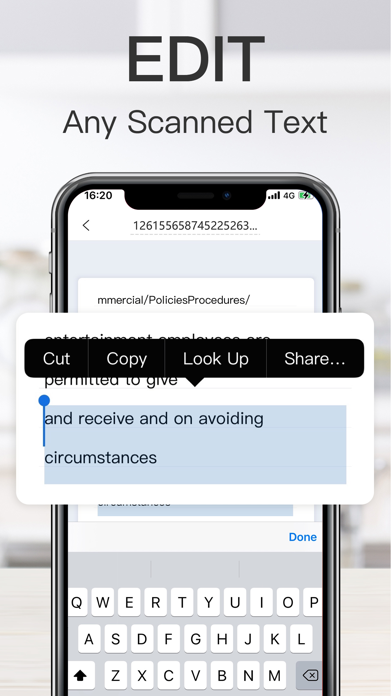
CONVERT. Easily turn an image to editable text format with the OCR function. Extract text from a scanned document and then edit it as you wish.
Languages supported for text recognition: English, German, French, Spanish, Italian, Portuguese, Dutch, Swedish, Norwegian, Turkish, Russian, Ukrainian, Japanese, Chinese, Arabic, Hindi, Korean, Hebrew.
SAVE. You can save documents in high quality as PDF, JPEG or DOC.
SIGN. E-sign any docs by simply adding your signature to electronic documents with just a few taps.
SHARE. Easily share documents with others via social media, messengers or email attachment. Upload scans to cloud services like Dropbox or Google Drive or simply print it via any WI-FI printer.
Information about the auto-renewal of unlimited access subscription:
– You can subscribe for unlimited access to all features within the app
- Subscription automatically renews unless auto-renewal is turned off at least 24-hours before the end of the current period.
- Subscriptions may be managed by the user and auto-renewal may be turned off by going to the user’s Account Settings after purchase.
- Please note: any unused portion of a free trial period will be forfeited when the user purchases a subscription.
- Payment will be charged to iTunes Account at confirmation of purchase.
- An account will be charged for renewal within 24 hours prior to the end of the current period. The cost depends on the selected plan.
Automatic renewal VIP service statement
- Your iTunes account will be charged and the subscription will automatically renew at confirmation of purchase unless auto-renew is turned off at least 24-hours before the end of the current subscription. Your account will be charged for renewal within the last 24-hours prior to the end of the current subscription, and renewal expenses will be confirmed.
- If you want to cancel the subscription, please manually open the "Settings" of your iPhone - -> enter "iTunes Store and App Store" - -> click "Apple ID", select "View Apple ID", enter the "Account Settings" page, click "Subscribe", select ScanAny to cancel the subscription.
User Agreement: https://fufei.pdf000.cn/agreement/scanios/en
Privacy Policy: https://fufei.pdf000.cn/policy/scanios/en
Automatic renewal agreement: https://fufei.pdf000.cn/vipinfo/scanios/en