



AppBrain's verdict
- Last updated
- November 5, 2026
- Size
- 42.0 MB
User feedback
Ratings and reviews on the App StoreComments on scandango: Document Scanner for iOS
We don't have enough comments to show example comments. Please check back later.
Store listing
By Neil Johnson, from the App StoreDescription by Neil Johnson Written by the developer, not by AppBrain. Click to read.
FREE, FOR GOOD
• Scan single pages or whole documents, from the camera, Photos or Files.
• Clean, straight pages: shadows evened out, text sharpened, and curved book pages flattened on iOS 27.
• Smart names and key details from Apple Intelligence: "Electricity Bill, October 2026", with its dates and amounts.
• Recipes ready to cook from: ingredients and method in large text, with ticks, and the screen kept on.
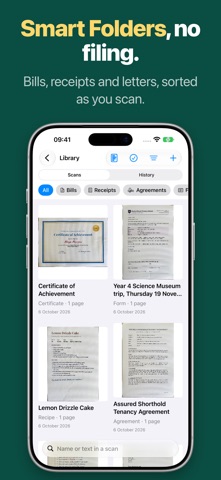
• Search every word in every scan, from scandango or Spotlight. Make folders of your own, or Smart Folders that fill themselves.
• Sign & Mark Up, Bill Reminders, and Expenses with totals and a spreadsheet.
• Searchable PDFs, PNGs and text, PDF passwords, batch export, and Export Everything whenever you like.
• iCloud Sync: your library on iPhone, iPad and Mac, through your own iCloud. And lock scandango with Face ID.
SCANDANGO PRO: PAY ONCE, NO SUBSCRIPTION
• Tax tools: expenses by UK tax year and quarter, VAT and categories, exports for Xero, QuickBooks and FreeAgent, and a pack for your accountant.
• Projects and expense claims: tag receipts to a client, job or trip, then send a claim with every receipt attached.
• What's Due: bills to pay, replies, renewals, warranties and expiry dates from all your scans, with reminders and a widget.
• Letters, explained: what a letter means in plain words, what to do and by when, and who to call.
• Agreements, explained: the dates, costs and catches in a tenancy, contract or policy, and a reminder before you need to give notice.
• Private Vault: passports, licenses and ID cards locked behind Face ID as you scan them, read on your device only, with every detail a tap to copy. Account numbers hidden when you share.
• Shared Folders: share a folder of bills and letters with the people you live with, through iCloud.
• Ask your paperwork: "When is the car insurance due?", answered from your own scans, with the page it came from.
• Providers: bills grouped by who sent them, with a note when one goes up.
• Filing rules, pile scanning, statement matching, and paper forms filled in with your details.
BUILT FOR IPHONE DUO, IPAD AND MAC
Open iPhone Duo and scan on one side while your pages build up on the other. On iPad and Mac, your library sits in a sidebar beside the scan, with keyboard shortcuts, multiple selection and drag and drop.
PRIVATE BY DESIGN
No account, no ads, no tracking, and nothing on our servers. Apple Intelligence can use Apple's Private Cloud Compute for better readings: a scan's text goes to Apple servers that keep nothing, images never leave your device, and you can turn it off. iCloud Sync uses your own iCloud, which we never see.
scandango prepares records for your accounting software or accountant; it isn't tax advice or MTD software.
Requires iOS 26 or later. Smart names, key details, recipes, letters, agreements and Ask need a device with Apple Intelligence.
Safety and technology
Found in the app by AppBrain- Price
- Free
- App size
- 42.0 MB
- Content rating
- Everyone
Technologies used by scandango: Document Scanner
Releases
Updates seen on the App Store- Version
- 2.0
- Launched
- September 2026
No changelog data
Alternatives
Similar apps and more from Neil JohnsonAlternatives to scandango: Document Scanner


More from Neil Johnson


Rankings
App Store top chartsApp Store Rankings for scandango: Document Scanner
About the app and developer
About scandango: Document Scanner
scandango: Document Scanner is a productivity app developed by Neil Johnson.
What is the rating of scandango: Document Scanner?
scandango: Document Scanner has no ratings yet.
Is scandango: Document Scanner free?
scandango: Document Scanner is free. The app size is 41.99 MB. The latest version available is 2.0. The last update was on November 5, 2026.
What are the requirements for scandango: Document Scanner?
The app has a content rating of Everyone. The app has been available on the App Store since September 2026.
scandango: Document Scanner is made and published by Neil Johnson. AppBrain is an independent app data site and isn't affiliated with Neil Johnson. The app name, icon, screenshots and description belong to Neil Johnson and are shown as published on the App Store.
Developer information for Neil Johnson
Address:
Frequently asked questions about scandango: Document Scanner
Is scandango: Document Scanner free?
Yes. scandango: Document Scanner is free on the App Store.
Is scandango: Document Scanner still available?
Yes. scandango: Document Scanner is on the App Store, and the last update we saw was on November 5, 2026.
How large is scandango: Document Scanner?
scandango: Document Scanner is 41.99 MB.
Is scandango: Document Scanner suitable for children?
App Store rates the content of scandango: Document Scanner as suitable for everyone.
Who made scandango: Document Scanner?
scandango: Document Scanner was developed by Neil Johnson. It is listed in the productivity category on the App Store.
What are the best alternatives to scandango: Document Scanner?
People looking at scandango: Document Scanner also look at these productivity apps: Doc Scanner To PDF, Fleetly, Simple Cal with History, Copyboard – Copy-Paste Tool, Procivis One Wallet.