Scanlivo: Notes & PDF Scanner
Scanlivo: Notes & PDF Scanner is made and published by Jewelsapps S. L. AppBrain is an independent app data site and isn't affiliated with Jewelsapps S. L. The app name, icon, screenshots and description belong to Jewelsapps S. L. and are shown as published on the App Store.
AppBrain's verdict
Established- Rating on App Store
- 3.90
- 10 ratings
- Last updated
- October 4, 2026
It doesn't have enough ratings yet to judge what users think.
Rankings
App Store top chartsApp Store Rankings for Scanlivo: Notes & PDF Scanner
Competitors
Similar apps and more from Jewelsapps S. L.Alternatives to Scanlivo: Notes & PDF Scanner
More from Jewelsapps S. L.
Releases
Updates seen on the App Store- Version
- 1.20
- Launched
- April 2020
No changelog data
User feedback
Ratings and reviews on the App StoreComments on Scanlivo: Notes & PDF Scanner for iOS
We don't have enough comments to show example comments. Please check back later.
Technology
Found in the app by AppBrain- Price
- Free
- App size
- 17.4 MB
- Content rating
- Everyone
Technologies used by Scanlivo: Notes & PDF Scanner
About the app and developer
About Scanlivo: Notes & PDF Scanner
Scanlivo: Notes & PDF Scanner is a productivity app developed by Jewelsapps S. L.
User Ratings
Scanlivo: Notes & PDF Scanner is rated 3.90 out of 5 stars. The rating is based on 10 ratings.
App Information
Scanlivo: Notes & PDF Scanner is freely available from the App Store. The app size is 17.37 MB. The latest version available is 1.20. The last update was on October 4, 2026.
Technical Requirements
The app has a content rating of Everyone. The app has been available on the App Store since April 2020.
Developer information for Jewelsapps S. L.
Address:
Frequently asked questions about Scanlivo: Notes & PDF Scanner
Is Scanlivo: Notes & PDF Scanner free?
Yes. Scanlivo: Notes & PDF Scanner is free on the App Store.
Is Scanlivo: Notes & PDF Scanner still available?
Yes. Scanlivo: Notes & PDF Scanner is on the App Store, and the last update we saw was on October 4, 2026.
How large is Scanlivo: Notes & PDF Scanner?
Scanlivo: Notes & PDF Scanner is 17.37 MB.
Is Scanlivo: Notes & PDF Scanner suitable for children?
App Store rates the content of Scanlivo: Notes & PDF Scanner as suitable for everyone.
How do people rate Scanlivo: Notes & PDF Scanner?
Scanlivo: Notes & PDF Scanner scores 3.90 out of 5 stars, from 10 ratings on the App Store.
Who made Scanlivo: Notes & PDF Scanner?
Scanlivo: Notes & PDF Scanner was developed by Jewelsapps S. L. It is listed in the productivity category on the App Store.
What are the best alternatives to Scanlivo: Notes & PDF Scanner?
People looking at Scanlivo: Notes & PDF Scanner also look at these productivity apps: KissTask : Task List Manager, Scanner : Scan and sign pdf, PDF Editor Docs files scanner, Scanvra - Doc Scanner & PDF, Document Scanner by Lufick.
Store listing
By Jewelsapps S. L., from the App StoreDescription by Jewelsapps S. L. Written by the developer, not by AppBrain. Click to read.
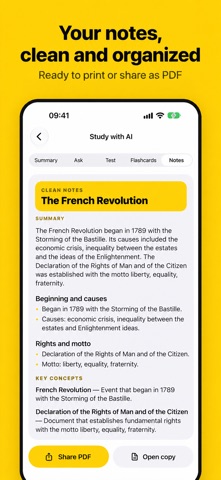
YOUR NOTES, IN ORDER
• Subject folders with their own color and icon: Math, History, Law, English… whatever you study.
• Quick suggestions to create your subjects in a second.
• Recent documents on the home screen so you can pick up where you left off.
• Move documents between subjects, rename them and sort by date or name.
SCAN IN ONE TAP
• The Scan button opens the camera instantly, no screens in between.
• Automatic edge detection and perspective correction: pages come out straight even if you shoot at an angle.
• Scan several pages in a row and save them as one document.
• Sharp pages saved at high resolution, ready to print.
IMAGE TO TEXT (OCR)
• Recognizes the text in your notes, books and handouts right on your iPhone. No internet, nothing uploaded.
• English, Spanish, French, German, Chinese and many more languages.
• Edit the text, copy it, share it or save it as .txt.
• Extract text: scan, import or pick a saved document and jump straight to its text.
STUDY WITH AI
• Ask your notes: answers come only from what they say, with the sentence they are based on.
• Summary and key points of any document.
• Exam-style quizzes with an explanation for each answer.
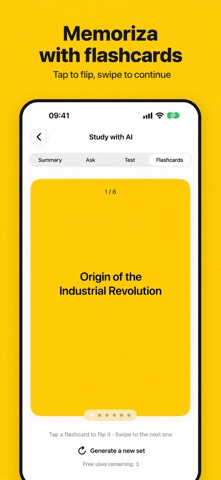
• Flashcards to memorize the key concepts.
• AI on your iPhone: everything is processed on the device and your notes never leave it. Requires iOS 26 or later and a compatible iPhone or iPad.
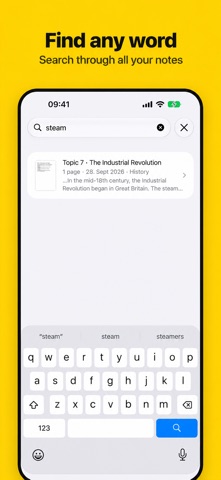
FIND ANY WORD
• Search by document name or by any word written inside your notes.
• Results show the snippet where the word appears.
REAL PDFs
• Letter (or A4) PDFs at high resolution, light enough to send.
• With selectable text: search and copy text inside the PDF in any reader.
• Share via WhatsApp, Mail or AirDrop, save to Files or Photos, and print.
PHOTOS AND FILES TO PDF
• Turn several photos from your library into a multi-page PDF. Scanlivo crops the page automatically.
• Import PDFs and images from Files.
EDIT, SIGN AND ANNOTATE
• Crop, rotate, apply filters and enhance contrast.
• Sign documents with your finger.
• Highlight, write and draw shapes on your pages.
ALWAYS AT HAND
• Siri Shortcut: "Scan with Scanlivo".
• Quick action from the app icon.
• Control for Control Center, the Lock Screen and the Action button (iOS 18 or later).
• For iPhone and iPad, in light and dark mode.
FULL VERSION
The monthly subscription gives you Scanlivo with no ads, unlimited AI, all filters, and unlimited signatures and annotations. Scanning, OCR, search and PDFs are free for everyone, and you can try each AI feature 3 times for free.
Subscriptions renew automatically unless cancelled at least 24 hours before the end of the period. Manage or cancel anytime in your Apple Account settings.
Privacy policy: http://jewelsapps.com/privacy-policy/
Terms of use (EULA): http://jewelsapps.com/terms-of-use/