Scanly — PDF Scanner & Tools is an overall app developed by Manh Dung Nguyen.
Download Statistics
User Ratings
The app has no ratings yet.
App Information
Scanly — PDF Scanner & Tools is FREE to download. The APK download size is 8.48 MB. The latest version available is 1.0.0. The last update was on May 27, 2026.
Technical Requirements
The app has a content rating of Everyone. The app has been available on Google Play 7 weeks ago.
Description
The fastest way to scan, convert and organize PDFs on your iPhone — fully on-device, fully private.
Scanly turns your camera into a precision document scanner with automatic edge detection, multi-page capture and OCR-ready output. Then it gives you every tool a paperless workflow actually needs: convert between PDF and Office, merge, split, compress, sign, watermark, lock with Face ID, and export to JPG. No cloud upload. No account. No subscription.
— SCAN — • Auto edge detection and perspective correction • Capture unlimited pages in one session • Review, reorder and delete pages before saving • Import existing PDFs from Files or Photos
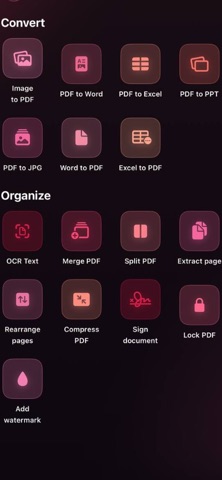
— CONVERT (NATIVE, NO INTERNET) — • PDF → Word (.docx) • PDF → Excel (.xlsx) • PDF → PowerPoint (.pptx) • PDF → JPG (per page) • Word / Excel → PDF • Image → PDF (from camera roll)
— ORGANIZE — • Merge multiple PDFs into one • Split a PDF into single-page files • Extract selected pages • Rearrange page order with drag handles • Compress to shrink file size
— SECURE — • Lock any PDF with a password • Lock with Face ID / Touch ID — a strong random password is generated and stored in your device's Keychain, retrievable only with biometrics • Unlock instantly when reopening in the app
— SIGN & ANNOTATE — • Draw your signature with Apple Pencil or finger • Add text watermarks (CONFIDENTIAL, DRAFT, etc.) • Extract text from any PDF with on-device OCR
— BUILT FOR iOS — • 100% on-device — your documents never leave your iPhone • Works offline anywhere • Light & Dark mode • 10 languages: English, Tiếng Việt, 简体中文, 日本語, 한국어, Español, Français, Deutsch, Português, Bahasa Indonesia • Native SwiftUI, optimised for iPhone 14 and later • No subscription. No ads. No tracking.
— PRIVACY — We don't have a server. There's nothing to send and nothing to leak. Face ID is used only to unlock PDFs you've explicitly locked. Camera access is only used when you tap Scan.
Download Scanly and turn your iPhone into a complete document workspace today.
Each subscription will automatically renew 3 days before the expiration date for
the same time period. Subscriptions can be cancelled at any time before the renewal.