

Scanner App: CleanScanner
Scanner App: CleanScanner is made and published by Ronald Lumor. AppBrain is an independent app data site and isn't affiliated with Ronald Lumor. The app name, icon, screenshots and description belong to Ronald Lumor and are shown as published on the App Store.
AppBrain's verdict
- Last updated
- May 11, 2026
Rankings
App Store top chartsApp Store Rankings for Scanner App: CleanScanner
Competitors
Similar apps and more from Ronald LumorAlternatives to Scanner App: CleanScanner


More from Ronald Lumor


Releases
Updates seen on the App Store- Version
- 1.0
- Launched
- May 2026
No changelog data
User feedback
Ratings and reviews on the App StoreComments on Scanner App: CleanScanner for iOS
We don't have enough comments to show example comments. Please check back later.
Technology
Found in the app by AppBrain- Price
- Free
- App size
- 4.34 MB
- Content rating
- Everyone
Technologies used by Scanner App: CleanScanner
About the app and developer
About Scanner App: CleanScanner
Scanner App: CleanScanner is a business app developed by Ronald Lumor.
User Ratings
The app has no ratings yet.
App Information
Scanner App: CleanScanner is freely available from the App Store. The app size is 4.34 MB. The latest version available is 1.0. The last update was on May 11, 2026.
Technical Requirements
The app has a content rating of Everyone. The app has been available on the App Store since May 2026.
Developer information for Ronald Lumor
Address:
Store listing
By Ronald Lumor, from the App Store



Description by Ronald Lumor Written by the developer, not by AppBrain. Click to read.
CleanScanner scanner app turns your iPhone into a fast, powerful PDF scanner for everyday documents, receipts, notes, IDs, homework, contracts, invoices and more.
Scan paper documents in seconds, clean up the image, organize pages, create high-quality PDFs, and export your files whenever you need them. Whether you are working, studying, managing personal documents, or saving important receipts, CleanScanner scanner app helps you keep everything clear, searchable and easy to share.
SCAN DOCUMENTS FAST
Use your iPhone camera to capture documents, forms, notes, letters, receipts, business cards, whiteboards, homework, books, IDs and more. CleanScanner scanner app helps you create sharp, readable scans that are easy to save as PDF files.
CREATE CLEAN PDF FILES
Turn your scans into polished PDF documents for work, school, travel, business or personal records. Save single-page scans or combine multiple pages into one organized PDF.
POWERFUL PDF TOOLS
CleanScanner scanner app includes useful tools to help you manage documents after scanning:
• Merge PDFs into one file
• Compress PDF files
• Split PDF documents
• Reorder and rearrange pages
• Extract selected pages
• Export scans as PDF
• Export pages as JPG images
• Add signatures to documents
• Protect PDF files with a password
• Crop and adjust scanned pages
• Resize pages when needed
• Organize your scanned files in one place
SCAN RECEIPTS, INVOICES AND CONTRACTS
Keep important paperwork saved digitally. Scan receipts, invoices, bills, agreements, contracts and forms so you can find them later without keeping piles of paper around.
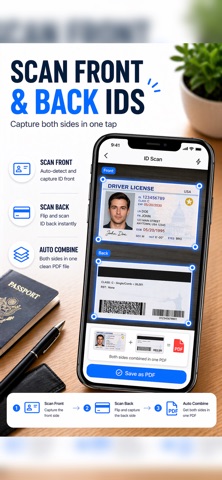
SCAN IDS AND CARDS
Use ID scan mode to capture the front and back of ID cards, licenses, business cards, membership cards and other small documents in a clean format.
SCAN NOTES, HOMEWORK AND WHITEBOARDS
CleanScanner scanner app is also useful for students and teachers. Scan handwritten notes, homework, printed pages, classroom documents and whiteboards, then save them as PDFs for studying, sharing or archiving.
OCR TEXT RECOGNITION
Use OCR to recognize text from scanned documents so your files are easier to read, copy or manage. This is useful for printed pages, receipts, notes, forms and other text-heavy documents.
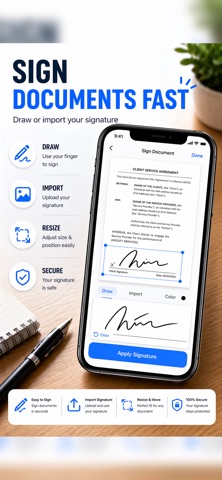
SIGN DOCUMENTS ON YOUR PHONE
Add signatures to documents without printing. Sign forms, agreements, letters and other PDF files directly from your iPhone.
ORGANIZE YOUR DOCUMENT LIBRARY
Keep your scans and PDF files together in a clean document library. Rename files, manage pages, select documents, and quickly find the scans you need.
EXPORT AND SHARE
Save or export your scanned documents when you need them. Create PDF files for email, cloud storage, printing, business use, school submissions, personal records and more.
WHY USE CLEANSCANNER SCANNER APP?
• Fast document scanning
• Clean PDF creation
• Receipt and invoice scanning
• ID and card scanning
• OCR text recognition
• PDF merge, split and compress tools
• Page reorder and extraction
• PDF password protection
• Signature support
• JPG export
• Simple document organization
• Built for everyday work, school and personal use
PERFECT FOR
• Students scanning notes, homework and whiteboards
• Professionals scanning contracts, receipts and forms
• Small business owners saving invoices and documents
• Anyone who wants to reduce paper clutter
• Travelers saving IDs, confirmations and important files
• People who need quick PDF scanning from their iPhone
CleanScanner scanner app helps you scan, save, edit and manage important documents without needing a bulky scanner. Capture paper documents with your camera, turn them into clean PDFs, and keep your files ready whenever you need them.
Download CleanScanner scanner app today and start scanning documents, receipts, IDs, notes and PDFs from your iPhone.