

One Scan: PDF Doc Scanner
One Scan: PDF Doc Scanner is made and published by App Rover. AppBrain is an independent app data site and isn't affiliated with App Rover. The app name, icon, screenshots and description belong to App Rover and are shown as published on the App Store.
AppBrain's verdict
EstablishedLoved by users- Best rank
- #46
- Top Grossing, Italy
- Rating on App Store
- 4.65
- 11,766 ratings
- Last updated
- October 7, 2026
Users love it: 4.7 stars from 11,766 ratings. Its best ranking is #46 in Top Grossing, Business in Italy.
Rankings
App Store top charts- Highest rank
- #46
- Chart
- Top Grossing
- Business
- Country
- Italy
App Store Rankings for One Scan: PDF Doc Scanner
Top rankings
| Rank | Country | Category | List |
|---|---|---|---|
| 46 | Italy | Business | Top Grossing |
| 49 | Netherlands | Business | Top Grossing |
| 53 | Russia | Business | Top Grossing |
| 57 | Norway | Business | Top Grossing |
| 77 | Slovakia | Business | Top Grossing |
| 81 | Saudi Arabia | Business | Top Grossing |
| 89 | South Korea | Business | Top Grossing |
| 95 | Spain | Business | Top Grossing |
Ranking history in Italy
Competitors
Similar apps and more from App RoverAlternatives to One Scan: PDF Doc Scanner



More from App Rover


Releases
Updates seen on the App Store- Version
- 3.0.4
- Launched
- January 2019
No changelog data
User feedback
Ratings and reviews on the App StoreComments on One Scan: PDF Doc Scanner for iOS
We don't have enough comments to show example comments. Please check back later.
Technology
Found in the app by AppBrain- Price
- Free
- App size
- 40.8 MB
- Content rating
- Everyone
Technologies used by One Scan: PDF Doc Scanner
About the app and developer
About One Scan: PDF Doc Scanner
One Scan: PDF Doc Scanner is a business app developed by App Rover.
User Ratings
One Scan: PDF Doc Scanner is rated 4.65 out of 5 stars. The rating is based on 12 thousand ratings.
App Information
One Scan: PDF Doc Scanner is freely available from the App Store. The app size is 40.76 MB. The latest version available is 3.0.4. The last update was on October 7, 2026.
Technical Requirements
The app has a content rating of Everyone. The app has been available on the App Store since January 2019.
Developer information for App Rover
Address:
Frequently asked questions about One Scan: PDF Doc Scanner
Is One Scan: PDF Doc Scanner free?
Yes. One Scan: PDF Doc Scanner is free on the App Store.
Is One Scan: PDF Doc Scanner still available?
Yes. One Scan: PDF Doc Scanner is on the App Store, and the last update we saw was on October 7, 2026.
How large is One Scan: PDF Doc Scanner?
One Scan: PDF Doc Scanner is 40.76 MB.
Is One Scan: PDF Doc Scanner suitable for children?
App Store rates the content of One Scan: PDF Doc Scanner as suitable for everyone.
How do people rate One Scan: PDF Doc Scanner?
One Scan: PDF Doc Scanner scores 4.65 out of 5 stars, from 11,766 ratings on the App Store.
Who made One Scan: PDF Doc Scanner?
One Scan: PDF Doc Scanner was developed by App Rover. It is listed in the business category on the App Store.
What are the best alternatives to One Scan: PDF Doc Scanner?
People looking at One Scan: PDF Doc Scanner also look at these business apps: My Scans, best PDF Scanner App, PDF Scanner Pro for Document, Mobile Scanner App - Scan PDF, PDF Scanner・Document Scanner, Photos PDF : Scanner Converter.
Store listing
By App Rover, from the App Store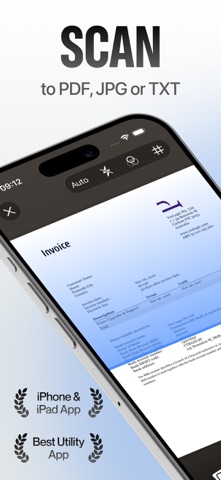



Description by App Rover Written by the developer, not by AppBrain. Click to read.
Everything you expect from a top scanner app, without the clutter. No settings to fiddle with, no learning curve: One Scan does the hard work for you.
SCAN ANYTHING IN ONE TAP
- Automatic edge detection, perspective correction and shadow removal
- Batch mode: capture dozens of pages in a row and get a single multi-page PDF
- Smart filters: color, grayscale, black & white, whiteboard and auto-enhance
- Dedicated modes for documents, ID cards (front and back on one page), passports, business cards, books, receipts and photos
- Import from Photos, Files, Mail or any app with the Share Sheet
- Built-in QR code and barcode reader
AI THAT DOES THE BORING PART
- OCR text recognition in 100+ languages: copy, search and export the text of any scan
- AI summaries and instant answers: ask a question about a contract, an invoice or a report and get the answer
- Smart naming and auto-sorting: One Scan reads your document, names it and files it for you
- Data extraction: pull dates, totals and vendors from receipts and invoices, ready to export
- One-tap translation of scanned text
SIGN AND EDIT PDFS
- Sign with your finger, Apple Pencil or a saved signature; add initials, dates and text fields
- Fill out forms, annotate, highlight, draw, add stamps and watermarks
- Reorder, rotate, delete, merge and split pages
- Compress files, choose the page size (A4, Letter…) and the margins
- Export as PDF, JPG, PNG, TXT or Word
ORGANIZE AND FIND EVERYTHING
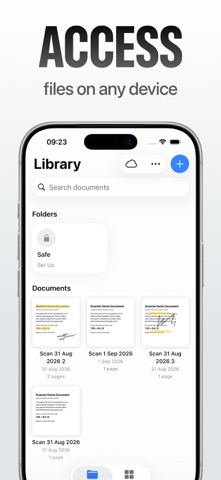
- Folders, tags and favorites
- Full-text search inside your scans, powered by OCR
- iCloud sync keeps your library up to date on iPhone and iPad
- Save to Files, iCloud Drive, Google Drive, Dropbox or OneDrive
- Share by Mail, Messages, AirDrop or WhatsApp, or print with AirPrint
PRIVATE BY DESIGN
- Your scans are processed on your device and stay in your library. No account required
- Lock the app and individual documents with Face ID, Touch ID or a passcode
- Password-protect PDFs before you share them
- No ads, and we never sell your data
MADE FOR IPHONE AND IPAD
- Full iPad experience: Split View, drag and drop, keyboard shortcuts and Apple Pencil
- Home Screen widgets, Siri Shortcuts and a Files extension to scan from anywhere
- Optimized for the latest iOS and iPadOS
PERFECT FOR
Students, teachers, freelancers, small businesses, travelers and remote workers. Anyone who needs to scan contracts, receipts, notes, whiteboards, IDs or old family photos.
Terms of Use: https://mwm.ai/legal/scanner/terms-of-use
Privacy Policy: https://mwm.ai/legal/scanner/privacy-policy