Download Android Apps and Games
AppBrain
  • Apps
  • Apps being viewed right now Trending apps today Most popular apps All-time most downloaded apps Top rated apps
  • Intelligence ▾
    Intelligence overview → Track any Android app or your whole market
    Track & analyze
    Keyword Tracker & OptimizerTrack & improve Play rankings App Performance ReportOne-off PDF for any app StatisticsFree Android & Play market stats
    Promote your app
    Featured Apps App Links
  • Intelligence
  • Pricing
  • Dashboard
  • Sign up
  • Log in
Last updated on: 2026-06-25
App Store Apps > Business > Scanner - Scan Docs to PDF
Scanner - Scan Docs to PDF icon

Scanner - Scan Docs to PDF

6.6
42 Digital
4.49
210 reviews
Free

Download from the App Store

About Scanner - Scan Docs to PDF

Scanner - Scan Docs to PDF is an overall app developed by 42 Digital.

Download Statistics

User Ratings

Scanner - Scan Docs to PDF is rated 4.49 out of 5 stars. The rating is based on 210 ratings.

App Information

Scanner - Scan Docs to PDF is FREE to download. The APK download size is 89.78 MB. The latest version available is 6.6. The last update was on June 17, 2026.

Technical Requirements

The app has a content rating of Everyone. The app has been available on Google Play April 2021.

Description
Scan any document and let AI do the rest.

Scanner turns your phone into a powerful document scanner, PDF creator, file converter, and AI document assistant. Capture paperwork in seconds, summarize long reports, extract key information, and ask questions about anything you scan.

SCAN ANYTHING IN SECONDS

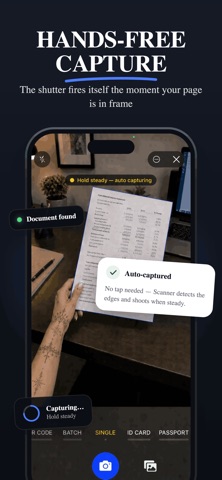
Point your camera at a page and Scanner automatically detects the edges, captures it when steady, corrects the perspective, improves the lighting, and creates a clean digital copy.

• Hands-free auto-capture
• Automatic edge detection and smart cropping
• Perspective and lighting correction
• Batch scanning for up to 50 pages
• Scan receipts, invoices, notes, contracts, photos, ID cards, and passports
• Scan both sides of an ID card
• Built-in QR code scanner

AI THAT READS FOR YOU

Save time on long or complicated documents with built-in AI tools.

• Summarize documents in seconds
• Extract names, dates, amounts, numbers, and action items
• Ask questions about scanned documents
• Find specific details without reading every page
• Translate scanned documents into your language

AI features are optional. When you choose to use them, relevant document text or page images may be securely processed by third-party AI providers after you grant permission. AI-generated results may be inaccurate, so verify important information.

CONVERT TO EDITABLE FILES

Turn paper documents into files you can continue editing on your phone or computer.

• Convert scans into editable text documents
• Extract tables into spreadsheets
• Turn documents into presentations
• Export as PDF, image, editable document, spreadsheet, or presentation files
• Combine multiple pages or images into one PDF
• Share files through email, messaging apps, or cloud storage

EDIT, SIGN, AND SHARE

Prepare documents without needing a computer.

• Crop, rotate, reorder, and enhance pages
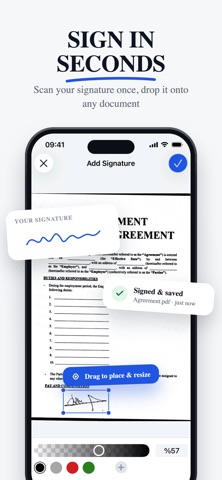
• Add your signature to PDF documents
• Create and reuse a digital signature
• Scan and save invoices as PDF files
• Organize multiple pages into one document

STAY ORGANIZED

Keep important documents easy to find.

• Smart folders for receipts, ID cards, invoices, and more
• Full-text search across scanned documents
• Search inside PDFs using recognized text
• Filter by scans, documents, spreadsheets, or presentations
• Rename and organize files in one place
• Optional account and cloud sync across devices

PRIVACY BY DESIGN

Your scans stay on your device by default. Document capture and basic text recognition are processed locally. You can scan, save, and export without creating an account.

Documents are uploaded only when you enable cloud sync or actively use a feature that requires online processing, such as AI or file conversion. AI features require permission before document content is sent for processing. Scanner does not sell your personal information or display third-party ads.

HOW TO SCAN A DOCUMENT

1. Open Scanner and create a new document.
2. Point your camera at the page.
3. Scanner automatically detects and captures it.
4. Crop, enhance, reorder, or add more pages.
5. Save as PDF or convert it into another format.

SCANNER PREMIUM

Some features, including AI tools, file conversion, advanced PDF editing, and QR code tools, may require a Scanner Premium subscription.

Available plans, prices, billing periods, and included features are shown before purchase. Payment is charged to your store account after confirmation. Subscriptions renew automatically unless canceled before the end of the current billing period. You can manage or cancel your subscription through your account settings.

Privacy Policy:
https://www.scannedapp.com/privacy

Terms of Use:
https://www.scannedapp.com/terms
Show more Show less

More data about Scanner - Scan Docs to PDF

Price Free to download
Rating 4.49 based on 210 ratings
Ranking Not ranked
Version 6.6
App download size 89.8 MB
Suitable for Everyone

Alternative downloads for the Scanner - Scan Docs to PDF app

ID Scanner • icon ID Scanner •
App Sub 1 LLC
4.3
Free
798 ratings
IDSafe: ID & passport scanner icon IDSafe: ID & passport scanner
Microblink
4.6
Free
250 ratings
Vemos - ID Scan icon Vemos - ID Scan
Vēmos
3.6
Free
137 ratings
Age ID icon Age ID
Intellicheck, Inc.
2.5
Free
92 ratings
IDOrganizer - ID Scanner icon IDOrganizer - ID Scanner
EssentialCapture Inc
0.0
Free
VeriScan - ID Scanner icon VeriScan - ID Scanner
IDScan.net, Inc.
3.3
Free
62 ratings
CheckpointID from MRI Software icon CheckpointID from MRI Software
MRI Software
3.8
Free
14 ratings
Higher rated
Camera Scanner: Clear Scan App icon Camera Scanner: Clear Scan App
Thi Nguyet
4.9
Free
27 ratings

More from 42 Digital

Banger: AI Cover Songs & Music icon Banger: AI Cover Songs & Music
42 Digital
4.3
Free
32.0K ratings
Banger for Artists: AI Music icon Banger for Artists: AI Music
42 Digital
4.5
Free
16.1K ratings
Photic - AI Headshot Generator icon Photic - AI Headshot Generator
42 Digital
4.2
Free
7.1K ratings
VidAI - AI Hug Video Maker icon VidAI - AI Hug Video Maker
42 Digital
3.8
Free
2.8K ratings
AI Photo Generator - Glowy icon AI Photo Generator - Glowy
42 Digital
4.6
Free
1.9K ratings
MathSnap: AI Math Solver icon MathSnap: AI Math Solver
42 Digital
4.5
Free
1.4K ratings
Value Identifier: ValueSnap icon Value Identifier: ValueSnap
42 Digital
4.5
Free
351 ratings
Translator+ : AI Translate icon Translator+ : AI Translate
42 Digital
4.7
Free
116 ratings

Changelog of Scanner - Scan Docs to PDF

No changelog data

Developer information for 42 Digital

42 Digital

Address:

Share Scanner - Scan Docs to PDF

Comments on Scanner - Scan Docs to PDF for iOS

We don't have enough comments to show example comments. Please check back later.

App Store Rankings for Scanner - Scan Docs to PDF

This app is not ranked

Technologies used by Scanner - Scan Docs to PDF

ID Scanner • icon ID Scanner •
IDSafe: ID & passport scanner icon IDSafe: ID & passport scanner
Vemos - ID Scan icon Vemos - ID Scan
Age ID icon Age ID
IDOrganizer - ID Scanner icon IDOrganizer - ID Scanner
VeriScan - ID Scanner icon VeriScan - ID Scanner
CheckpointID from MRI Software icon CheckpointID from MRI Software
Camera Scanner: Clear Scan App icon Camera Scanner: Clear Scan App

Back to top
AppBrain Intelligence premium content

Subscribe now to get full and unlimited access to AppBrain Intelligence. You'll have access to:

  • App Intelligence dashboard (performance timeline, competitor comparison, country rankings, insight cards)
  • Detailed ranking data per app
  • Full timeline per developer
  • Device market shares data per country
1 Month

$75/mo
(billed every month)

SAVE 0%
Subscribe
3 Months

$65/mo
($195 billed every 3 months)

SAVE 13%
Subscribe
1 Year

$57.50/mo
($690 billed every year)

SAVE 23%
Subscribe
Each subscription will automatically renew 3 days before the expiration date for the same time period. Subscriptions can be cancelled at any time before the renewal.

AppBrain is a directory focused on discovering great apps and games. We give statistics, rankings and search options that Google Play and the App Store don't have. All trademarks are owned by their respective owners. AppBrain doesn't offer APKs or binaries, and always lets users install the official version from Google Play or the App Store.

More apps

  • Top Android apps being viewed
  • Analog PRO: Watch face
  • Gatherings At Wellington for Android
  • NZ Truck and Machinery

Android Statistics

  • Android statistics
  • Google Play Developer stats
  • Trending Android Apps
  • Top popular Apps
  • Buy the best Android phone

About AppBrain

  • Contact
  • Privacy
  • Documentation
  • DMCA takedowns
  • Articles
  • Blog
  • Monetization tips: Understanding your eCPM
© 2010-2026 - AppBrain