
Scanning App with Scan to PDF
Scanning App with Scan to PDF is made and published by Kamalkumar Trapasiya. AppBrain is an independent app data site and isn't affiliated with Kamalkumar Trapasiya. The app name, icon, screenshots and description belong to Kamalkumar Trapasiya and are shown as published on the App Store.
AppBrain's verdict
- Rating on App Store
- 5.00
- 2 ratings
- Last updated
- July 17, 2025
- Size
- 16.2 MB
It doesn't have enough ratings yet to judge what users think.
User feedback
Ratings and reviews on the App StoreComments on Scanning App with Scan to PDF for iOS
We don't have enough comments to show example comments. Please check back later.
Store listing
By Kamalkumar Trapasiya, from the App Store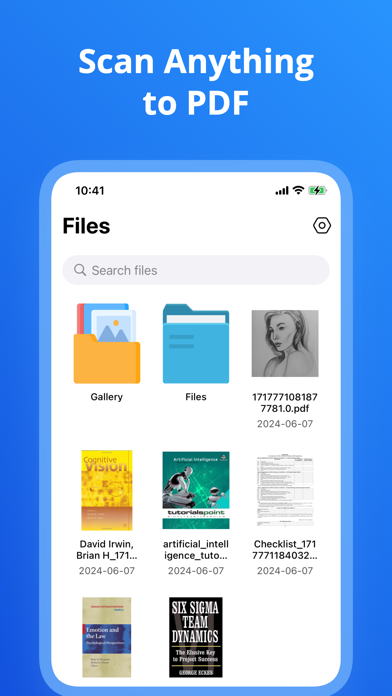



Description by Kamalkumar Trapasiya Written by the developer, not by AppBrain. Click to read.
PDF Scanner Pro is your ultimate solution for scanning documents, photos, and more. Seamlessly transform your paper documents into high-quality PDFs with just a few taps. Experience the convenience of a portable scanner in your pocket!
Key Features:
Scan Anything: Quickly scan documents, photos, receipts, notes, and more.
Camera & Photo Selection: Use your camera to scan directly or select images from your photo library.
File Integration: Easily pick documents from your files for scanning and editing.
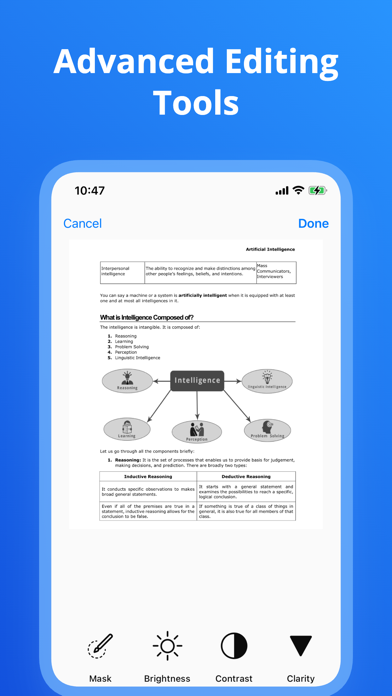
Edit with Ease: Add new pages, reorder them, crop, and edit your scans to perfection.
Preview & Share: Preview your scanned PDFs before sharing them via email, cloud storage, or social media.
Organize & Manage: Easily delete or reorder pages within your scanned PDFs.
High-Quality Output: Enjoy crystal-clear scans with advanced image processing.
Multi-Page Scanning: Create comprehensive PDFs by scanning multiple pages into a single document.
User-Friendly Interface: Intuitive and easy-to-use interface makes scanning a breeze.
Why PDF Scanner Pro?
Effortless Scanning: Simply point and scan, choose photos, or pick documents for scanning and editing.
Comprehensive Tools: Edit, crop, and enhance your scans for professional-quality PDFs.
Stay Organized: Keep all your important documents neatly organized and accessible anytime, anywhere.
Share with Confidence: Share your scanned PDFs effortlessly via email, cloud services, or social media platforms.
Reliable & Secure: Your scanned documents are saved securely on your device.
Pro Version: Unlock the full potential of our app with premium version. Payment will be charged to your iTunes account at confirmation of purchase. Subscriptions automatically renew unless auto-renew is turned off 24-hours before the end of the current period. Accounts will be charged for renewal within 24 hours of the end of the current period, and a renewal fee will be provided. The unused portion of a free trial period, if offered, will be forfeited when the user purchases a subscription to that product. Please note that a subscription is required for the complete functionality of the app.
Privacy: https://sites.google.com/view/kttechapps-privacy/home
Terms: https://sites.google.com/view/kttechapps-terms/home
Download PDF Scanner Pro today and transform the way you handle documents. Scanning, editing, and sharing PDFs has never been this easy!
Safety and technology
Found in the app by AppBrain- Price
- Free
- App size
- 16.2 MB
- Content rating
- Everyone
Technologies used by Scanning App with Scan to PDF
Releases
Updates seen on the App Store- Version
- 1.0.7
- Launched
- June 2024
No changelog data
Alternatives
Similar apps and more from Kamalkumar TrapasiyaMore from Kamalkumar Trapasiya







Rankings
App Store top chartsApp Store Rankings for Scanning App with Scan to PDF
About the app and developer
About Scanning App with Scan to PDF
Scanning App with Scan to PDF is a productivity app developed by Kamalkumar Trapasiya.
User Ratings
Scanning App with Scan to PDF is rated 5.00 out of 5 stars. The rating is based on 2 ratings.
App Information
Scanning App with Scan to PDF is freely available from the App Store. The app size is 16.16 MB. The latest version available is 1.0.7. The last update was on July 17, 2025.
Technical Requirements
The app has a content rating of Everyone. The app has been available on the App Store since June 2024.
Developer information for Kamalkumar Trapasiya
Address:
Frequently asked questions about Scanning App with Scan to PDF
Is Scanning App with Scan to PDF free?
Yes. Scanning App with Scan to PDF is free on the App Store.
Is Scanning App with Scan to PDF still available?
Yes. Scanning App with Scan to PDF is on the App Store, and the last update we saw was on July 17, 2025.
How large is Scanning App with Scan to PDF?
Scanning App with Scan to PDF is 16.16 MB.
Is Scanning App with Scan to PDF suitable for children?
App Store rates the content of Scanning App with Scan to PDF as suitable for everyone.
How do people rate Scanning App with Scan to PDF?
Scanning App with Scan to PDF scores 5.00 out of 5 stars, from 2 ratings on the App Store.
Who made Scanning App with Scan to PDF?
Scanning App with Scan to PDF was developed by Kamalkumar Trapasiya. It is listed in the productivity category on the App Store.