
Scenic Map Central Canada
Scenic Map Central Canada is made and published by GrangerFX. AppBrain is an independent app data site and isn't affiliated with GrangerFX. The app name, icon, screenshots and description belong to GrangerFX and are shown as published on the App Store.
AppBrain's verdict
- Last updated
- January 19, 2024
- Size
- 66.2 MB
User feedback
Ratings and reviews on the App StoreComments on Scenic Map Central Canada for iOS
We don't have enough comments to show example comments. Please check back later.
Store listing
By GrangerFX, from the App Store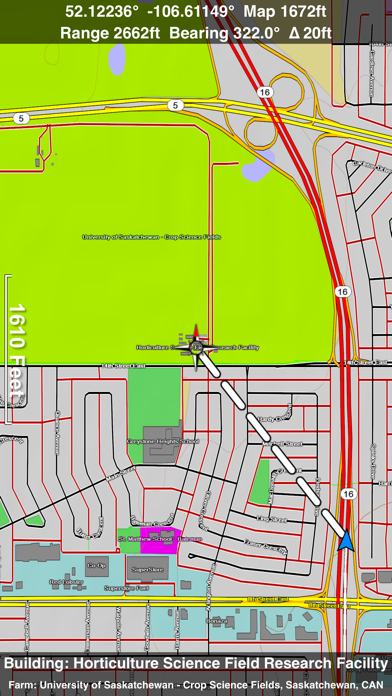


Description by GrangerFX Written by the developer, not by AppBrain. Click to read.
Scenic Map now covers the entire world via online maps. The maps are cached automatically so they can still be used when there is no cell coverage. Turn on Online Map in the Settings menu and you can then scroll or go to any location on the planet. Satellite image overlays add breathtaking detail and realism to the maps (tap preset 2 or 4 when Online Map is enabled). You can use them as you travel to see what is hidden from view at ground level. This takes moving maps to a whole new level.
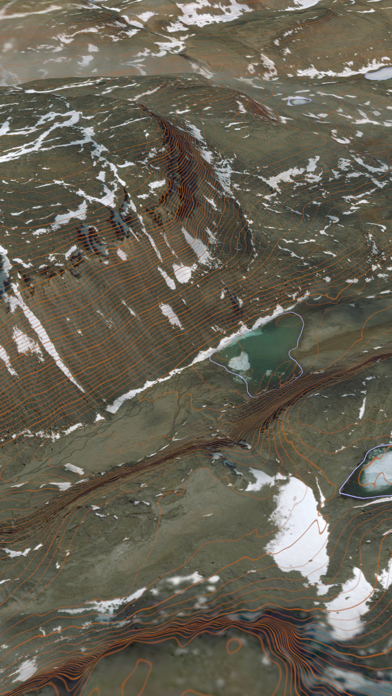
Use the two finger vertical swipe gesture to tilt the map for a 3D view. Scroll like a map or fly like a flight simulator. Enable Joystick Gestures in the Settings menu and then fly around the terrain using a virtual joystick. Prefer only 2D maps? Enable the 2D Map option in the Settings menu.
Scenic Map is simply the best 3D topo map available for a mobile device. You will see incredible detail while scrolling, rotating and zooming perfectly smoothly. You will see every road even if you zoom out to the altitude of a satellite. As you zoom in, you will see every small bump and hollow of the Earth and terrain features as small as ten meters. Unlike old fashioned topo maps, Scenic Map’s roads and trails are up to date thanks to OpenStreetMap.org. It contains polygons for urban areas, shopping malls, an ever growing number of buildings and many other features, The best lake, pond, stream and rivers from the USGS and Canadian public databases are also included.
Tap the GPS center button to begin tracking your location. As you move, you will generate a track file. Tracks can be replayed with video like controls to speed up, slow down, pause, restart or skip to the end. You can display existing tracks while recording another if you want to retrace your route. When online, you can automatically create a route from your current GPS location to any other point on the map. Tracks can be received from or sent to other apps in GPX format. GPS recording stops automatically after you have remained stationary for some time or you can choose to manually stop tracking by tapping on the top track in the Tracks view.
Never before have maps been this customizable. For example, you can turn on or off the roads. You can change the lighting direction or remove terrain shading entirely. You can display contour lines even over satellite images. There are five presets which let you quickly switch between map styles. Use Metric, English or Nautical units and choose one of four different coordinate displays including UTM.
Want to learn more about a map feature? Tap the target icon and center the feature under the compass rose to display its name, type, urban area, county, state, elevation and coordinates. You will also see a bearing line back to your current GPS location or from your location to a selected waypoint. The status bar shows the bearing direction and distance along with the map and GPS elevation, the track length, and your current speed and direction of travel.
In-app documentation is provided in the Help section at the top of the Settings menu. Links are provided in the documentation to detailed coverage maps, tutorial videos, installation guide and blog at ScenicMap.com
Map data © OpenStreetMap and contributors under the Open Database License
Scenic Map supports GPS tracking while the app is in the background.
Caution: Continued use of GPS running in the background can dramatically decrease battery life.
Safety and technology
Found in the app by AppBrain- Price
- $3.99
- App size
- 66.2 MB
- Content rating
- Everyone
Technologies used by Scenic Map Central Canada
Releases
Updates seen on the App Store- Version
- 1.9.2
- Launched
- February 2013
No changelog data
Alternatives
Similar apps and more from GrangerFXAlternatives to Scenic Map Central Canada


More from GrangerFX


Rankings
App Store top chartsApp Store Rankings for Scenic Map Central Canada
About the app and developer
About Scenic Map Central Canada
Scenic Map Central Canada is a navigation app developed by GrangerFX.
User Ratings
The app has no ratings yet.
App Information
Scenic Map Central Canada costs $3.99. The app size is 66.25 MB. The latest version available is 1.9.2. The last update was on January 19, 2024.
Technical Requirements
The app has a content rating of Everyone. The app has been available on the App Store since February 2013.
Developer information for GrangerFX
Address: