Download Android Apps and Games
AppBrain
  • Apps
  • Apps being viewed right now Trending apps today Most popular apps All-time most downloaded apps Top rated apps
  • Intelligence ▾
    Intelligence overview → Track any Android app or your whole market
    Track & analyze
    Keyword Tracker & OptimizerTrack & improve Play rankings App Performance ReportOne-off PDF for any app StatisticsFree Android & Play market stats
    Promote your app
    Featured Apps App Links
  • Intelligence
  • Pricing
  • Dashboard
  • Sign up
  • Log in
Last updated on: 2026-06-13
App Store Apps > Education > ScopeBoss
ScopeBoss icon

ScopeBoss

1.2.1
Lodewijk Bonebakker
4.00
6 reviews
Free

Not recently updated — last update was on 2023-12-23. This app may no longer be actively maintained.
ScopeBoss Screenshot 1 of 5
ScopeBoss Screenshot 2 of 5
ScopeBoss Screenshot 3 of 5
ScopeBoss Screenshot 4 of 5
ScopeBoss Screenshot 5 of 5
Download from the App Store

About ScopeBoss

ScopeBoss is an overall app developed by Lodewijk Bonebakker.

Download Statistics

User Ratings

ScopeBoss is rated 4.00 out of 5 stars. The rating is based on 6 ratings.

App Information

ScopeBoss is FREE to download. The APK download size is 18.57 MB. The latest version available is 1.2.1. The last update was on December 23, 2023.

Technical Requirements

The app has a content rating of Everyone. The app has been available on Google Play February 2015.

Description
ScopeBoss emulates the Autostar II controller for Meade LX200GPS telescopes. It communicates with the scope through a WiFi-to-Serial adapter, such as the SkyFi by Southern Stars or the GC Wi-Fi Adapter, and provides complete control from iPhone or iPad. Using your telescope has never been so simple, convenient and reliable.


ScopeBoss arranges the Autostar II functionality into logical, convenient tabs, making important but hard-to-find operations immediately accessible.

Keypad Tab
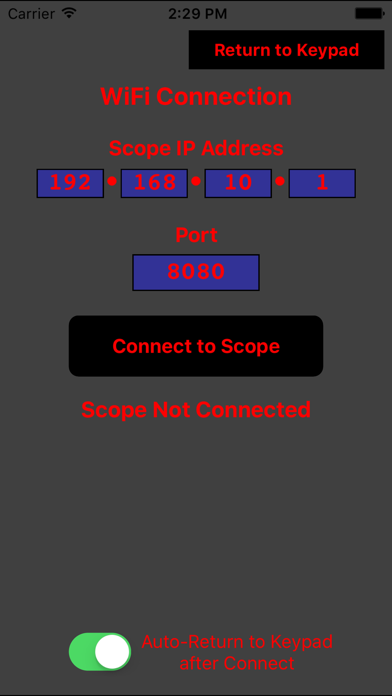
The Keypad Tab provides the LCD display and the primary keypad buttons (minus slew arrows, which are found on their own separate tab) of the real, Autostar II hand-box controller. Most LX200GPS users will find much functionality here familiar, including numeric keys for data entry and hot button short cuts, as well as scrolling arrows for object and option lists. The Enter, Mode, and Go To keys provide their full Autostar II functionality, including long presses for syncing, displaying or entering RA/Dec coordinates, and initiating spiral searches. "Flipping" to the back side of the Keypad tab reveals the Connection tab. Connection between the iPhone or iPad’s WiFi and the scope’s WiFi-to-Serial adapter is established in this tab. Input fields permit specification of the adapter’s specific IP Address and port number.

Slew Tab
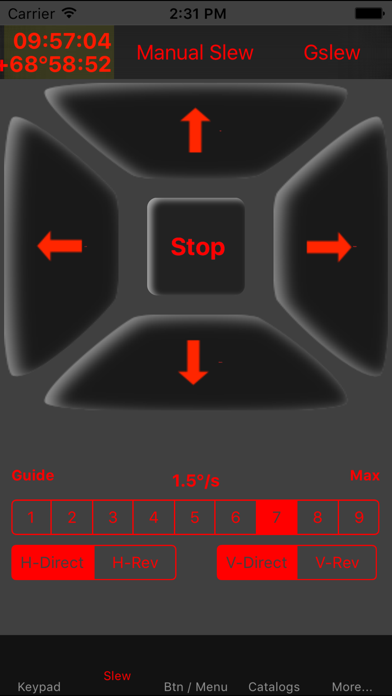
Manually slewing the scope is performed in the Slew Tab. The primary slewing method uses Up, Down, Left and Right arrow buttons in the same manner as the real Autostar II. In addition, segmented switches provide control of the slew speed, as well as the ability to reverse slewing direction to match the optical system. “Flipping” to the back side of the tab reveals a second, gesture-based slewing method. This method uses finger drag gestures to slew the scope. In addition, a third method slews the scope according to the tip and tilt of the iPhone or iPad.

Btn/Menu Tab
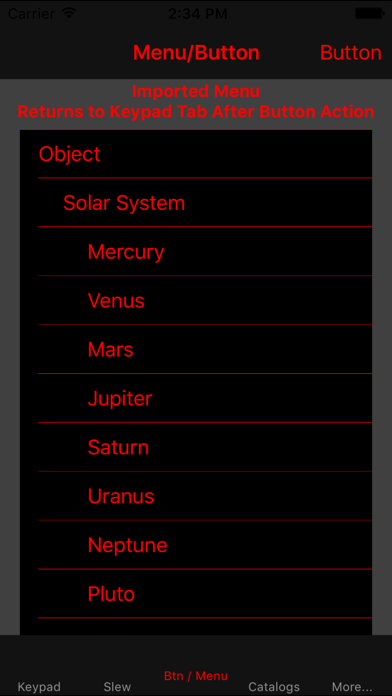
This tab makes much of the operation of the LX200GPS easier and more accessible. The front side of the tab provides customizable buttons for important functions such as Alignment methods, Parking, Initializing, Guided Tours and more. The back side presents the entire operation menu of the Autostar II in an expandable/collapsible table. This operation menu can be imported directly from the scope, or the default menu can be used.

Catalogs Tab
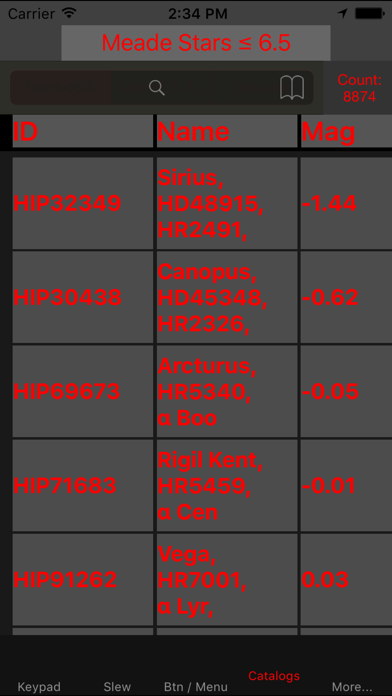
This tab provides a choice of two star catalogs and one Messier catalog, totaling over 21,000 objects. Each catalog is displayed in a scrollable, searchable table. Tapping on an object in the table displays additional object information and offers the option to Go To the object or add it to Favorites.

More…
Additional convenience functions are provided in the More… tab. Features include, displaying current coordinates or slewing to input coordinates (RA/Dec, Alt/Az), controlling the Meade micro focuser, entering manual commands, setting the scope from iPhone or iPad location and time, and more.
Show more Show less

More data about ScopeBoss

Price Free to download
Rating 4.00 based on 6 ratings
Ranking Not ranked
Version 1.2.1
App download size 18.6 MB
Suitable for Everyone

Alternative downloads for the ScopeBoss app

SkySafari 6 Pro icon SkySafari 6 Pro
Simulation Curriculum Corp.
4.8
$24.99
6.4K ratings
RST Decoder Pro icon RST Decoder Pro
koji kamogawa
5.0
$1.99
1 ratings
Astro-COLIBRI icon Astro-COLIBRI
Fabian Schussler
0.0
Free
Small Vessel Sea Service icon Small Vessel Sea Service
Mike Anderson
2.0
Free
3 ratings
SkySafari 7 Pro icon SkySafari 7 Pro
Simulation Curriculum Corp.
4.6
$29.99
5.3K ratings
SNEWS Events icon SNEWS Events
Peter Kramer
5.0
Free
3 ratings
SkySafari 7 Plus icon SkySafari 7 Plus
Simulation Curriculum Corp.
4.7
$19.99
1.6K ratings
PegasusAstro Unity icon PegasusAstro Unity
Pegasus Astro Co. Ltd.
1.0
Free
8 ratings

Changelog of ScopeBoss

No changelog data

Developer information for Lodewijk Bonebakker

Lodewijk Bonebakker

Address:

Share ScopeBoss

Comments on ScopeBoss for iOS

We don't have enough comments to show example comments. Please check back later.

App Store Rankings for ScopeBoss

This app is not ranked

Technologies used by ScopeBoss

SkySafari 6 Pro icon SkySafari 6 Pro
RST Decoder Pro icon RST Decoder Pro
Astro-COLIBRI icon Astro-COLIBRI
Small Vessel Sea Service icon Small Vessel Sea Service
SkySafari 7 Pro icon SkySafari 7 Pro
SNEWS Events icon SNEWS Events
SkySafari 7 Plus icon SkySafari 7 Plus
PegasusAstro Unity icon PegasusAstro Unity

Back to top
AppBrain Intelligence premium content

Subscribe now to get full and unlimited access to AppBrain Intelligence. You'll have access to:

  • App Intelligence dashboard (performance timeline, competitor comparison, country rankings, insight cards)
  • Detailed ranking data per app
  • Full timeline per developer
  • Device market shares data per country
1 Month

$75/mo
(billed every month)

SAVE 0%
Subscribe
3 Months

$65/mo
($195 billed every 3 months)

SAVE 13%
Subscribe
1 Year

$57.50/mo
($690 billed every year)

SAVE 23%
Subscribe
Each subscription will automatically renew 3 days before the expiration date for the same time period. Subscriptions can be cancelled at any time before the renewal.

AppBrain is a directory focused on discovering great apps and games. We give statistics, rankings and search options that Google Play and the App Store don't have. All trademarks are owned by their respective owners. AppBrain doesn't offer APKs or binaries, and always lets users install the official version from Google Play or the App Store.

More apps

  • Top Android apps being viewed
  • Water Sort Puzzle Challenge
  • Money Earning Game: Easypaisa
  • Arrow Popper - Color Blast

Android Statistics

  • Android statistics
  • Google Play Developer stats
  • Trending Android Apps
  • Top popular Apps
  • Buy the best Android phone

About AppBrain

  • Contact
  • Privacy
  • Documentation
  • DMCA takedowns
  • Articles
  • Blog
  • Free App-Ads.Txt Validation
© 2010-2026 - AppBrain