AppBrain
AppBrain
  • Apps
  • Apps being viewed right now Trending apps today Most popular apps All-time most installed apps Top rated apps iPhone and iPad apps
  • Intelligence ▾
    Intelligence overview → Track any Android app or your whole market
    Track & analyze
    Keyword Tracker & OptimizerTrack & improve Play rankings App Performance ReportOne-off PDF for any app StatisticsFree Android & Play market stats
    Promote your app
    Featured Apps App Links
  • Intelligence
  • Pricing
  • Dashboard
  • Sign up
  • Log in
App Store Apps > Productivity > Scrap Paper Pro
App profile & analytics · Productivity · Data updated 2026-10-05
Scrap Paper Pro icon

Scrap Paper Pro

by ANKUR AGRAWAL · $2.99 · Version 1.0
Availability On the App Store since September 2026 ↗
Rating on App Store
5.00/5
1 ratings
Rating
5.00
1 reviews
Best rank
–
not in the top lists
Last updated
September 9, 2026
1.0
AppBrain's verdict New

Scrap Paper Pro came out 34 days ago. It doesn't have enough ratings yet to judge what users think.

Scrap Paper Pro is made and published by ANKUR AGRAWAL. AppBrain is an independent app data site and isn't affiliated with ANKUR AGRAWAL. The app name, icon, screenshots and description belong to ANKUR AGRAWAL and are shown as published on the App Store.

About Scrap Paper Pro

Scrap Paper Pro is a productivity app developed by ANKUR AGRAWAL.

User Ratings

Scrap Paper Pro is rated 5.00 out of 5 stars. The rating is based on one rating ratings.

App Information

Scrap Paper Pro costs $2.99. The app size is 1.76 MB. The latest version available is 1.0. The last update was on September 9, 2026.

Technical Requirements

The app has a content rating of Everyone. The app has been available on the App Store since September 2026.

Description by ANKUR AGRAWAL (from the App Store)
Scrap paper, not a filing system.

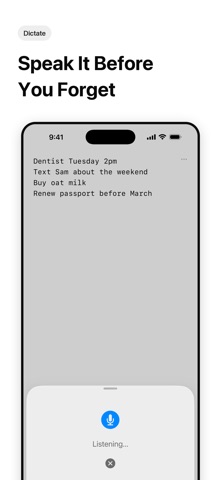
Scrap Paper Pro is one page. It opens where you left off, at the bottom, with the keyboard already up. There are no notebooks, no folders, no titles, no tags, and nothing to name. You write the thing down and get on with your day.

ONE PAGE, EVERYWHERE

• One canvas. Everything you jot lands on the same page, in order. Nothing to file, nothing to lose.
• Always at the bottom. The app opens with the cursor where you stopped writing.
• Syncs privately. Your page follows you across iPhone, iPad, and Apple Watch through your own iCloud account.
• Capture without opening it. A Home Screen widget shows your latest lines and drops you into the canvas. A Lock Screen widget starts dictation in one tap. Siri takes a thought hands-free.
• Apple Watch. Dictate a line from your wrist and it appears on the page.
• Swipe to undo. A horizontal swipe undoes and redoes by thought, not by character.
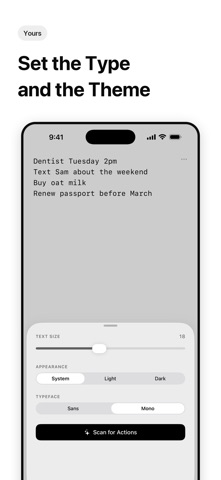
• Two typefaces, three appearances, one size slider. That is the entire settings screen.

TURN NOTES INTO ACTIONS

On devices with Apple Intelligence, tap Scan for Actions and your page is read on-device to find the things you meant to do:

• "coffee with Sam Thursday at 10" becomes a Calendar event at the right time
• "add a reminder to get toilet paper" becomes a reminder that says get toilet paper
• "text Sam that I'm going to be home late" opens Messages to the right person with the message already written
• "buy printer ink from amazon" opens Amazon searching for it
• Addresses open in Maps, links open in Safari, numbers dial

You choose which suggestions to keep, and nothing happens until you say so. Anything already handled stops being suggested next time.

PRIVATE BY CONSTRUCTION

No account, no server, no analytics, no ads. Parsing runs entirely on your device — your writing is never uploaded to anyone, including me. Your notes live in your own private iCloud. Contacts, Calendar, and Reminders are touched only in response to an action you tap.

One purchase, no subscription. Write the thing down and get on with your day.
Show more Show less

Screenshots

Scrap Paper Pro Screenshot 1 of 6
Scrap Paper Pro Screenshot 2 of 6
Scrap Paper Pro Screenshot 3 of 6
Scrap Paper Pro Screenshot 4 of 6
Scrap Paper Pro Screenshot 5 of 6
Scrap Paper Pro Screenshot 6 of 6
Screenshots by ANKUR AGRAWAL, from the the App Store listing
Official page on the App Store

Alternatives to Scrap Paper Pro

Gratodo: Habit Tracker & To Do icon Gratodo: Habit Tracker & To Do
Nguyen Luu
0.0
Free
Any Counter: Endless Counter icon Any Counter: Endless Counter
Dmitry Merkushin
1.0
$2.99
1 ratings
NameSpark: Never Forget Names icon NameSpark: Never Forget Names
Kohei Ishikawa
0.0
$1.99
StartFocus icon StartFocus
通 庞
0.0
Free
Flow Timer: Tasks & Lofi icon Flow Timer: Tasks & Lofi
Ardis Zhong
0.0
Free
SnapNote: Offline AI Scanner icon SnapNote: Offline AI Scanner
森 柴
0.0
Free
Lifeward-Less Screen,More Life icon Lifeward-Less Screen,More Life
世昌 杨
0.0
$2.99
Evris: Thought Keeper icon Evris: Thought Keeper
Parampreet Singh
0.0
Free

Changelog of Scrap Paper Pro

No changelog data

Developer information for ANKUR AGRAWAL

ANKUR AGRAWAL

Address:

Share Scrap Paper Pro

Comments on Scrap Paper Pro for iOS

We don't have enough comments to show example comments. Please check back later.

App Store Rankings for Scrap Paper Pro

This app is not ranked

Technologies used by Scrap Paper Pro

Frequently asked questions about Scrap Paper Pro

Is Scrap Paper Pro free?

No. Scrap Paper Pro costs $2.99 on the App Store.

Is Scrap Paper Pro still available?

Yes. Scrap Paper Pro is on the App Store, and the last update we saw was on September 9, 2026.

How large is Scrap Paper Pro?

Scrap Paper Pro is 1.76 MB.

Is Scrap Paper Pro suitable for children?

App Store rates the content of Scrap Paper Pro as suitable for everyone.

How do people rate Scrap Paper Pro?

Scrap Paper Pro has one rating of 5.00 stars on the App Store.

Who made Scrap Paper Pro?

Scrap Paper Pro was developed by ANKUR AGRAWAL. It is listed in the productivity category on the App Store.

What are the best alternatives to Scrap Paper Pro?

People looking at Scrap Paper Pro also look at these productivity apps: Gratodo: Habit Tracker & To Do, Any Counter: Endless Counter, NameSpark: Never Forget Names, StartFocus, Flow Timer: Tasks & Lofi.

Today's trending apps Top new apps Popular Productivity Apps Price drops on Google Play Apps other people are watching
Gratodo: Habit Tracker & To Do icon Gratodo: Habit Tracker & To Do
Any Counter: Endless Counter icon Any Counter: Endless Counter
NameSpark: Never Forget Names icon NameSpark: Never Forget Names
StartFocus icon StartFocus
Flow Timer: Tasks & Lofi icon Flow Timer: Tasks & Lofi
SnapNote: Offline AI Scanner icon SnapNote: Offline AI Scanner
Lifeward-Less Screen,More Life icon Lifeward-Less Screen,More Life
Evris: Thought Keeper icon Evris: Thought Keeper
Overview Alternatives Reviews Rankings Technology
AppBrain Intelligence premium content

Subscribe now to get full and unlimited access to AppBrain Intelligence. You'll have access to:

  • App Intelligence dashboard (performance timeline, competitor comparison, country rankings, insight cards)
  • Detailed ranking data per app
  • Full timeline per developer
  • Device market shares data per country
  • Unlimited keyword tracking
1 Month

$75/mo
(billed every month)

SAVE 0%
Subscribe
3 Months

$65/mo
($195 billed every 3 months)

SAVE 13%
Subscribe
1 Year

$57.50/mo
($690 billed every year)

SAVE 23%
Subscribe
Each subscription will automatically renew 3 days before the expiration date for the same time period. Subscriptions can be cancelled at any time before the renewal.

AppBrain is an app data site, we track rankings, ratings, installs for all apps and games on Google Play and the App Store. AppBrain doesn't host app files or APKs, all install links go directly to the official store. All trademarks are owned by their respective owners.

More apps

  • Top Android apps being viewed
  • View M Bosses
  • View FD Markets - Pocket Trading
  • Dumbbells Training stats

App statistics

  • Android statistics
  • Google Play Developer stats
  • Trending Android Apps
  • Trending iOS apps
  • Top popular Apps
  • Buy the best Android phone
  • Buy & sell app businesses

About AppBrain

  • Contact
  • Privacy
  • Documentation
  • DMCA takedowns
  • Articles
  • Blog
  • Monetization tips: Understanding your eCPM
© 2010-2026 - AppBrain