

Scrapaper
Scrapaper is made and published by Kyung Hyun Park. AppBrain is an independent app data site and isn't affiliated with Kyung Hyun Park. The app name, icon, screenshots and description belong to Kyung Hyun Park and are shown as published on the App Store.
AppBrain's verdict
- Last updated
- September 15, 2026
Rankings
App Store top chartsApp Store Rankings for Scrapaper
Competitors
Similar apps and more from Kyung Hyun Park
















Releases
Updates seen on the App Store- Version
- 1.0.1
- Launched
- September 2026
No changelog data
User feedback
Ratings and reviews on the App StoreComments on Scrapaper for iOS
We don't have enough comments to show example comments. Please check back later.
Technology
Found in the app by AppBrain- Price
- Free
- App size
- 71.8 MB
- Content rating
- Everyone
Technologies used by Scrapaper
About the app and developer
About Scrapaper
Scrapaper is a photo & video app developed by Kyung Hyun Park.
User Ratings
The app has no ratings yet.
App Information
Scrapaper is freely available from the App Store. The app size is 71.81 MB. The latest version available is 1.0.1. The last update was on September 15, 2026.
Technical Requirements
The app has a content rating of Everyone. The app has been available on the App Store since September 2026.
Developer information for Kyung Hyun Park
Address:
Frequently asked questions about Scrapaper
Is Scrapaper free?
Yes. Scrapaper is free on the App Store.
Is Scrapaper still available?
Yes. Scrapaper is on the App Store, and the last update we saw was on September 15, 2026.
How large is Scrapaper?
Scrapaper is 71.81 MB.
Is Scrapaper suitable for children?
App Store rates the content of Scrapaper as suitable for everyone.
Who made Scrapaper?
Scrapaper was developed by Kyung Hyun Park. It is listed in the photo & video category on the App Store.
What are the best alternatives to Scrapaper?
People looking at Scrapaper also look at these photo & video apps: ALIGNED — Carousel Layout, Shable, Swatch This: Capture Colors, iSketch - Pencil Sketch Effect, ReelGrid: Video Collage Maker.
Store listing
By Kyung Hyun Park, from the App Store


Description by Kyung Hyun Park Written by the developer, not by AppBrain. Click to read.
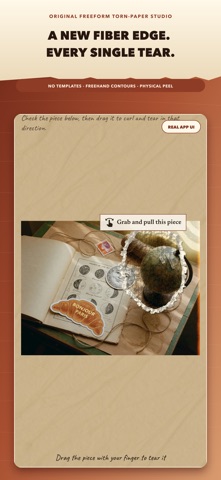
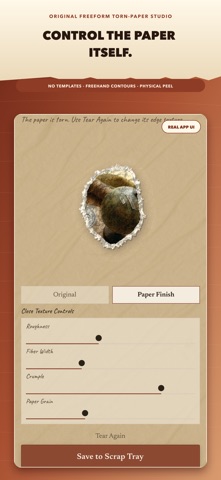
Every piece begins with your own gesture. Draw any closed contour over a photo, tune the paper’s roughness, fiber width, crumple, and grain, then pull to peel the piece away. Each re-tear creates a newly randomized edge, so the result is not a fixed mask or a recycled template.
WHAT MAKES SCRAPAPER DISTINCT
• Freehand contour tearing: trace any shape instead of choosing a preset frame.
• Tactile peel interaction: pull the selected area away with curl and rip motion.
• Material-level controls: adjust torn fibers, wrinkles, paper grain, and edge roughness.
• On-device text awareness: Apple Vision can suggest text-edge regions while keeping central text intact.
• Editable paper composition: overlap, rotate, scale, move, and reorder every scrap and decoration.
• Handmade tools: masking tape, kraft tape, twine, handwriting, paper styles, and procedural stickers.
• Two original outputs: a 4:5 feed image and a 9:16 animated MP4 reel in which pieces arrive one by one.
MAKE IT YOURS
Choose a photo from your library, take one with the camera, or practice with the included sample. Build one shareable artwork per scrapbook, keep reusable pieces in the scrap tray, and revise your composition with undo and redo.
GEMS, ADS, AND PURCHASES
Scrapaper starts with 10 gems. Optional rewarded ads grant 5 gems. Special stickers cost 1 gem and animated-reel exports cost 3 gems. Optional consumable gem packs are also available as one-time in-app purchases. There is no subscription, and the core freehand tearing and scrapbook editor remain available without a purchase.
PRIVACY-FIRST CREATION
Your photo cutting, page composition, text recognition, and export rendering happen on the device. Camera and photo access are requested only when you choose the related action. Scrapaper has no account, social feed, public upload, or cloud workspace.
Privacy Policy: https://devkhpark.tistory.com/453
Terms of Use: https://ikhpark.com/blog/with-theapp-terms-of-use-2026-08-20