

Screen Forge
Screen Forge is made and published by JOSE F DA SILVA NT. AppBrain is an independent app data site and isn't affiliated with JOSE F DA SILVA NT. The app name, icon, screenshots and description belong to JOSE F DA SILVA NT and are shown as published on the App Store.
AppBrain's verdict
- Last updated
- July 8, 2025
Rankings
App Store top chartsApp Store Rankings for Screen Forge
Competitors
Similar apps and more from JOSE F DA SILVA NTMore from JOSE F DA SILVA NT


Releases
Updates seen on the App Store- Version
- 1.2.1
- Launched
- April 2024
No changelog data
User feedback
Ratings and reviews on the App StoreComments on Screen Forge for iOS
We don't have enough comments to show example comments. Please check back later.
Technology
Found in the app by AppBrain- Price
- Free
- App size
- 1.17 MB
- Content rating
- Everyone
Technologies used by Screen Forge
About the app and developer
About Screen Forge
Screen Forge is a photo & video app developed by JOSE F DA SILVA NT.
What is the rating of Screen Forge?
Screen Forge has no ratings yet.
Is Screen Forge free?
Screen Forge is free. The app size is 1.17 MB. The latest version available is 1.2.1. The last update was on July 8, 2025.
What are the requirements for Screen Forge?
The app has a content rating of Everyone. The app has been available on the App Store since April 2024.
Developer information for JOSE F DA SILVA NT
Address:
Frequently asked questions about Screen Forge
Is Screen Forge free?
Yes. Screen Forge is free on the App Store.
Is Screen Forge still available?
Yes. Screen Forge is on the App Store, and the last update we saw was on July 8, 2025.
How large is Screen Forge?
Screen Forge is 1.17 MB.
Is Screen Forge suitable for children?
App Store rates the content of Screen Forge as suitable for everyone.
Who made Screen Forge?
Screen Forge was developed by JOSE F DA SILVA NT. It is listed in the photo & video category on the App Store.
Store listing
By JOSE F DA SILVA NT, from the App Store



Description by JOSE F DA SILVA NT Written by the developer, not by AppBrain. Click to read.
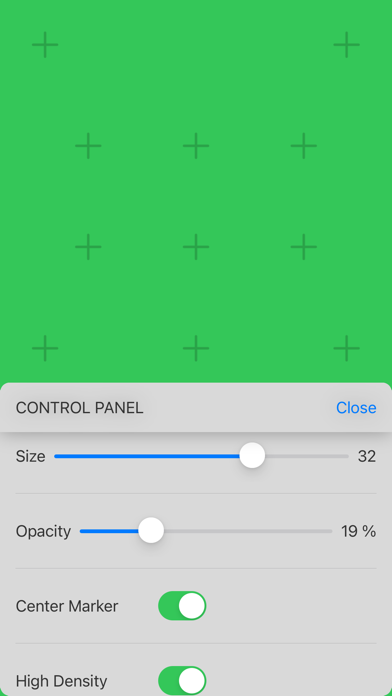
Screen Forge is a powerful tool designed for filmmakers using iPhones and iPads to shoot scenes where screens will later be replaced in VFX. Whether you’re using Chroma Key or other screen replacement techniques, Screen Forge helps you set up your screen for seamless post-production integration.
Key Features:
• Multiple Background Colors – Select from a range of colors to match any scene’s needs.
• Tracking Markers – Choose from various marker types to ensure precise alignment in post-production.
• Touch References – On-screen ‘Keyboard’ and ‘Phone’ guides help actors interact naturally with virtual interfaces.
• Single Tap Track Marker – Custom markers for precise tap and drag tracking (not compatible with multiple touches).
• Custom Size & Opacity – Adjust tracking markers to balance visibility, reflections, and removal ease in VFX.
• Tips for Beginners – Get practical guidance on optimizing your screen for VFX.
• Brightness Adjustment Chart – Fine-tune screen brightness to match scene exposure for optimal results.
• Focus Chart – Ensure sharp focus on the screen during filming.
Designed for both beginners and professionals, Screen Forge simplifies screen preparation, making your VFX workflow smoother and more efficient.
Disclaimer:
Screen Forge is a pre-production tool and does not generate VFX or final composites. It assists filmmakers in setting up screens for filming, while actual VFX work should be done using professional post-production software.
Terms Of Use:
https://www.apple.com/legal/internet-services/itunes/dev/stdeula/
Privacy Policy:
https://www.dotcine.com.br/screenforge-privacy