

Screen Mirroring: View TV
Screen Mirroring: View TV is made and published by Valerian Kokhreidze. AppBrain is an independent app data site and isn't affiliated with Valerian Kokhreidze. The app name, icon, screenshots and description belong to Valerian Kokhreidze and are shown as published on the App Store.
AppBrain's verdict
- Rating on App Store
- 5.00
- 2 ratings
- Last updated
- October 6, 2026
It doesn't have enough ratings yet to judge what users think.
Rankings
App Store top chartsApp Store Rankings for Screen Mirroring: View TV
Competitors
Similar apps and more from Valerian KokhreidzeAlternatives to Screen Mirroring: View TV





More from Valerian Kokhreidze




Releases
Updates seen on the App Store- Version
- 2.0
- Launched
- May 2026
No changelog data
User feedback
Ratings and reviews on the App StoreComments on Screen Mirroring: View TV for iOS
We don't have enough comments to show example comments. Please check back later.
Technology
Found in the app by AppBrain- Price
- Free
- App size
- 51.5 MB
- Content rating
- Everyone
Technologies used by Screen Mirroring: View TV
About the app and developer
About Screen Mirroring: View TV
Screen Mirroring: View TV is an utilities app developed by Valerian Kokhreidze.
User Ratings
Screen Mirroring: View TV is rated 5.00 out of 5 stars. The rating is based on 2 ratings.
App Information
Screen Mirroring: View TV is freely available from the App Store. The app size is 51.47 MB. The latest version available is 2.0. The last update was on October 6, 2026.
Technical Requirements
The app has a content rating of Everyone. The app has been available on the App Store since May 2026.
Developer information for Valerian Kokhreidze
Address:
Store listing
By Valerian Kokhreidze, from the App Store

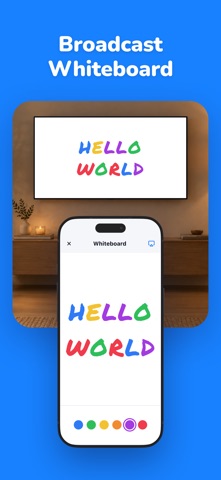

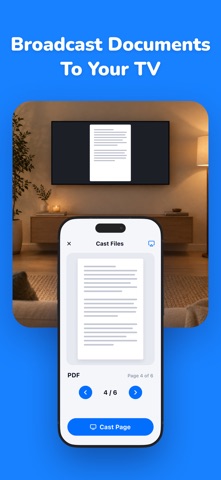
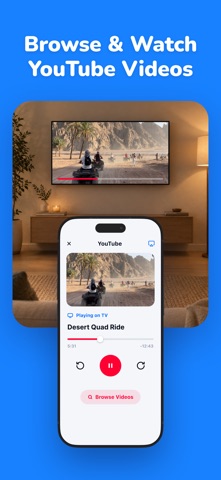
Description by Valerian Kokhreidze Written by the developer, not by AppBrain. Click to read.
Stream your screen, photos, videos, and apps to Smart TV, Roku, Chromecast, and Fire TV in seconds. No cables just tap and cast. Mirror screen content from your iPhone in stunning HD with zero setup hassle.
WHAT YOU CAN MIRROR
Mirror your full iPhone screen in real time. Cast photos, videos, music, YouTube clips, slideshows, web browsers, presentations, and documents straight to the big screen. Share family memories, work decks, and movie nights without any setup. Mirror to TV from anywhere in the house over Wi-Fi.
WORKS WITH EVERY TV
Connect to Smart TVs from Samsung, LG, Sony, Hisense, TCL, Vizio, Panasonic, Philips, Sharp, and more. Compatible with AirPlay, Roku, Chromecast, Fire TV, Apple TV, and other major streaming devices and dongles. Whether you call it screen mirroring, screencast, tvcast, smartview, castplay, or phone mirroring, this app handles it all in one place.
POWERFUL FEATURES
Full screen mirror with low latency and crisp HD output
Photo and video casting in HD and 4K
YouTube and media casting from your favorite streaming apps
Browser mirroring to view websites, articles, and live streams on TV
Document and PDF casting for meetings, lessons, and study sessions
Slideshow mode with smooth transitions and music
Share files, links, screens, and tabs with one tap
AirPlay support for Apple TV and AirPlay-enabled Smart TVs
iPhone mirroring without extra hardware, adapters, or HDMI cables
Auto-detect nearby devices on your network for instant pairing
Background audio mirroring for music, podcasts, and calls
Rotate, zoom, and adjust display to fit your screen perfectly
PERFECT FOR
Movie nights and binge-watching with friends and family. Showing off vacation photos and reels on the big screen. Business presentations, sales pitches, and remote work meetings. Classroom lessons, lectures, and online tutorials. Streaming sports, gaming highlights, and live events. Pulling up recipes, workouts, and how-to videos in the kitchen, gym, or garage. Sharing baby photos with grandparents and turning birthdays into slideshows.
NO CABLES, NO HASSLE
Skip the HDMI cables, adapters, and dongles. Connect over Wi-Fi and start mirroring in under a minute. Quick setup, stable connection, smooth playback, and a clean, simple interface that anyone in the family can use from kids to grandparents.
HOW IT WORKS
Open the app and choose your TV or streaming device.
Tap connect and confirm the pairing on your TV.
Choose what to share screen, photos, videos, browser, or documents.
Enjoy your content on the big screen instantly, with full control from your phone.
WORKS ON EVERY MAJOR PLATFORM
Built for AirPlay, Roku, Chromecast, Fire TV, and DLNA-compatible Smart TVs. Compatible with most Wi-Fi routers and home networks. Optimized for the latest iOS releases and tuned for low battery use during long streaming sessions.
PRIVACY FIRST
Your content stays between your phone and your TV. No accounts required, no tracking, no ads sneaking onto your screen, and no nonsense just a fast, reliable mirroring experience you can trust.
From late-night movies to last-minute meetings, turn any TV into your second screen. Download Screen Mirroring - View TV today and start casting, sharing, and streaming in seconds.
You may purchase an auto-renewing subscription through an In-App Purchase.
Auto-renewable subscription
Your subscription will be charged to your iTunes account at confirmation of purchase and will automatically renew (at the duration selected) unless auto-renew is turned off at least 24 hours before the end of the current period.
Current subscription may not be cancelled during the active subscription period; however, you can manage your subscription and/or turn off auto-renewal by visiting your iTunes Account Settings after purchase
Privacy & policy: https://www.plainraw.com/markdown/81074e00bcfc
Terms of service: https://www.plainraw.com/markdown/245506ed8609