AppBrain
AppBrain
  • Apps
  • Apps being viewed right now Trending apps today Most popular apps All-time most installed apps Top rated apps iPhone and iPad apps
  • Intelligence ▾
    Intelligence overview → Track any Android app or your whole market
    Track & analyze
    Keyword Tracker & OptimizerTrack & improve Play rankings App Performance ReportOne-off PDF for any app StatisticsFree Android & Play market stats
    Promote your app
    Featured Apps App Links
  • Intelligence
  • Pricing
  • Dashboard
  • Sign up
  • Log in
App Store Apps > Productivity > Screen time control - Lummi
App profile & analytics · Productivity · Data updated 2026-10-01
Screen time control - Lummi icon

Screen time control - Lummi

by Antonio Sanchez · Free · Version 1.1.0
Availability On the App Store since June 2026 ↗
Rating on App Store
–
Rating
–
0 reviews
Best rank
–
not in the top lists
Last updated
July 1, 2026
1.1.0

Screen time control - Lummi is made and published by Antonio Sanchez. AppBrain is an independent app data site and isn't affiliated with Antonio Sanchez. The app name, icon, screenshots and description belong to Antonio Sanchez and are shown as published on the App Store.

About Screen time control - Lummi

Screen time control - Lummi is a productivity app developed by Antonio Sanchez.

What is the rating of Screen time control - Lummi?

Screen time control - Lummi has no ratings yet.

Is Screen time control - Lummi free?

Screen time control - Lummi is free. The app size is 16.95 MB. The latest version available is 1.1.0. The last update was on July 1, 2026.

What are the requirements for Screen time control - Lummi?

The app has a content rating of Medium Maturity. The app has been available on the App Store since June 2026.

Description by Antonio Sanchez (from the App Store)
Scroll less. Read more.

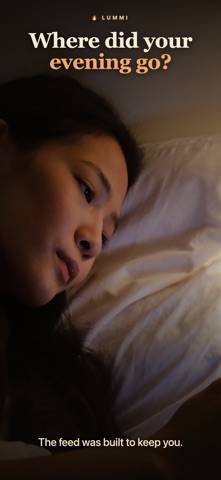
You know the loop. You pick up your phone for one thing and look up forty minutes later, the thing undone. The feed is good at that. It's the only thing it's good at.

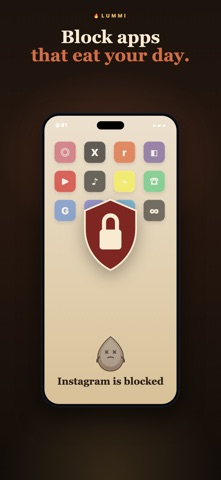
Lummi blocks the apps that do this to you. Pick the ones you open without thinking, set a daily limit, and that's that - no "five more minutes" button to talk yourself into. When you reach for a blocked app anyway, Lummi doesn't just slam a wall down. It offers you the next page of whatever you're reading instead.

Because there's a whole library inside. Real books, your own shelves, highlights and notes that stick around, a night mode that won't fry your eyes at 11pm. Thousands of titles. Start tonight with the classics.

There's also a flame named Lummi who takes your screen time a little personally. Stay under your limit and it burns bright. Slip and it dims. It's a small thing, but a creature quietly rooting for you beats a red notification badge every time.

And none of it phones home - your Screen Time data never leaves your device. We couldn't see it if we wanted to.

If you own more unread books than read ones, this is for you.

Enough scrolling. Start your first chapter.

-

Lummi requires a subscription to unlock app blocking, goals, and the full reader.
• Payment is charged to your Apple Account at purchase confirmation.
• Subscriptions auto-renew unless turned off at least 24 hours before the period ends; your account is charged within 24 hours prior to renewal.
• Manage or cancel anytime in Apple Account settings.

Privacy Policy: https://ilummi.app/privacy
Terms of Use: https://ilummi.app/terms
Show more Show less

Screenshots

Screen time control - Lummi Screenshot 1 of 5
Screen time control - Lummi Screenshot 2 of 5
Screen time control - Lummi Screenshot 3 of 5
Screen time control - Lummi Screenshot 4 of 5
Screen time control - Lummi Screenshot 5 of 5
Screenshots by Antonio Sanchez, from the the App Store listing
Official page on the App Store

Alternatives to Screen time control - Lummi

Svala: Screen Time Control icon Svala: Screen Time Control
Sebastian Kalita
0.0
Free
Taskwall: Screen Time + To Do icon Taskwall: Screen Time + To Do
OrigamiStudio
0.0
Free
DOTS - Screen Time & Focus icon DOTS - Screen Time & Focus
Novarch LLC
5.0
Free
1 ratings
PolyAsk icon PolyAsk
Echo Apps Limited
0.0
Free
Mado: Dopamine & Digital Detox icon Mado: Dopamine & Digital Detox
Marcin Piechaczek
0.0
Free
Screen Time & Focus - Tomosu icon Screen Time & Focus - Tomosu
nakajima ryoma
0.0
Free
LockIn: Screen Time Control icon LockIn: Screen Time Control
Tymofii Hrynchuk
4.7
Free
3 ratings
AllChat: Verify AI Answers icon AllChat: Verify AI Answers
IQDigital
4.7
Free
17 ratings

More from Antonio Sanchez

QuorumAI icon QuorumAI
Antonio Sanchez
0.0
$14.99

Changelog of Screen time control - Lummi

No changelog data

Developer information for Antonio Sanchez

Antonio Sanchez

Address:

Share Screen time control - Lummi

Comments on Screen time control - Lummi for iOS

We don't have enough comments to show example comments. Please check back later.

App Store Rankings for Screen time control - Lummi

This app is not ranked

Technologies used by Screen time control - Lummi

Frequently asked questions about Screen time control - Lummi

Is Screen time control - Lummi free?

Yes. Screen time control - Lummi is free on the App Store.

Is Screen time control - Lummi still available?

Yes. Screen time control - Lummi is on the App Store, and the last update we saw was on July 1, 2026.

How large is Screen time control - Lummi?

Screen time control - Lummi is 16.95 MB.

Is Screen time control - Lummi suitable for children?

App Store gives Screen time control - Lummi a medium maturity rating, so it is not meant for young children.

Who made Screen time control - Lummi?

Screen time control - Lummi was developed by Antonio Sanchez. It is listed in the productivity category on the App Store.

What are the best alternatives to Screen time control - Lummi?

People looking at Screen time control - Lummi also look at these productivity apps: Svala: Screen Time Control, Taskwall: Screen Time + To Do, DOTS - Screen Time & Focus, PolyAsk, Mado: Dopamine & Digital Detox.

Apps other people are watching Price drops on Google Play Today's trending apps Top new apps Popular Productivity Apps
Svala: Screen Time Control icon Svala: Screen Time Control
Taskwall: Screen Time + To Do icon Taskwall: Screen Time + To Do
DOTS - Screen Time & Focus icon DOTS - Screen Time & Focus
PolyAsk icon PolyAsk
Mado: Dopamine & Digital Detox icon Mado: Dopamine & Digital Detox
Screen Time & Focus - Tomosu icon Screen Time & Focus - Tomosu
LockIn: Screen Time Control icon LockIn: Screen Time Control
AllChat: Verify AI Answers icon AllChat: Verify AI Answers
Overview Alternatives Reviews Rankings Technology
AppBrain Intelligence premium content

Subscribe now to get full and unlimited access to AppBrain Intelligence. You'll have access to:

  • App Intelligence dashboard (performance timeline, competitor comparison, country rankings, insight cards)
  • Detailed ranking data per app
  • Full timeline per developer
  • Device market shares data per country
  • Unlimited keyword tracking
1 Month

$75/mo
(billed every month)

SAVE 0%
Subscribe
3 Months

$65/mo
($195 billed every 3 months)

SAVE 13%
Subscribe
1 Year

$57.50/mo
($690 billed every year)

SAVE 23%
Subscribe
Each subscription will automatically renew 3 days before the expiration date for the same time period. Subscriptions can be cancelled at any time before the renewal.

AppBrain is an app data site, we track rankings, ratings, installs for all apps and games on Google Play and the App Store. AppBrain doesn't host app files or APKs, all install links go directly to the official store. All trademarks are owned by their respective owners.

More apps

  • Top Android apps being viewed
  • Wooden Cube : 2048 Merge 3D
  • Zerodha Varsity
  • Winning Jackpot Slots Casino

App statistics

  • Android statistics
  • Google Play Developer stats
  • Trending Android Apps
  • Trending iOS apps
  • Top popular Apps
  • Buy the best Android phone
  • Buy & sell app businesses

About AppBrain

  • Contact
  • Privacy
  • Documentation
  • DMCA takedowns
  • Articles
  • Blog
  • Android App Marketing: Learn how to better market your Android app
© 2010-2026 - AppBrain