

ScreenMate: TV Remote & Mirror
ScreenMate: TV Remote & Mirror is made and published by APPSPHERE LIMITED. AppBrain is an independent app data site and isn't affiliated with APPSPHERE LIMITED. The app name, icon, screenshots and description belong to APPSPHERE LIMITED and are shown as published on the App Store.
AppBrain's verdict
- Rating on App Store
- 4.00
- 3 ratings
- Last updated
- August 25, 2026
- Size
- 73.8 MB
It doesn't have enough ratings yet to judge what users think.
User feedback
Ratings and reviews on the App StoreComments on ScreenMate: TV Remote & Mirror for iOS
We don't have enough comments to show example comments. Please check back later.
Store listing
By APPSPHERE LIMITED, from the App Store


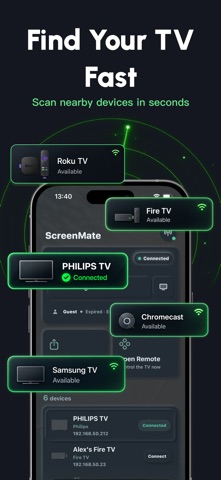

Description by APPSPHERE LIMITED Written by the developer, not by AppBrain. Click to read.
Share TV Control
Create a QR code remote for family members or guests.
• Choose which controls are available
• Set an automatic access time limit
• End guest access at any time
• Let others control the TV without using your iPhone
Control Your TV
Use your iPhone as a remote when both devices are connected to the same Wi-Fi network.
Available controls may include:
• Navigation and menu controls
• Volume and playback controls
• Power and input controls
• Number and channel buttons
• A large-button layout for easier tapping
Available controls vary by TV model.
Screen Mirroring
Mirror your iPhone screen to supported TVs over the same Wi-Fi network.
Mirroring availability depends on the TV, supported connection method, and network settings. Protected or rights-managed content may not be available.
Photo and Video Casting
Display photos and videos from your iPhone on a supported TV.
Media compatibility and playback quality may vary by TV, file format, and network connection.
TV Doctor
If your TV cannot be found or connected, TV Doctor provides guided troubleshooting for common issues, including:
• Wi-Fi network checks
• Local network permissions
• TV availability
• Pairing and confirmation requirements
• Device discovery problems
Getting Started
1. Connect your iPhone and TV to the same Wi-Fi network.
2. Allow local network access.
3. Select an available TV.
4. Complete any confirmation shown on the TV.
5. Start using the available features.
No account is required.
Remote control, guest access, screen mirroring, and casting availability vary by TV model, supported connection method, device settings, and network configuration. Some TVs may require additional setup or on-screen confirmation.
Premium Access
ScreenMate offers optional in-app purchases to unlock premium features and expanded access. Available plans and pricing are shown in the app before purchase.
Privacy Policy:
https://appsphereltd.com/pp/6785789246/
Terms of Use:
https://appsphereltd.com/tou/6785789246/
Safety and technology
Found in the app by AppBrain- Price
- Free
- App size
- 73.8 MB
- Content rating
- Everyone
Technologies used by ScreenMate: TV Remote & Mirror
Releases
Updates seen on the App Store- Version
- 1.1
- Launched
- July 2026
No changelog data
Alternatives
Similar apps and more from APPSPHERE LIMITEDAlternatives to ScreenMate: TV Remote & Mirror


More from APPSPHERE LIMITED


Rankings
App Store top chartsApp Store Rankings for ScreenMate: TV Remote & Mirror
About the app and developer
About ScreenMate: TV Remote & Mirror
ScreenMate: TV Remote & Mirror is an utilities app developed by APPSPHERE LIMITED.
User Ratings
ScreenMate: TV Remote & Mirror is rated 4.00 out of 5 stars. The rating is based on 3 ratings.
App Information
ScreenMate: TV Remote & Mirror is freely available from the App Store. The app size is 73.84 MB. The latest version available is 1.1. The last update was on August 25, 2026.
Technical Requirements
The app has a content rating of Everyone. The app has been available on the App Store since July 2026.
Developer information for APPSPHERE LIMITED
Address: