

ScreenSeek: Screenshot OCR
ScreenSeek: Screenshot OCR is made and published by Haruki Sugaya. AppBrain is an independent app data site and isn't affiliated with Haruki Sugaya. The app name, icon, screenshots and description belong to Haruki Sugaya and are shown as published on the App Store.
AppBrain's verdict
- Last updated
- May 18, 2026
- Size
- 5.54 MB
User feedback
Ratings and reviews on the App StoreComments on ScreenSeek: Screenshot OCR for iOS
We don't have enough comments to show example comments. Please check back later.
Store listing
By Haruki Sugaya, from the App Store


Description by Haruki Sugaya Written by the developer, not by AppBrain. Click to read.
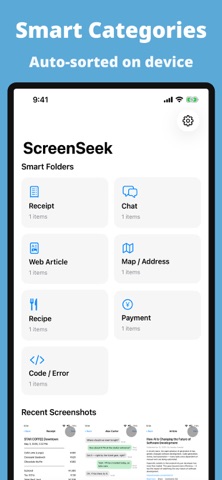
Stop scrolling through thousands of screenshots looking for that one receipt, address, or chat message. ScreenSeek runs Apple Vision OCR locally to make every word in every screenshot searchable.
KEY FEATURES
• Full-text search across your entire screenshot library
• On-device OCR — your photos never leave your phone
• Smart categories: Receipts, Chats, Articles, Maps, Code, Recipes, Payments
• Detect URLs, phone numbers, and email addresses automatically
• Read QR codes embedded in screenshots
• One-tap copy of recognized text
• Filter by date, category, or favorites
• Works fully offline — no account required
PRIVACY FIRST
• All processing happens on your device
• No analytics, no ads, no tracking
• Photo Library access is read-only by default
WHO IT'S FOR
• Anyone who saves articles, receipts, or chat captures
• Researchers, students, and journalists
• Travelers organizing maps and confirmation screens
• Developers searching for code snippets
Make your screenshot library actually useful.
Safety and technology
Found in the app by AppBrain- Price
- Free
- App size
- 5.54 MB
- Content rating
- Everyone
Technologies used by ScreenSeek: Screenshot OCR
Releases
Updates seen on the App Store- Version
- 1.0
- Launched
- May 2026
No changelog data
Alternatives
Similar apps and more from Haruki SugayaAlternatives to ScreenSeek: Screenshot OCR


More from Haruki Sugaya


Rankings
App Store top chartsApp Store Rankings for ScreenSeek: Screenshot OCR
About the app and developer
About ScreenSeek: Screenshot OCR
ScreenSeek: Screenshot OCR is a productivity app developed by Haruki Sugaya.
User Ratings
The app has no ratings yet.
App Information
ScreenSeek: Screenshot OCR is freely available from the App Store. The app size is 5.54 MB. The latest version available is 1.0. The last update was on May 18, 2026.
Technical Requirements
The app has a content rating of Everyone. The app has been available on the App Store since May 2026.
Developer information for Haruki Sugaya
Address: