

ScreenShare for OBS
ScreenShare for OBS is made and published by Ludovic Bouguerra. AppBrain is an independent app data site and isn't affiliated with Ludovic Bouguerra. The app name, icon, screenshots and description belong to Ludovic Bouguerra and are shown as published on the App Store.
AppBrain's verdict
- Rating on App Store
- 1.00
- 1 ratings
- Last updated
- September 5, 2025
- Size
- 42.4 MB
It doesn't have enough ratings yet to judge what users think.
User feedback
Ratings and reviews on the App StoreComments on ScreenShare for OBS for iOS
We don't have enough comments to show example comments. Please check back later.
Store listing
By Ludovic Bouguerra, from the App Store
Description by Ludovic Bouguerra Written by the developer, not by AppBrain. Click to read.
Key Features:
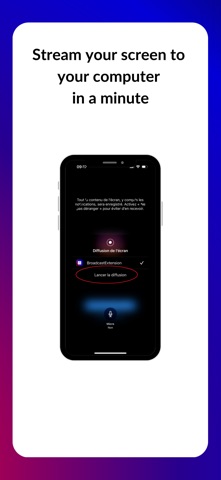
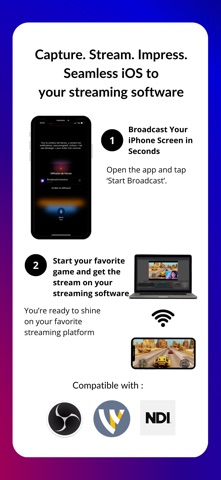
• Game Streaming on streaming studio : Share your mobile gameplay directly to your computer streaming's studio. Showcase your skills to the world with no extra hardware needed.
• Create Engaging Tutorials: Use ScreenShare virtual camera to record your screen for educational content, app demos, or step-by-step guides. Easily combine with your streaming studio or a virtual camera for professional-quality results.
• High-Quality Streaming: Enjoy smooth and high-resolution screen sharing, perfect for capturing every detail of your gameplay or instructional videos.
• Simple Setup: Just a few taps to start sharing your screen. Screen Share integrates seamlessly with your streaming software, making it easy to set up and use.
• Virtual Camera Support: Use your shared screen as a virtual camera input in your streaming software, ideal for interactive presentations, live streams, or online classes.
Safety and technology
Found in the app by AppBrain- Price
- Free
- App size
- 42.4 MB
- Content rating
- Everyone
Technologies used by ScreenShare for OBS
Releases
Updates seen on the App Store- Version
- 2.0
- Launched
- July 2025
No changelog data
Alternatives
Similar apps and more from Ludovic BouguerraAlternatives to ScreenShare for OBS


More from Ludovic Bouguerra


Rankings
App Store top chartsApp Store Rankings for ScreenShare for OBS
About the app and developer
About ScreenShare for OBS
ScreenShare for OBS is a photo & video app developed by Ludovic Bouguerra.
What is the rating of ScreenShare for OBS?
ScreenShare for OBS is rated 1.00 out of 5 stars, based on one rating ratings.
Is ScreenShare for OBS free?
ScreenShare for OBS is free. The app size is 42.42 MB. The latest version available is 2.0. The last update was on September 5, 2025.
What are the requirements for ScreenShare for OBS?
The app has a content rating of Everyone. The app has been available on the App Store since July 2025.
Developer information for Ludovic Bouguerra
Address: