AppBrain
AppBrain
  • Apps
  • Apps being viewed right now Trending apps today Most popular apps All-time most installed apps Top rated apps iPhone and iPad apps
  • Intelligence ▾
    Intelligence overview → Track any Android app or your whole market
    Track & analyze
    Keyword Tracker & OptimizerTrack & improve Play rankings App Performance ReportOne-off PDF for any app StatisticsFree Android & Play market stats
    Promote your app
    Featured Apps App Links
  • Intelligence
  • Pricing
  • Dashboard
  • Sign up
  • Log in
App Store Apps > Utilities > Screenshot AI: Cleaner & Notes
App profile & analytics · Utilities · Data updated 2026-10-31
Screenshot AI: Cleaner & Notes icon

Screenshot AI: Cleaner & Notes

by TRILLIWON, Co. · Free · Version 3.4
Availability On the App Store since December 2025
Rating on App Store
3.20/5
5 ratings
Rating
3.20
5 reviews
Best rank
–
not in the top lists
Last updated
October 29, 2026
3.4
AppBrain's verdict

It doesn't have enough ratings yet to judge what users think.

Official page on the App Store

Screenshot AI: Cleaner & Notes is made and published by TRILLIWON, Co. AppBrain is an independent app data site and isn't affiliated with TRILLIWON, Co. The app name, icon, screenshots and description belong to TRILLIWON, Co. and are shown as published on the App Store.

About Screenshot AI: Cleaner & Notes

Screenshot AI: Cleaner & Notes is an utilities app developed by TRILLIWON, Co.

User Ratings

Screenshot AI: Cleaner & Notes is rated 3.20 out of 5 stars. The rating is based on 5 ratings.

App Information

Screenshot AI: Cleaner & Notes is freely available from the App Store. The app size is 31.80 MB. The latest version available is 3.4. The last update was on October 29, 2026.

Technical Requirements

The app has a content rating of Everyone. The app has been available on the App Store since December 2025.

Description by TRILLIWON, Co. (from the App Store)
Your camera roll is full of screenshots: recipes, tickets, addresses, receipts, tips you meant to come back to. Screenshot AI clears out the ones you don't need and turns the rest into notes you can actually find.

SWIPE AWAY THE CLUTTER
• Go through your screenshots one card at a time: swipe left to delete, right to keep
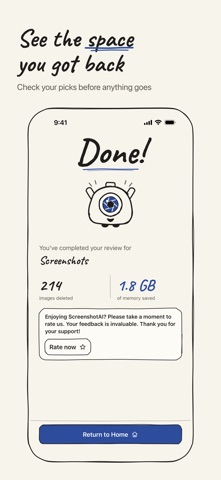
• Check everything you marked before anything is deleted
• See how much storage you got back when you finish

AI TURNS SCREENSHOTS INTO NOTES
• Every note gets a title, a short summary, key points and tags
• The text in each screenshot is cleaned up so you can copy it
• Phone numbers, emails, links and dates are picked out: tap to call, write or open
• Group a few related screenshots and get one summary for all of them

FIND ANY SCREENSHOT BY ITS WORDS
• Search the text inside your screenshots, plus titles, summaries and tags
• Find notes from Spotlight, or ask Siri through App Shortcuts
• Notes from screenshots you delete stay in the Archive for 30 days
• Export a note as Markdown or PDF, or back up all your notes to a file

PRIVATE BY DEFAULT
• With Apple Intelligence, text recognition and AI notes run on your iPhone
• No account, no sign-up
• On iPhones without Apple Intelligence you can add your own OpenAI API key. Only then is the text from your screenshots sent to OpenAI to write the note

FREE AND PRO
• The swipe cleaner is free
• You get 30 AI notes free every month
• Pro unlocks unlimited AI notes. Choose monthly, yearly, or a one-time lifetime purchase

AI notes need iOS 26 with Apple Intelligence turned on (iPhone 15 Pro or later), or your own OpenAI API key. AI-written titles and summaries can be wrong; the original text is always kept.

Terms of Use: https://trilliwon.com/apps/terms-and-conditions
Privacy Policy: https://trilliwon.com/apps/privacy-policy
Show more Show less

More data about Screenshot AI: Cleaner & Notes

Price Free
Rating 3.20 based on 5 ratings
Ranking Not ranked
Version 3.4
App size 31.8 MB
Suitable for Everyone

Screenshots

Screenshot AI: Cleaner & Notes Screenshot 1 of 7
Screenshot AI: Cleaner & Notes Screenshot 2 of 7
Screenshot AI: Cleaner & Notes Screenshot 3 of 7
Screenshot AI: Cleaner & Notes Screenshot 4 of 7
Screenshot AI: Cleaner & Notes Screenshot 5 of 7
Screenshot AI: Cleaner & Notes Screenshot 6 of 7
Screenshot AI: Cleaner & Notes Screenshot 7 of 7
Screenshots by TRILLIWON, Co., from the the App Store listing
Official page on the App Store

Alternatives to Screenshot AI: Cleaner & Notes

AttendanceElf icon AttendanceElf
Yuxi Liu
0.0
Free
MindNote - Mind Map&Notes icon MindNote - Mind Map&Notes
Xianlong Liu
4.6
Free
5 ratings
Time Calendar, Event, Task icon Time Calendar, Event, Task
Yeonwoo Lee
4.6
Free
16 ratings
kip! icon kip!
Jahyeon Ko
5.0
Free
2 ratings
IdeAI icon IdeAI
Aleksander Allen
4.7
Free
3 ratings
Ora - Daily Planner for Women icon Ora - Daily Planner for Women
Umar Javed
4.9
Free
14 ratings
Animation Pocket icon Animation Pocket
Arjun Gupte
2.8
Free
13 ratings
Haru - Calendar & Task Manager icon Haru - Calendar & Task Manager
HYOSEOK KIM
5.0
Free
1 ratings

More from TRILLIWON, Co.

Bookdot - Book Tracker icon Bookdot - Book Tracker
TRILLIWON, Co.
4.8
Free
67 ratings
FlowIn - Screen Time Control icon FlowIn - Screen Time Control
TRILLIWON, Co.
4.8
Free
18 ratings
PocketTok - Save Videos icon PocketTok - Save Videos
TRILLIWON, Co.
4.9
Free
15 ratings
Shield - Spam text filter icon Shield - Spam text filter
TRILLIWON, Co.
4.4
$0.99
8 ratings
Snorify icon Snorify
TRILLIWON, Co.
0.0
Free

Changelog of Screenshot AI: Cleaner & Notes

No changelog data

Developer information for TRILLIWON, Co.

TRILLIWON, Co.

Address:

Share Screenshot AI: Cleaner & Notes

Comments on Screenshot AI: Cleaner & Notes for iOS

We don't have enough comments to show example comments. Please check back later.

App Store Rankings for Screenshot AI: Cleaner & Notes

This app is not ranked

Technologies used by Screenshot AI: Cleaner & Notes

Top new apps Price drops on Google Play Apps other people are watching Popular Utilities Apps Today's trending apps
AttendanceElf icon AttendanceElf
MindNote - Mind Map&Notes icon MindNote - Mind Map&Notes
Time Calendar, Event, Task icon Time Calendar, Event, Task
kip! icon kip!
IdeAI icon IdeAI
Ora - Daily Planner for Women icon Ora - Daily Planner for Women
Animation Pocket icon Animation Pocket
Haru - Calendar & Task Manager icon Haru - Calendar & Task Manager
Overview Alternatives Reviews Rankings Technology
AppBrain Intelligence premium content

Subscribe now to get full and unlimited access to AppBrain Intelligence. You'll have access to:

  • App Intelligence dashboard (performance timeline, competitor comparison, country rankings, insight cards)
  • Detailed ranking data per app
  • Full timeline per developer
  • Device market shares data per country
  • Unlimited keyword tracking
1 Month

$75/mo
(billed every month)

SAVE 0%
Subscribe
3 Months

$65/mo
($195 billed every 3 months)

SAVE 13%
Subscribe
1 Year

$57.50/mo
($690 billed every year)

SAVE 23%
Subscribe
Each subscription will automatically renew 3 days before the expiration date for the same time period. Subscriptions can be cancelled at any time before the renewal.

AppBrain is an app data site, we track rankings, ratings, installs for all apps and games on Google Play and the App Store. AppBrain doesn't host app files or APKs, all install links go directly to the official store. All trademarks are owned by their respective owners.

More apps

  • Top Android apps being viewed
  • Flixeon Movies & TV Shows stats
  • View PS1/PSX PSP ROM Downloader
  • MoviClaud HD

App statistics

  • Android statistics
  • Google Play Developer stats
  • Trending Android Apps
  • Trending iOS apps
  • Top popular Apps
  • Buy the best Android phone
  • Buy & sell app businesses

About AppBrain

  • Contact
  • Privacy
  • Documentation
  • DMCA takedowns
  • Blog
  • How to improve the earnings of your ad units
© 2010-2026 - AppBrain