

FlowIn - Screen Time Control
FlowIn - Screen Time Control is made and published by TRILLIWON, Co. AppBrain is an independent app data site and isn't affiliated with TRILLIWON, Co. The app name, icon, screenshots and description belong to TRILLIWON, Co. and are shown as published on the App Store.
AppBrain's verdict
- Rating on App Store
- 4.83
- 18 ratings
- Last updated
- February 26, 2026
It doesn't have enough ratings yet to judge what users think.
Rankings
App Store top chartsApp Store Rankings for FlowIn - Screen Time Control
Competitors
Similar apps and more from TRILLIWON, Co.Alternatives to FlowIn - Screen Time Control






More from TRILLIWON, Co.


Releases
Updates seen on the App Store- Version
- 2.12
- Launched
- July 2025
No changelog data
User feedback
Ratings and reviews on the App StoreComments on FlowIn - Screen Time Control for iOS
We don't have enough comments to show example comments. Please check back later.
Technology
Found in the app by AppBrain- Price
- Free
- App size
- 87.6 MB
- Content rating
- Everyone
Technologies used by FlowIn - Screen Time Control
About the app and developer
About FlowIn - Screen Time Control
FlowIn - Screen Time Control is a productivity app developed by TRILLIWON, Co.
User Ratings
FlowIn - Screen Time Control is rated 4.83 out of 5 stars. The rating is based on 18 ratings.
App Information
FlowIn - Screen Time Control is freely available from the App Store. The app size is 87.55 MB. The latest version available is 2.12. The last update was on February 26, 2026.
Technical Requirements
The app has a content rating of Everyone. The app has been available on the App Store since July 2025.
Developer information for TRILLIWON, Co.
Address:
Frequently asked questions about FlowIn - Screen Time Control
Is FlowIn - Screen Time Control free?
Yes. FlowIn - Screen Time Control is free on the App Store.
Is FlowIn - Screen Time Control still available?
Yes. FlowIn - Screen Time Control is on the App Store, and the last update we saw was on February 26, 2026.
How large is FlowIn - Screen Time Control?
FlowIn - Screen Time Control is 87.55 MB.
Is FlowIn - Screen Time Control suitable for children?
App Store rates the content of FlowIn - Screen Time Control as suitable for everyone.
How do people rate FlowIn - Screen Time Control?
FlowIn - Screen Time Control scores 4.83 out of 5 stars, from 18 ratings on the App Store.
Who made FlowIn - Screen Time Control?
FlowIn - Screen Time Control was developed by TRILLIWON, Co. It is listed in the productivity category on the App Store.
What are the best alternatives to FlowIn - Screen Time Control?
People looking at FlowIn - Screen Time Control also look at these productivity apps: App limit: Screen Time Control, Screen Time Blocker: Focus, App Time Limit: Limitly, Air Print & Smart Printer Scan, IntelNote - Ai Note Taker.
Store listing
By TRILLIWON, Co., from the App Store

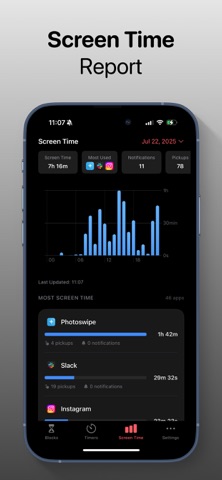

Description by TRILLIWON, Co. Written by the developer, not by AppBrain. Click to read.
FlowIn is your all-in-one app and website blocker designed to help you reduce screen time, stay focused, and build better digital habits.
Whether you’re studying, working, or just trying to break free from endless scrolling, FlowIn makes it easy to control distractions and stay in flow.
Powerful Blocking Features:
Block Any App or Website: From YouTube to Instagram, TikTok, Snapchat, Reddit, Discord, and more. FlowIn helps you take back control.
Deep Focus Options: Limit unblocking to Pomodoro sessions (25 min focus, 5 min rest).
Smart Timers & Schedules:
- Block apps for a set duration (e.g., 30 minutes).
- Create schedules (e.g., every weekday from 9 AM–5 PM).
Detailed Screen Time Insights: Track your app usage daily, weekly, and monthly.
Designed for People Who Want To:
- Boost productivity
- Overcome ADHD or attention issues
- Do a digital detox or dopamine reset
- Practice digital minimalism
- Control screen time and social media use
- Block distractions and stay focused
Ready to get back in control? Download FlowIn and start building a better relationship with your phone.
Support: support@trilliwon.com
Terms of Use: https://www.trilliwon.com/apps/terms-and-conditions/