

Screenshot Deleter & Archive
Screenshot Deleter & Archive is made and published by Morten Punnerud. AppBrain is an independent app data site and isn't affiliated with Morten Punnerud. The app name, icon, screenshots and description belong to Morten Punnerud and are shown as published on the App Store.





AppBrain's verdict
- Rating on App Store
- 5.00
- 1 ratings
- Last updated
- October 15, 2026
- Size
- 3.66 MB
It doesn't have enough ratings yet to judge what users think.
User feedback
Ratings and reviews on the App StoreComments on Screenshot Deleter & Archive for iOS
We don't have enough comments to show example comments. Please check back later.
Store listing
By Morten Punnerud, from the App StoreDescription by Morten Punnerud Written by the developer, not by AppBrain. Click to read.
Boarding passes, receipts, recipes, chat threads, funny memes, things you want to remember – screenshots pile up between your real photos. You don't want to delete them, but you don't want them in your Camera Roll either.
Screenshot Deleter & Archive moves your screenshots out of Photos and into a private Library inside the app. Nothing is lost: they stay safe, searchable and synced to your other devices, and Photos is left for real photos.
CLEAN UP IN MINUTES
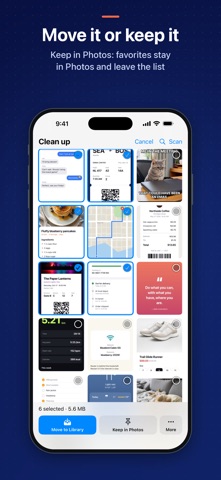
Every screenshot in Photos shows up in one Clean up grid, newest first. For each one, choose:
• Move to Library – out of Photos, kept in the app at original quality
• Keep in Photos – stays in your gallery and is hidden from the list. Good for pictures from Snapchat and other apps that you want in Photos
• Delete – for the junk you don't need
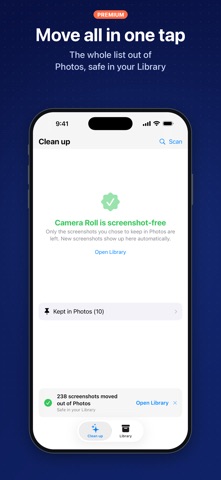
Or tap Move all to clear the whole list at once. Screenshots marked Keep in Photos are never included.
NEW SCREENSHOTS, FOUND AUTOMATICALLY
Open the app and your new screenshots are already there, waiting for a decision. No long scans.
FIND ANY SCREENSHOT BY ITS TEXT
Type a word – a flight number, an address, a price, a name – and the Library finds the screenshot that contains it. Text recognition runs entirely on your iPhone.
A LIBRARY THAT STAYS TIDY
• Screenshots grouped by month
• Full-screen view with pinch to zoom
• Share or export whenever you need to
• Move any screenshot back to Photos at any time
PRIVATE ICLOUD SYNC
Your Library syncs through your own private iCloud account. Your screenshots are never uploaded to our servers, and we can't see them.
AUTO-DELETE FOR TEMPORARY SCREENSHOTS
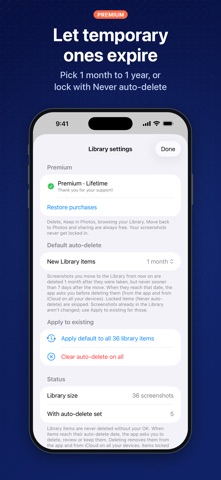
Give screenshots an expiry date: 1 month, 3 months, 6 months or 1 year. Protect the ones that matter with Never auto-delete.
SAFE BY DESIGN
• A screenshot is only removed from Photos after its copy is safely saved in the Library
• Deleted screenshots go to the Recently Deleted album in Photos, so you have 30 days to change your mind
• iOS asks you to confirm before anything is removed from Photos
FREE AND PREMIUM
These are always free: scanning, deleting, browsing and searching the Library, and moving screenshots back to Photos. Your screenshots are never held hostage. You can also move up to 50 screenshots to the Library for free.
Premium unlocks unlimited moves, Move all and auto-delete. Choose a yearly subscription with a 14-day free trial, or Lifetime as a one-time purchase. If you bought Full Access before, you keep Premium.
GOOD TO KNOW
• Moving cleans up Photos but does not make your screenshots smaller. Library copies keep the original quality and count toward your iCloud storage
• Only Delete frees up space on your iPhone, once the screenshots leave Recently Deleted
• No account or sign-up. We collect anonymous usage statistics to improve the app, never your images
Payment is charged to your Apple ID when you confirm the purchase. The yearly subscription renews automatically unless you cancel it at least 24 hours before the current period ends. Manage or cancel it in Settings > your name > Subscriptions.
Terms of Use (EULA): https://www.apple.com/legal/internet-services/itunes/dev/stdeula/
Privacy policy: https://screenshotdeleter.com/privacy-policy/
Safety and technology
Found in the app by AppBrain- Price
- Free
- App size
- 3.66 MB
- Content rating
- Everyone
Technologies used by Screenshot Deleter & Archive
Releases
Updates seen on the App Store- Version
- 2.1
- Launched
- December 2024
No changelog data
Alternatives
Similar apps and more from Morten PunnerudAlternatives to Screenshot Deleter & Archive




More from Morten Punnerud


Rankings
App Store top chartsApp Store Rankings for Screenshot Deleter & Archive
About the app and developer
About Screenshot Deleter & Archive
Screenshot Deleter & Archive is an utilities app developed by Morten Punnerud.
What is the rating of Screenshot Deleter & Archive?
Screenshot Deleter & Archive is rated 5.00 out of 5 stars, based on one rating ratings.
Is Screenshot Deleter & Archive free?
Screenshot Deleter & Archive is free. The app size is 3.66 MB. The latest version available is 2.1. The last update was on October 15, 2026.
What are the requirements for Screenshot Deleter & Archive?
The app has a content rating of Everyone. The app has been available on the App Store since December 2024.
Developer information for Morten Punnerud
Address:
Frequently asked questions about Screenshot Deleter & Archive
Is Screenshot Deleter & Archive free?
Yes. Screenshot Deleter & Archive is free on the App Store.
Is Screenshot Deleter & Archive still available?
Yes. Screenshot Deleter & Archive is on the App Store, and the last update we saw was on October 15, 2026.
How large is Screenshot Deleter & Archive?
Screenshot Deleter & Archive is 3.66 MB.
Is Screenshot Deleter & Archive suitable for children?
App Store rates the content of Screenshot Deleter & Archive as suitable for everyone.
How do people rate Screenshot Deleter & Archive?
Screenshot Deleter & Archive has one rating of 5.00 stars on the App Store.
Who made Screenshot Deleter & Archive?
Screenshot Deleter & Archive was developed by Morten Punnerud. It is listed in the utilities category on the App Store.
What are the best alternatives to Screenshot Deleter & Archive?
People looking at Screenshot Deleter & Archive also look at these utilities apps: Contacts Deleter, GLE Dashboard, Heatit WIFI, Timestamper - Add Photo Stamps, Time Zone Converter: Tizipizi.