

Screenshot Editor - SnapHub
Screenshot Editor - SnapHub is made and published by Dzmitry Biruk. AppBrain is an independent app data site and isn't affiliated with Dzmitry Biruk. The app name, icon, screenshots and description belong to Dzmitry Biruk and are shown as published on the App Store.
AppBrain's verdict
- Rating on App Store
- 5.00
- 2 ratings
- Last updated
- February 13, 2026
It doesn't have enough ratings yet to judge what users think.
Rankings
App Store top chartsApp Store Rankings for Screenshot Editor - SnapHub
Competitors
Similar apps and more from Dzmitry BirukAlternatives to Screenshot Editor - SnapHub


More from Dzmitry Biruk


Releases
Updates seen on the App Store- Version
- 1.0.2
- Launched
- January 2026
No changelog data
User feedback
Ratings and reviews on the App StoreComments on Screenshot Editor - SnapHub for iOS
We don't have enough comments to show example comments. Please check back later.
Technology
Found in the app by AppBrain- Price
- Free
- App size
- 67.3 MB
- Content rating
- Everyone
Technologies used by Screenshot Editor - SnapHub
About the app and developer
About Screenshot Editor - SnapHub
Screenshot Editor - SnapHub is a graphics & design app developed by Dzmitry Biruk.
What is the rating of Screenshot Editor - SnapHub?
Screenshot Editor - SnapHub is rated 5.00 out of 5 stars, based on 2 ratings.
Is Screenshot Editor - SnapHub free?
Screenshot Editor - SnapHub is free. The app size is 67.32 MB. The latest version available is 1.0.2. The last update was on February 13, 2026.
What are the requirements for Screenshot Editor - SnapHub?
The app has a content rating of Everyone. The app has been available on the App Store since January 2026.
Developer information for Dzmitry Biruk
Address:
Frequently asked questions about Screenshot Editor - SnapHub
Is Screenshot Editor - SnapHub free?
Yes. Screenshot Editor - SnapHub is free on the App Store.
Is Screenshot Editor - SnapHub still available?
Yes. Screenshot Editor - SnapHub is on the App Store, and the last update we saw was on February 13, 2026.
How large is Screenshot Editor - SnapHub?
Screenshot Editor - SnapHub is 67.32 MB.
Is Screenshot Editor - SnapHub suitable for children?
App Store rates the content of Screenshot Editor - SnapHub as suitable for everyone.
How do people rate Screenshot Editor - SnapHub?
Screenshot Editor - SnapHub scores 5.00 out of 5 stars, from 2 ratings on the App Store.
Who made Screenshot Editor - SnapHub?
Screenshot Editor - SnapHub was developed by Dzmitry Biruk. It is listed in the graphics & design category on the App Store.
What are the best alternatives to Screenshot Editor - SnapHub?
People looking at Screenshot Editor - SnapHub also look at these graphics & design apps: Tattoo AI: Design Generator +, AI Interior Design: SpaceDecor, AI Video Generator - Al Studio, CarTheme: Car Widgets & Sounds, Screenshot Editor - SnapIt.
Store listing
By Dzmitry Biruk, from the App Store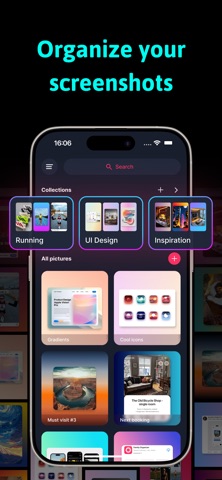


Description by Dzmitry Biruk Written by the developer, not by AppBrain. Click to read.
Transform your screenshots with SnapHub, the ultimate screenshot editor and image organizer! Edit, enhance, and organize all your captures effortlessly in one hub.
Key Features:
• Organize Photos & Screenshots – Keep all your captures neatly sorted in collections. Never lose a screenshot again!
• Edit Backgrounds & Images – Crop, rotate, flip, and scale your screenshots. Add gradient backgrounds or change the aspect ratio to create the perfect layout.
• Shadow Styling – Add shadows with customizable position, transparency, and color.
• Stylize Your Screenshots – Round corners, scale images, and adjust layers for standout visuals.
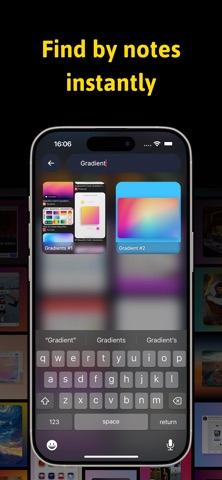
• Add Captions & Notes – Annotate your screenshots with titles and labels for quick reference.
• Search & Find – Easily locate screenshots by captions or collections.
Why SnapHub?
• Perfect for screen capture, snap edits, and mockups.
• Combine multiple images with pic stitch or create custom layouts.
• Enhance your screenshots with background editing, gradients, and shadow effects.
• Keep everything private and organized in your personal photo hub.
Whether you’re a designer, student, or casual user, SnapHub makes it easy to organize, edit, and annotate screenshots in a snap.
Some features are available with limited free usage.
A paid subscription unlocks full access to pro features, including:
• Unlimited exports
• High-quality image export
• Unlimited collections
• Unlimited notes search
• Additional shadow colors
Subscription is optional.
All personal data is protected in accordance with the Terms of Use and Privacy Policy:
https://birapps.com/privacy
https://birapps.com/terms