

ScreenshotSmart - AI Organizer
ScreenshotSmart - AI Organizer is made and published by Beijing Zhongtian Kechuang Technology Co., Ltd. AppBrain is an independent app data site and isn't affiliated with Beijing Zhongtian Kechuang Technology Co., Ltd. The app name, icon, screenshots and description belong to Beijing Zhongtian Kechuang Technology Co., Ltd. and are shown as published on the App Store.
AppBrain's verdict
- Last updated
- August 20, 2026
Rankings
App Store top chartsApp Store Rankings for ScreenshotSmart - AI Organizer
Competitors
Similar apps and more from Beijing Zhongtian Kechuang Technology Co., Ltd.Alternatives to ScreenshotSmart - AI Organizer


Releases
Updates seen on the App Store- Version
- 1.0
- Launched
- August 2026
No changelog data
User feedback
Ratings and reviews on the App StoreComments on ScreenshotSmart - AI Organizer for iOS
We don't have enough comments to show example comments. Please check back later.
Technology
Found in the app by AppBrain- Price
- Free
- App size
- 5.45 MB
- Content rating
- Everyone
Technologies used by ScreenshotSmart - AI Organizer
About the app and developer
About ScreenshotSmart - AI Organizer
ScreenshotSmart - AI Organizer is a photo & video app developed by Beijing Zhongtian Kechuang Technology Co., Ltd.
User Ratings
The app has no ratings yet.
App Information
ScreenshotSmart - AI Organizer is freely available from the App Store. The app size is 5.45 MB. The latest version available is 1.0. The last update was on August 20, 2026.
Technical Requirements
The app has a content rating of Everyone. The app has been available on the App Store since August 2026.
Developer information for Beijing Zhongtian Kechuang Technology Co., Ltd.
Frequently asked questions about ScreenshotSmart - AI Organizer
Is ScreenshotSmart - AI Organizer free?
Yes. ScreenshotSmart - AI Organizer is free on the App Store.
Is ScreenshotSmart - AI Organizer still available?
Yes. ScreenshotSmart - AI Organizer is on the App Store, and the last update we saw was on August 20, 2026.
How large is ScreenshotSmart - AI Organizer?
ScreenshotSmart - AI Organizer is 5.45 MB.
Is ScreenshotSmart - AI Organizer suitable for children?
App Store rates the content of ScreenshotSmart - AI Organizer as suitable for everyone.
Who made ScreenshotSmart - AI Organizer?
ScreenshotSmart - AI Organizer was developed by Beijing Zhongtian Kechuang Technology Co., Ltd. It is listed in the photo & video category on the App Store.
What are the best alternatives to ScreenshotSmart - AI Organizer?
People looking at ScreenshotSmart - AI Organizer also look at these photo & video apps: Screenshot Organizer AI, AI Screenshot Organizer, LumaStamp - Photo Stamp, Petalog Photo Sticker Book, Exif Viewer: Photo Metadata.
Store listing
By Beijing Zhongtian Kechuang Technology Co., Ltd., from the App Store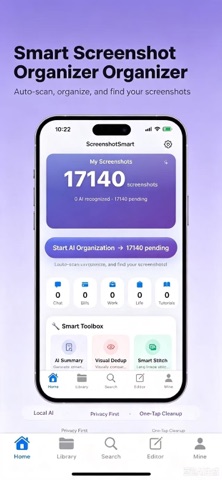




Description by Beijing Zhongtian Kechuang Technology Co., Ltd. Written by the developer, not by AppBrain. Click to read.
Tired of thousands of screenshots cluttering your photo library? ScreenshotSmart helps you organize all screenshots with one tap. Automatically recognize text content, intelligently classify screenshots, and instantly find any screenshot by typing a keyword. Plus duplicate cleaner, privacy redaction, long image stitching and more useful tools to keep your photo library tidy.
CORE FEATURES
【AI Screenshot Organizer & Classifier】
• One-tap scan of all screenshots in your photo library
• Automatic OCR text recognition for every screenshot
• Smart classification into Chat, Bills, Work, Life, Tutorial, ID and more
• Real-time progress indicator with cancel support
• Incremental scanning — only processes new screenshots to save time
【Screenshot Text Search】
• Type any keyword, instantly find screenshots containing that text
• Search for chat conversations, bill amounts, work keywords and more
• Search index built entirely on-device, totally private and secure
• Filter by category and time period (Today / Last 7 Days / All Time)
• Search history — reuse your most frequent queries
• Long-press results to manually re-classify
【Privacy Protection & Info Redaction】
• Auto-detect 4 types of sensitive info: Phone Number, Email, ID Card, Bank Card
• 3 redaction styles: Black Bar, Gaussian Blur, Pixel Mosaic
• Manual drawing with undo / redo history
• Compare Mode — toggle between Original and Redacted with one tap
• Detection result list, tap to jump to regions
• Save redacted image back to photo library or share with friends
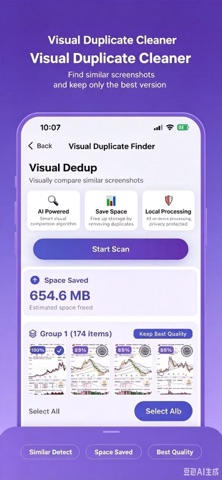
【Duplicate Screenshot Cleaner】
• Perceptual Hash algorithm — accurately finds similar screenshots and duplicate photos
• Keeps best quality version, saves storage space on your phone
• Batch select, group confirmation, bulk deletion
• Large image preview side-by-side, you decide what to keep
• Delete directly from photo library (with confirmation)
【Privacy Scan & Batch Redaction】
• Batch scan screenshots for sensitive content
• Toggle 4 sensitive types independently (Phone/Email/ID/Bank)
• One-tap entry into redaction mode for batch processing
【Smart Merge Similar Screenshots】
• Detects semantically related screenshot groups
• Smart recommendations for merging
• Less clutter, cleaner photo library
• Keep best version, auto-clean redundant screenshots
【Chat Screenshot Stitching】
• Select multiple chat screenshots, auto-stitch into one long image
• Overlap-aware alignment for seamless joins
• Drag-to-reorder — arrange before stitching
• Live preview of the result
• High-resolution save to photo library, no quality loss
【Screenshot to PDF Export】
• Batch select screenshots, export as a PDF document
• Auto-layout for a professional-looking photo album
• Share via Messages, Email, AirDrop, etc.
【AI Smart Text Summary】
• Generates summaries from screenshot OCR text
• Extracts key information quickly, saves reading time
• Great for long article screenshots and meeting notes
【Screenshot Notes & Annotations】
• Add text annotations and notes to any screenshot
• Notes are fully searchable for fast lookup
• Organized by category, never lose important info
【Smart Timeline Browser】
• Browse screenshots in chronological order
• 24-hour screenshot distribution at a glance
• Quick jump to any date's screenshots
• Understand your screenshot usage habits
【Favorites Manager】
• Bookmark your most important screenshots
• Dedicated category, always at your fingertips
• Never lose important information
Privacy Policy: https://your-app.com/privacy-policy
Terms of Service: https://your-app.com/terms-of-service