

Scriba: Transcribe Audio
Scriba: Transcribe Audio is made and published by Danjel Durmo. AppBrain is an independent app data site and isn't affiliated with Danjel Durmo. The app name, icon, screenshots and description belong to Danjel Durmo and are shown as published on the App Store.
AppBrain's verdict
- Last updated
- October 12, 2026
Rankings
App Store top chartsApp Store Rankings for Scriba: Transcribe Audio
Competitors
Similar apps and more from Danjel DurmoAlternatives to Scriba: Transcribe Audio


More from Danjel Durmo

Releases
Updates seen on the App Store- Version
- 1.1
- Launched
- September 2026
No changelog data
User feedback
Ratings and reviews on the App StoreComments on Scriba: Transcribe Audio for iOS
We don't have enough comments to show example comments. Please check back later.
Technology
Found in the app by AppBrain- Price
- Free
- App size
- 3.28 MB
- Content rating
- Everyone
Technologies used by Scriba: Transcribe Audio
About the app and developer
About Scriba: Transcribe Audio
Scriba: Transcribe Audio is a productivity app developed by Danjel Durmo.
User Ratings
The app has no ratings yet.
App Information
Scriba: Transcribe Audio is freely available from the App Store. The app size is 3.28 MB. The latest version available is 1.1. The last update was on October 12, 2026.
Technical Requirements
The app has a content rating of Everyone. The app has been available on the App Store since September 2026.
Developer information for Danjel Durmo
Address:
Frequently asked questions about Scriba: Transcribe Audio
Is Scriba: Transcribe Audio free?
Yes. Scriba: Transcribe Audio is free on the App Store.
Is Scriba: Transcribe Audio still available?
Yes. Scriba: Transcribe Audio is on the App Store, and the last update we saw was on October 12, 2026.
How large is Scriba: Transcribe Audio?
Scriba: Transcribe Audio is 3.28 MB.
Is Scriba: Transcribe Audio suitable for children?
App Store rates the content of Scriba: Transcribe Audio as suitable for everyone.
Who made Scriba: Transcribe Audio?
Scriba: Transcribe Audio was developed by Danjel Durmo. It is listed in the productivity category on the App Store.
What are the best alternatives to Scriba: Transcribe Audio?
People looking at Scriba: Transcribe Audio also look at these productivity apps: Scribe Recorder, SpeakSense: Voice Recorder, Transcribe Audio to Text PRO, Audio to Text Converter Zeepit, Voice to Text Offline.
Store listing
By Danjel Durmo, from the App Store






Description by Danjel Durmo Written by the developer, not by AppBrain. Click to read.
FREE UP TO 5 MINUTES, THEN A FLAT PRICE
Every recording is transcribed in full on your iPhone. Up to 5 minutes is completely free: full transcript, summary, concept map, study cards and action items. For a longer recording you read the first 5 minutes free, and Scriba Pro unlocks the rest instantly, with no re-processing. No per-minute fees, no credits to buy, no weekly plan.
NOTHING LEAVES YOUR IPHONE
Your recordings and transcripts are never uploaded to a server. No account, no sign-in, no tracking. After a one-time language download, Scriba works in airplane mode, in a basement lecture hall and on the metro, at the same speed.
BRING ANYTHING IN
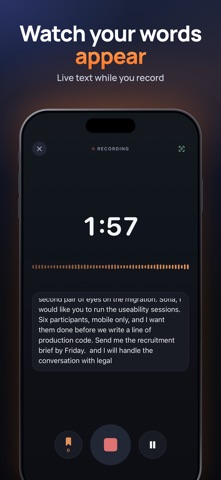
• Record with a live transcript as you speak
• Import audio files: MP3, M4A, WAV, AIFF
• Import a video and Scriba pulls out the audio track
• Tap a marker while recording to flag a moment you want to find again
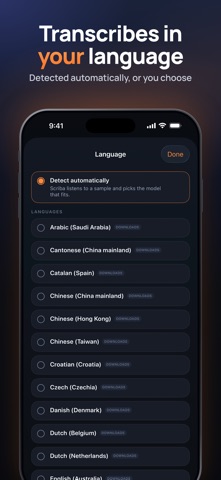
• Choose the language, or let Scriba detect it from the ones on your iPhone
READ IT PROPERLY
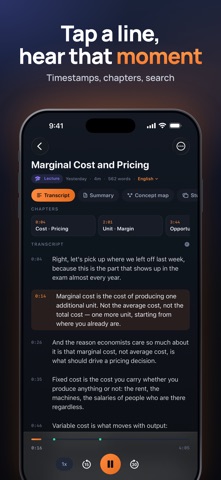
• Tap any line to jump the audio there
• The line playing now is highlighted as you listen
• Playback speed from 0.75x to 2x
• Automatic chapters from the speaker's own pauses
• Search inside every transcript, and find your notes from iPhone search
TURN IT INTO SOMETHING USEFUL
• A summary and the key points
• A concept map of how the ideas connect
• Question-and-answer study cards and a glossary of the terms used
• Action items, with who owns them where a name was said
All generated on the device from what was actually said.
BUILT FOR STUDY AND WORK
Students recording lectures. Journalists with interviews. Teams that need the decisions from a meeting. Anyone who gets long voice messages and would rather read them.
EXPORT AND SEND
Plain text is free. Markdown, PDF, Word-compatible RTF and SRT subtitles come with Scriba Pro.
LANGUAGES
Scriba transcribes on the device in the languages your iPhone supports, among them English, Italian, French, German, Spanish, Portuguese, Japanese, Korean and Chinese. Settings shows the full list. Requires iOS 26 and an iPhone or iPad that supports on-device speech recognition.
SCRIBA PRO (OPTIONAL)
• Yearly: USD 39.99 per year, with a 7-day free trial for new subscribers
• Monthly: USD 6.99 per month
• Lifetime: USD 59.99, one payment, no subscription
Payment is charged to your Apple Account at confirmation of purchase. Subscriptions renew automatically unless cancelled at least 24 hours before the end of the current period. Your account is charged for renewal within 24 hours before the end of the current period. You can manage and cancel your subscription in your Apple Account settings after purchase. Any unused portion of a free trial is forfeited when you purchase a subscription. Prices are for the United States; in other countries the price is shown in the app and on the App Store before you confirm.
Terms of Use (EULA): https://www.apple.com/legal/internet-services/itunes/dev/stdeula/
Privacy Policy: https://edgemarket.app/scriba/privacy
Questions or problems: info@edgemarket.app