

Scripture Alone Bible
Scripture Alone Bible is made and published by Blaine Miller. AppBrain is an independent app data site and isn't affiliated with Blaine Miller. The app name, icon, screenshots and description belong to Blaine Miller and are shown as published on the App Store.
AppBrain's verdict
- Last updated
- October 25, 2026
Rankings
App Store top chartsApp Store Rankings for Scripture Alone Bible
Competitors
Similar apps and more from Blaine MillerAlternatives to Scripture Alone Bible


More from Blaine Miller


Releases
Updates seen on the App Store- Version
- 1.2.1
- Launched
- September 2026
No changelog data
User feedback
Ratings and reviews on the App StoreComments on Scripture Alone Bible for iOS
We don't have enough comments to show example comments. Please check back later.
Technology
Found in the app by AppBrain- Price
- Free
- App size
- 73.8 MB
- Content rating
- Everyone
Technologies used by Scripture Alone Bible
About the app and developer
About Scripture Alone Bible
Scripture Alone Bible is a reference app developed by Blaine Miller.
User Ratings
The app has no ratings yet.
App Information
Scripture Alone Bible is freely available from the App Store. The app size is 73.75 MB. The latest version available is 1.2.1. The last update was on October 25, 2026.
Technical Requirements
The app has a content rating of Everyone. The app has been available on the App Store since September 2026.
Developer information for Blaine Miller
Address:
Frequently asked questions about Scripture Alone Bible
Is Scripture Alone Bible free?
Yes. Scripture Alone Bible is free on the App Store.
Is Scripture Alone Bible still available?
Yes. Scripture Alone Bible is on the App Store, and the last update we saw was on October 25, 2026.
How large is Scripture Alone Bible?
Scripture Alone Bible is 73.75 MB.
Is Scripture Alone Bible suitable for children?
App Store rates the content of Scripture Alone Bible as suitable for everyone.
Who made Scripture Alone Bible?
Scripture Alone Bible was developed by Blaine Miller. It is listed in the reference category on the App Store.
What are the best alternatives to Scripture Alone Bible?
People looking at Scripture Alone Bible also look at these reference apps: apologetics.pro, AmenLink: AI Bible & Faith, Plain Truth Network, Bíblia Executiva, Mizmor: Psalms Hebrew–English.
Store listing
By Blaine Miller, from the App Store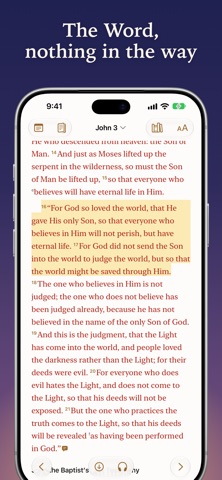



Description by Blaine Miller Written by the developer, not by AppBrain. Click to read.
Read the whole Bible, offline
The New American Standard Bible — NASB 2020 is on your device from the moment it installs. The NASB 1995, American Standard Version, Berean Standard Bible and King James Version download the first time you choose one. Full-text search, the words of Christ in red, poetry set as poetry, and footnotes a tap away.
What the Bible says about what you're going through
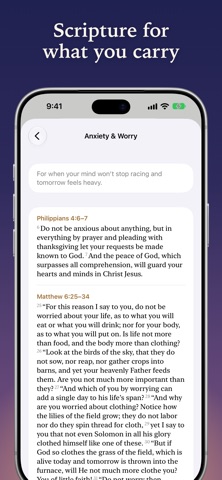
Topics gathers passages for 72 themes — anxiety, grief, loneliness, fear, marriage, waiting and more — in the translation you read. Type a feeling like "anxious" in Go To and its topic comes up. In English, Nave's Topical Bible is there too, A to Z.
Bring your own Bibles
Import a DRM-free ePub, a Bible PDF with a text layer or a USFM file you own, or browse the openly licensed translations on eBible.org. A study Bible brings its notes, introductions, essays and maps; the words of Christ carry over in red; and your imports reach your other devices through your iCloud. The ESV, CSB and NKJV can be read with your own publisher key, or from a copy you've imported.
In your language
Also in Chinese, Japanese, German, French, Spanish, Korean, Portuguese and Italian, each with a whole Bible of its own. A built-in, illustrated User Guide in your language covers every feature.
Make it comfortable
Seven typefaces, adjustable size and spacing, five themes, paragraphs or verse by verse, full Dynamic Type, two columns on a wide screen, and auto-scroll into the next chapter.
Go straight there
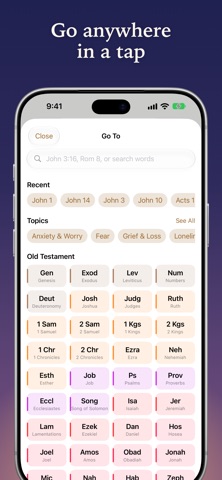
Type "jn 3 16" or "rom 8:28-39" to jump to a passage, or search any word or phrase.
Highlight, note and favorite
Highlight in five colors, favorite the verses you return to, and attach notes to one or more passages — a Sunday sermon on Romans 8:1–17, say. The Highlights list gathers every marked verse in Bible order, and Notes, Highlights and Favorites narrow to one book or chapter. Export notes as PDF, Markdown or text, or bring years of them in from Life Bible (formerly Tecarta) or a CSV.
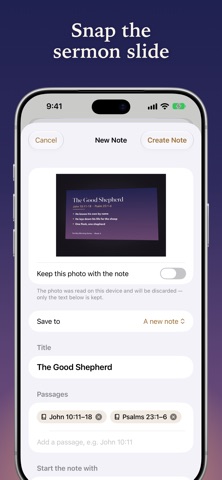
Snap the sermon slide
Photograph the slide at church and Scripture Alone starts your note: titled, linked to every passage on the slide, its points ready to fill in. The photo is read on your device, never uploaded.
Listen
Hear any chapter read aloud with your device's voices, the spoken verse marked as it goes — or in Studio voices with a Mi Speaks Premium subscription (a separate app).
Study mode, a toggle away
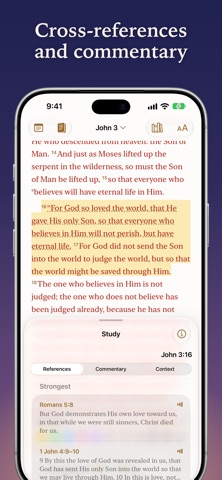
Ranked cross-references, commentary from Calvin, Gill and Jamieson-Fausset-Brown, the Hebrew and Greek word by word with parsing, Strong's numbers and a lexicon in every translation, and Context for every chapter: an overview, a map of the places it names, its era on a timeline, and charts of the kings, Paul's journeys, the tribes and the feasts.
Share beautifully
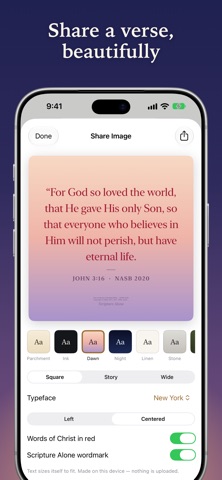
Design a verse image from eight templates, or share a link that rebuilds it in any browser — nothing is stored on a server.
On your wrist and Home Screen
Verse of the Day and Favorites widgets, and an Apple Watch app with the NASB 2020 built in and a complication. It reads offline, follows your iPhone's translation and carries your highlights, favorites and notes, in your iPhone's accent color.
A Bible to hand down
Make a Keepsake Bible: a file of your highlights and notes, with a dedication, that your family can read as you marked it — a digital "Dad's Bible".
Private by design
Your highlights, notes and favorites sync across your devices through your private iCloud. No server, no account; the developer never sees your data. Scripture Alone is open source under the AGPL, so anyone can read what it does.
Built to help people study God's word and grow closer to Christ.
NASB 2020 and NASB 1995 © The Lockman Foundation. Used by permission. www.Lockman.org