
Download Android Apps and Games
AppBrain
  • Apps
  • Apps being viewed right now Trending apps today Most popular apps All-time most downloaded apps Top rated apps
  • Intelligence ▾
    Intelligence overview → Track any Android app or your whole market
    Track & analyze
    Keyword Tracker & OptimizerTrack & improve Play rankings App Performance ReportOne-off PDF for any app StatisticsFree Android & Play market stats
    Promote your app
    Featured Apps App Links
  • Intelligence
  • Pricing
  • Dashboard
  • Sign up
  • Log in
Last updated on: 2026-06-11
App Store Apps > Business > SealSignDate
SealSignDate icon

SealSignDate

2.5
Kandasamy Kaleeswaran
3.00
1 reviews
$29.99

SealSignDate Screenshot 1 of 9
SealSignDate Screenshot 2 of 9
SealSignDate Screenshot 3 of 9
SealSignDate Screenshot 4 of 9
SealSignDate Screenshot 5 of 9
SealSignDate Screenshot 6 of 9
SealSignDate Screenshot 7 of 9
SealSignDate Screenshot 8 of 9
SealSignDate Screenshot 9 of 9
Download from the App Store

About SealSignDate

SealSignDate is an overall app developed by Kandasamy Kaleeswaran.

Download Statistics

User Ratings

SealSignDate is rated 3.00 out of 5 stars. The rating is based on one rating ratings.

App Information

SealSignDate costs $29.99 to download. The APK download size is 6.59 MB. The latest version available is 2.5. The last update was on November 11, 2024.

Technical Requirements

The app has a content rating of Everyone. The app has been available on Google Play June 2020.

Description
This app creates Signature seals, digital Company Seals and Date seals.
The user can stamp the Company seal, the Signature seal and the Date seal on pdf and save it.
The user can lock the pdf document with password.
The user can unlock pdf document, sign/seal/date the document and save it as new copy and lock the new document if required.
The user can lock the pdf document with empty password(Encrypt only).
Original pdf documents are not changed.
But,Seal impressions are permanent on saved Pdf Documents.Seal impressions are not pdf annotations.

Create A New Signature:-

Hit + button
Select Pen thickness.
Select Pen colour.
Sign in the white box(iPhone - bottom to top)
Save the seal.The user can create as many signs as he requires.
The sign can be exported(shared) if required.
Signature size in inches can be changed(1 5/8 inches to 2 1/2 inches).
Other signature images can be imported to this app.

Date seal settings:-

Date seal size in inches can be changed(1 5/8 inches to 2 1/2 inches).
Font size and font name can be changed.
Seal colour can be changed.
Default date gives the device default date format.
The user can customise date format.
Date format with / or - separator can be used.
Date format with leading zeros(eg. 02/02/2020)can be selected or unselected.
Month in letters can be selected(eg. June, 11 2020).
Four digit or two digit year can be selected.

Create A New Seal:-
Hit + Button and
1)Select a seal Template,
2)Edit Text,
3)Leave blank for no text,
4)Select icon image if required by the template,
5)Select Other Properties of the seal
6)Preview and
7)Save the seal.
Note:- Company Icon Images needs to be 1024 pt x 1024 pt image with/without transparent background.Lower resolution icons may give poor quality seal images.

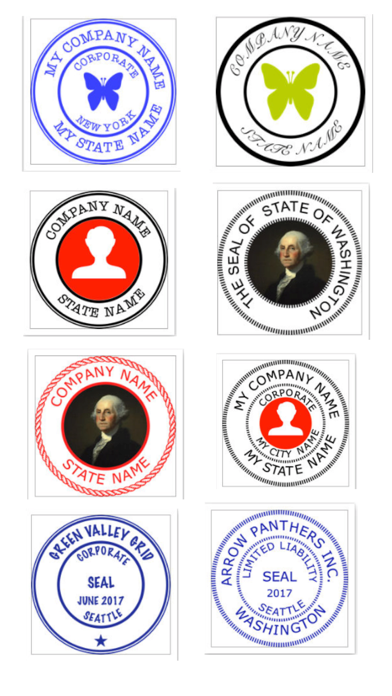
Eight seal templates are provided.

The following can be chosen by the user:-
1)Seal colour
2)Seal Type
3)Border Type
4)Inner Border Type
5)Font Size
6)Font Name
7)Icon type(Round or Square)
8)Icon colour (seal colour mask or original).
9)Rotation 0-30 deg left/right
10)Yin or Yang Seal.
Yang seal - Transparent background with Letters in Seal colour.
Yin Seal - Background in seal colour and Letters are transparent.

Select an Available Seal for stamping:-
1)Select a seal
2)Hit Pick seal

Export an Available Seal:-
1)Select a seal
2)Hit Export Seal
3)Save the seal image to your location

Company Seal size in inches can be changed(1 5/8 inches to 2 1/2 inches).

Other seal images can be imported to this app.
You need to import a 1024 pt x 1024 pt png/tiff image.The seal image background needs to be transparent.

Note:- Avoid very Dark Colours for Emboss or Wax Seal types.

Delete an Available Seal:-
1)Select a seal
2)Hit Delete Seal

Stamping On Pdf:-
Hit Import Pdf & Choose a Pdf Document.
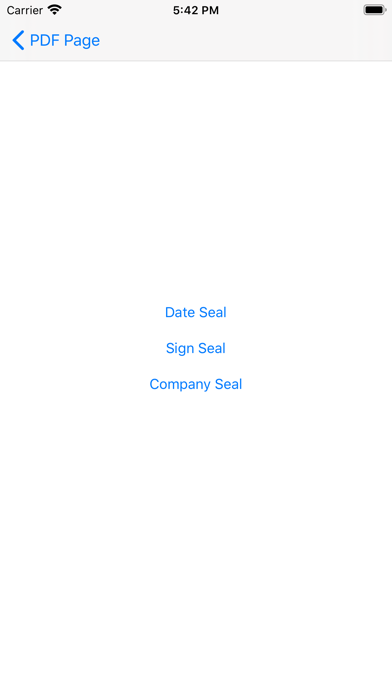
Hit Switch. Select seal:-
1)Company seal
2)Signature seal
3)Date seal
Go to the page where you want to stamp.
Move to the required location on the page.
Tap to stamp.

Reset Selected page:-
1)Select the page
2) Hit Clear

www.appskou.com for support
Show more Show less

More data about SealSignDate

Price $29.99
Rating 3.00 based on a single rating
Ranking Not ranked
Version 2.5
App download size 6.59 MB
Suitable for Everyone

Alternative downloads for the SealSignDate app

Task Office: to-do, calendar icon Task Office: to-do, calendar
DK CONSULTING, TOV
3.7
$19.99
69 ratings
Express Invoice Pro 2022 icon Express Invoice Pro 2022
NCH Software
4.7
$29.99
44 ratings
Stock Screener Pro - Technical icon Stock Screener Pro - Technical
Qiting Huang
4.4
$29.99
39 ratings
Email Address Reader icon Email Address Reader
yu sakamoto
1.0
Free
1 ratings
My Co-op icon My Co-op
Fonterra Co-Operative Group
0.0
Free
Dictation Pro - Voice to Text icon Dictation Pro - Voice to Text
IBN Software GmbH
4.5
$44.99
509 ratings
Seal Maker-sign pdf with seal icon Seal Maker-sign pdf with seal
Wuhan Yitesi Technology Co., Ltd
0.0
Free
Bitcoin Ticker: 3D Live Widget icon Bitcoin Ticker: 3D Live Widget
MoneyCoach UG
2.1
$1.99
8 ratings

More from Kandasamy Kaleeswaran

Company Seals icon Company Seals
Kandasamy Kaleeswaran
5.0
$24.99
1 ratings
Business Starter icon Business Starter
Kandasamy Kaleeswaran
0.0
$9.99
Company Seals icon Company Seals
Kandasamy Kaleeswaran
0.0
$24.99

Changelog of SealSignDate

No changelog data

Developer information for Kandasamy Kaleeswaran

Kandasamy Kaleeswaran

Address:

Share SealSignDate

Comments on SealSignDate for iOS

We don't have enough comments to show example comments. Please check back later.

App Store Rankings for SealSignDate

This app is not ranked

Technologies used by SealSignDate

Task Office: to-do, calendar icon Task Office: to-do, calendar
Express Invoice Pro 2022 icon Express Invoice Pro 2022
Stock Screener Pro - Technical icon Stock Screener Pro - Technical
Email Address Reader icon Email Address Reader
My Co-op icon My Co-op
Dictation Pro - Voice to Text icon Dictation Pro - Voice to Text
Seal Maker-sign pdf with seal icon Seal Maker-sign pdf with seal
Bitcoin Ticker: 3D Live Widget icon Bitcoin Ticker: 3D Live Widget

Back to top
AppBrain Intelligence premium content

Subscribe now to get full and unlimited access to AppBrain Intelligence. You'll have access to:

  • App Intelligence dashboard (performance timeline, competitor comparison, country rankings, insight cards)
  • Detailed ranking data per app
  • Full timeline per developer
  • Device market shares data per country
1 Month

$75/mo
(billed every month)

SAVE 0%
Subscribe
3 Months

$65/mo
($195 billed every 3 months)

SAVE 13%
Subscribe
1 Year

$57.50/mo
($690 billed every year)

SAVE 23%
Subscribe
Each subscription will automatically renew 3 days before the expiration date for the same time period. Subscriptions can be cancelled at any time before the renewal.

AppBrain is a directory focused on discovering great apps and games. We give statistics, rankings and search options that Google Play and the App Store don't have. All trademarks are owned by their respective owners. AppBrain doesn't offer APKs or binaries, and always lets users install the official version from Google Play or the App Store.

More apps

  • Top Android apps being viewed
  • StudyTok AI: Note,Feynman,Memo
  • Spot Player - All Video Player
  • View Math Quick Solution

Android Statistics

  • Android statistics
  • Google Play Developer stats
  • Trending Android Apps
  • Top popular Apps
  • Buy the best Android phone

About AppBrain

  • Contact
  • Privacy
  • Documentation
  • DMCA takedowns
  • Articles
  • Blog
  • Tips to improve your Android promotional campaign
© 2010-2026 - AppBrain